Get the BMW 2 Series owner's manual for any model with My Car User Manual. The manual is the fastest way to confirm what a button does, what a warning means, and what a setting change entails. Here, you can view the BMW 2 Series user manual PDF in your browser. You can also print the required page set or download the full manual for offline use. Every user manual PDF is free. There is no purchase flow and no paid step. You can use the PDF when you need exact terms, exact icons, and exact step order for your BMW Series. You can read the PDF online, print any page, or save the manual for trips later. It works on any device.
Each BMW 2 Series PDF owner manual is organized by year and model in our library. You can choose the right manual easily, so the content matches your generation, trim, and installed options. Choose your model year first, then pick the correct body style when the library lists more than one manual for the same year. This prevents wrong menu paths, wrong maintenance steps, and wrong specifications. You can search inside the PDF for a specific section or problem, then jump to the page that matches your symptom. We constantly update the library with new model years and revised PDFs, so check back if your year is not listed.
BMW 2 Series vehicles span multiple generations. Each generation can change the dashboard layout, iDrive screens, safety systems, and maintenance instructions. Free PDF viewing lets BMW owners open the correct user manual in seconds. The PDF built-in search option helps to locate a feature name, a warning light, or a setup topic. PDF format keeps diagrams, tables, and symbols readable. It matters when you compare check control messages, tyre data, or fuse charts. If you want a local copy, use the free PDF download, then save it to your phone or print key pages.
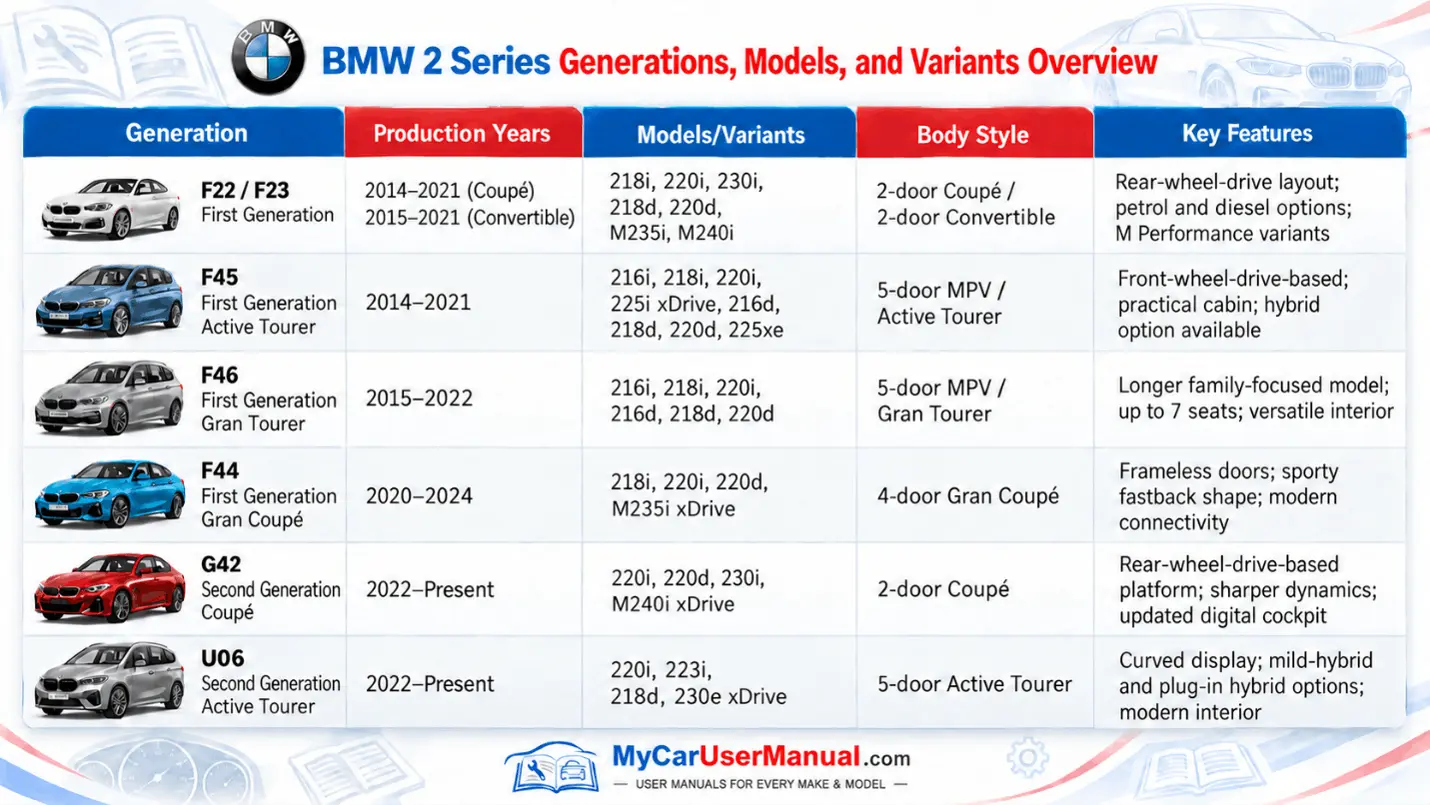
Our list covers older and newer BMW 2 Series manuals, so you can move between generations without guessing. Many owners search by chassis or body type, such as F22 Coupe, F23 Convertible, F44 Gran Coupe, or G42 Coupe, because equipment and menu labels differ across these builds. The correct manual matters for driver-assistance features, iDrive versions, and service reset steps that change over time. A 2016 manual can describe different screens than a 2024 manual, even if both say 2 Series. Always confirm the year, market, and options before you rely on a procedure.
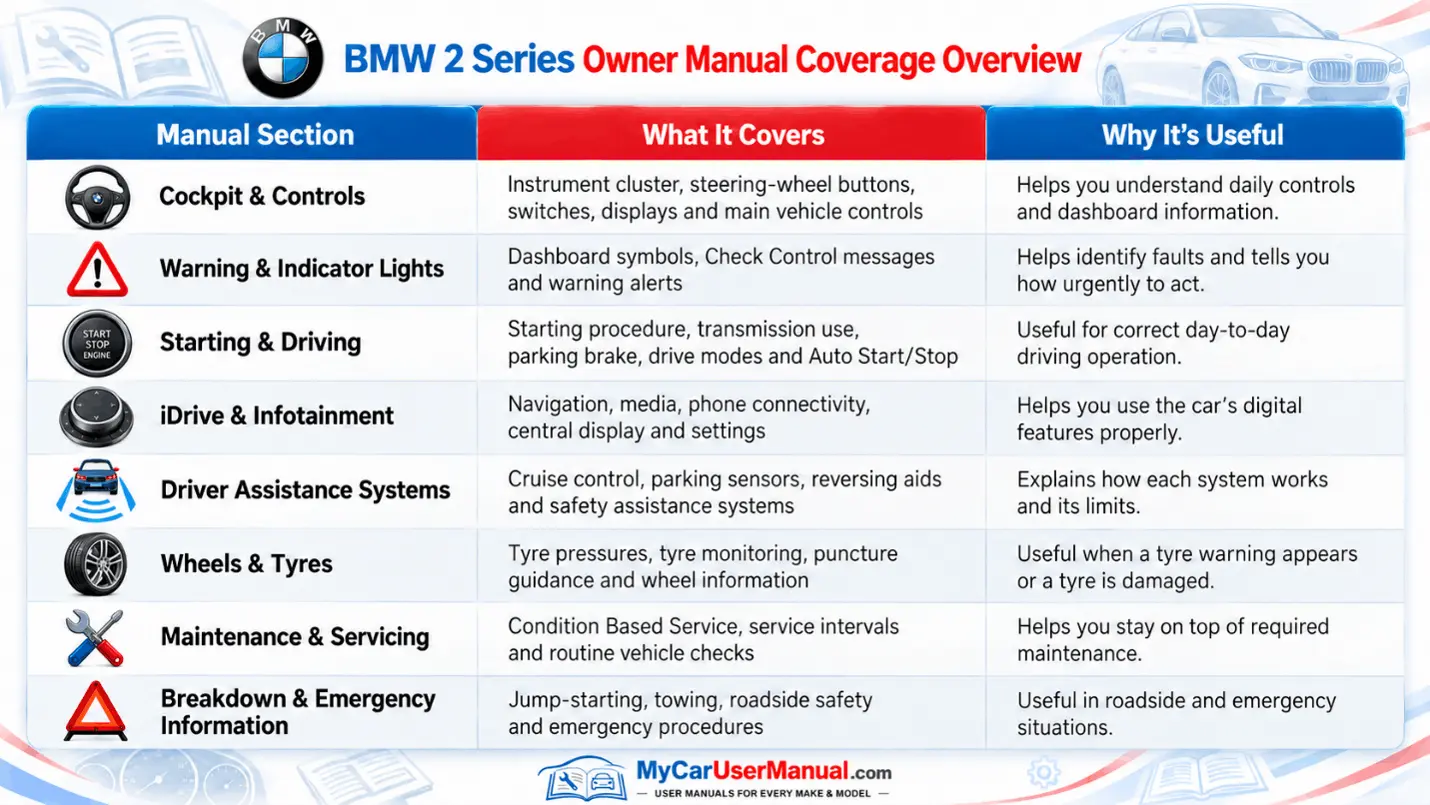
The BMW 2 Series owner's manual covers core vehicle operation, from startup to shut down. It explains keys and access, seat and mirror adjustment, steering wheel controls, and instrument cluster indicators. It describes driving modes, stability control, traction functions, braking systems, and parking brake use. It covers lighting, wipers, defrost, climate control, and cabin functions that affect visibility and comfort. For technology, it explains iDrive menus, audio sources, navigation functions when equipped, plus Bluetooth pairing, smartphone integration, and driver profile setup.
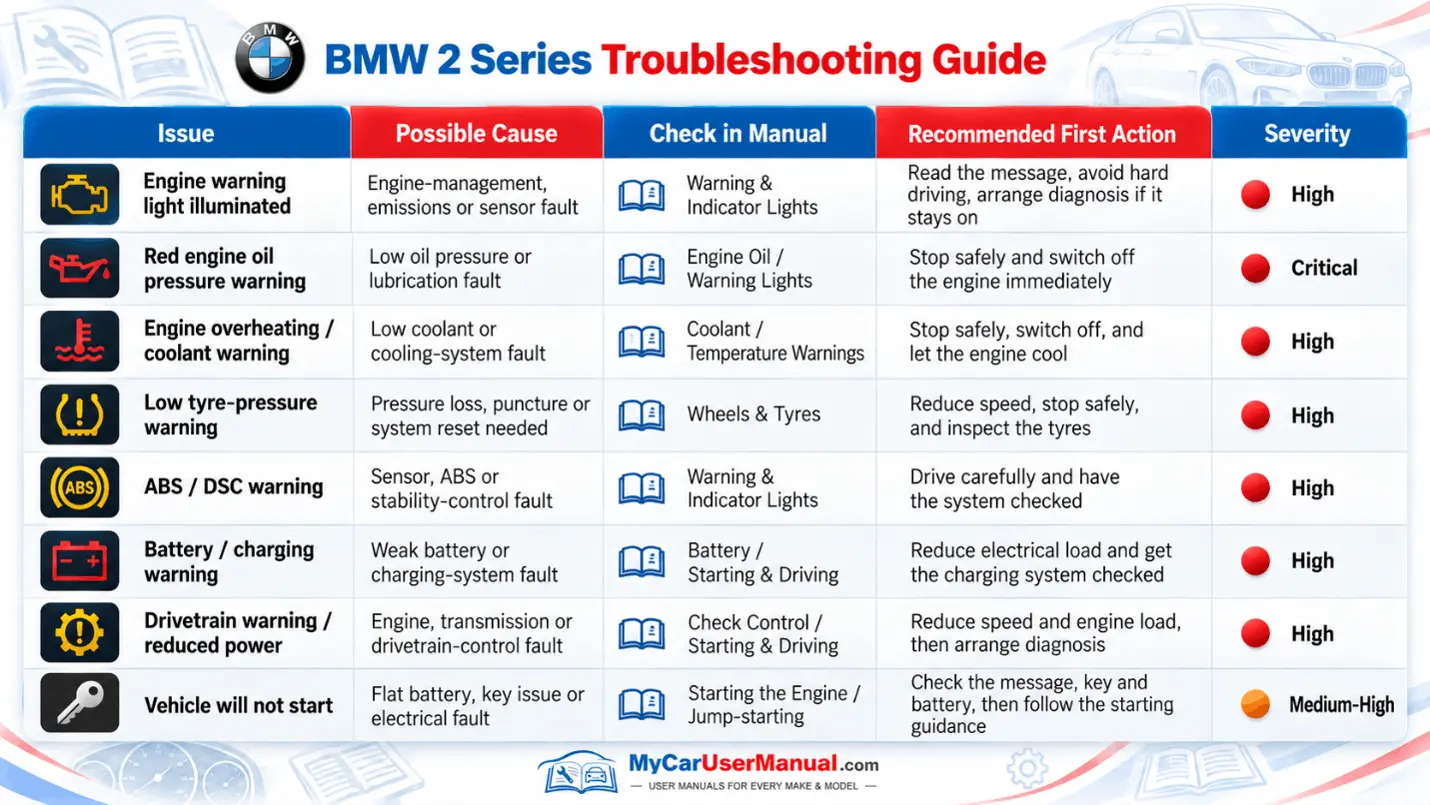
The manual also covers safety information, maintenance guidance, and technical specifications needed for correct upkeep. It lists service intervals, fluid types, capacities, and tyre and wheel data. It also lists basic checks like engine oil level and coolant warnings. The manual includes jump-starting and battery notes, towing instructions, jacking points, load limits, and tyre repair guidance when supplied for your model. You will get an explanation about warning lights and check control messages. The recommended actions and urgency levels are also mentioned with this. The manual also covers emergency equipment, roadside safety, and what to do after a minor incident.
Start with a PDF search because the BMW 2 Series owner’s manual is long and uses repeated terms across sections. Search for the exact term you see in the car, such as TPMS, Check Controls, Service required, iDrive, Auto Start Stop, Parking assistant, or Driving mode. Then scan the nearby headings because BMW groups related settings and notes on adjacent pages. If you get closer but not exact results, then search the second term that is more specific, like reset, calibrate, pairing, sensor, driver profiles, or activation. When you find the right section, read the warning notes above and below the steps.
Use the table of contents for broad topics, then use a keyword search for the exact procedure and screen path. If you need fast access, bookmark or print the highest-use pages. It can be a warning light list, a tyre pressure table, towing and jump start pages, and service reset steps. Follow cross-references inside the PDF because BMW often links a warning symbol to the correct system section, such as brakes, cooling, transmission, or driver-assistance sensors. When a step includes a caution note, treat it as a hard limit and follow it. Keep safety warnings and torque specs in view.
When you see the warning light, check the control message section first. It tells you what is wrong with your car and how serious the problem is. If you get a warning about the tyre pressure, the BMW 2 Series owner's manual explains the TPMS meaning, the correct tyre pressure values, and the reset workflow after reinflation. If the engine gets too hot, the manual will explain what you should do to stay safe. It will tell you how to pull over and what to do when the car is overheating. The manual also explains when you should not open the hood of the car. You should always follow these steps when the engine temperature rises. For no-start cases, the manual covers key detection, battery state, jump start terminals, safe handling warnings, cable order, and correct under-hood connection points.
Use the manual to separate normal operating logic from real faults, then confirm the next step in the relevant system section. Auto Start Stop can stay off due to battery charge, cabin demand, or temperature, and the owner's manual lists enabling conditions and driver settings. Driver-assistance systems can be disabled due to blocked cameras, radar limits, heavy rain, snow, or dirt, and the manual states sensor limits and cleaning guidance. If the car shows a drivetrain, brake, or steering message, the manual tells you when to stop driving and contact service. Use it to decide what you can check and what needs a workshop.