Get the BMW 4 Series owner manual as a free PDF. You can download it for your exact year, trim, and body style. The PDF file can be viewed, read, printed, and saved on any device. Open it on a browser for access, then download it for offline use on a phone or laptop. You can print single pages for reference. It can include tyre pressures, jack points, fuse charts, or warning light lists. Use PDF search to jump to terms like iDrive, Tyre Pressure Monitor, engine oil level, coolant, battery, key, or service interval.
Our manual library is sorted by year and model. It helps you to find the correct BMW 4 Series handbook quickly and easily. Choose Coupe, Convertible, or Gran Coupe, then choose your model year to match your equipment and screen layout. All the user manuals are free, and you do not need to purchase them. We update the collection when BMW revises features, adds driver assistance functions, or changes menu paths. A 430i and an M440i can share a body but differ in systems, so the right PDF helps you confirm controls, specifications, and settings for your exact vehicle.
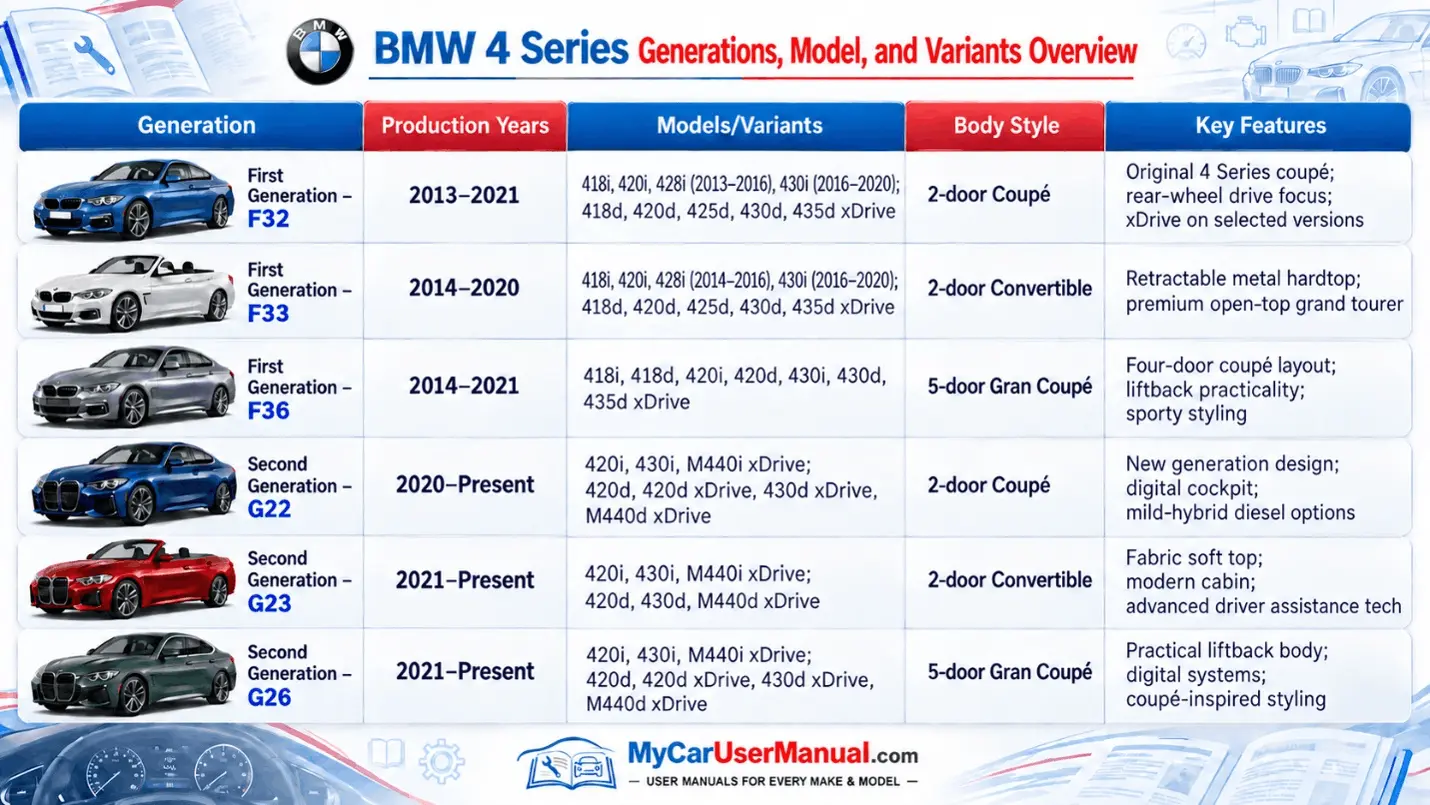
BMW 4 Series systems are different across new and old generations. So, it is important that the PDF manual match your platform. First-generation cars include the F32 Coupe, F33 Convertible, and F36 Gran Coupe. Later models include G22 Coupe, G23 Convertible, and G26 Gran Coupe. Buttons, instrument graphics, and driver assistance names can change even within one generation by model year. Free PDF viewing lets you confirm the cover, year range, and table of contents before you download. That prevents wrong reset steps and wrong settings paths during troubleshooting.
Use the year list to filter to the correct handbook, then open related supplements when they are available. Some years include separate PDFs for navigation, ConnectedDrive, media, or M-specific content. Keep those PDFs together because one task can span sections. Parking sensors may be explained in Driver Assistance, camera cleaning is in Maintenance, and the setting toggle is in iDrive. Free viewing lets you check a page fast while you stand next to the car. Free downloading lets you store the complete manual set for that year in one folder.
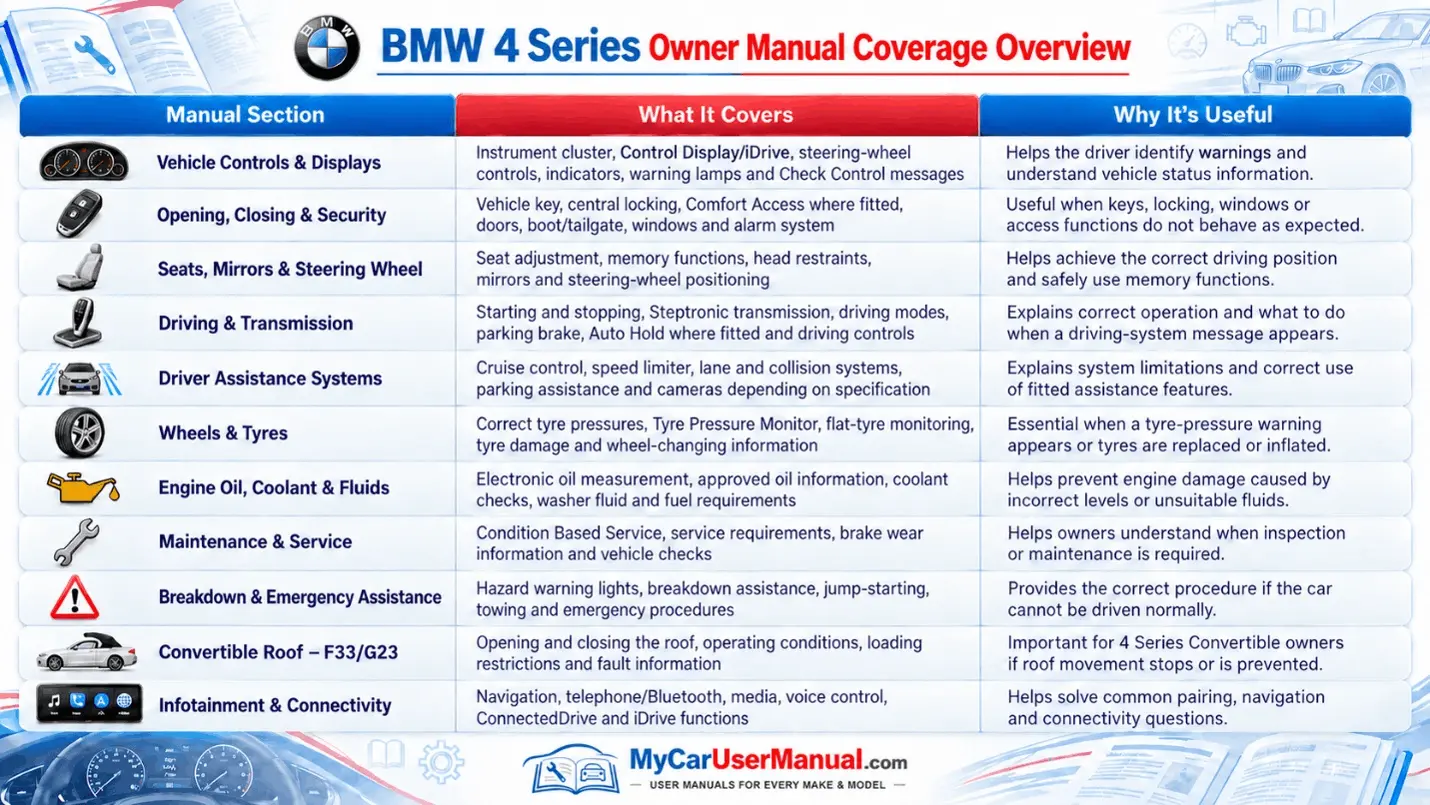
The BMW 4 Series owner’s manual covers operation, safety, and daily use with system names and clear action steps. It explains the instrument cluster, warning symbols, check control messages, and alert priority levels. It maps controls for lights, wipers, steering wheel buttons, mirrors, seats, and climate settings. It explains iDrive basics, menu structure, and common setup tasks like pairing Bluetooth, managing user profiles, and configuring audio sources. It covers driving systems like start/stop, driving modes, traction control, cruise control, and speed limiter functions, depending on equipment.
The manual also covers maintenance and specification data that BMW owners need for correct service. It lists the required engine oil specifications, oil checking methods, coolant warnings, brake fluid notes, and washer fluid guidance. You can get information like tyre size and tyre pressure values, wheel change steps, tyre mobility kit instructions, and winter tyre guidance. The manual shows jack points, towing eye locations, towing limits, and safe recovery notes. It includes fuel locations with cautions, battery access, and jump-start terminal locations, and safe electrical handling rules. It also explains how service indicators work and where to view condition-based service status.
Start with a PDF search. If that fails, use the index. If that fails, use the section headings. Search exact BMW terms, not general problems. Use phrases like Check Control, Tyre Pressure Monitor, engine oil, coolant temperature, charging system, remote control key, Comfort Access, or start/stop function. If you get too many results, narrow with a second word like reset, initialization, warning, or malfunction. For hardware tasks, search the part name, not the symptom. Search for fuse, towing eye, jacking point, battery terminals, headlight, and wiper blades. For iDrive tasks, search the feature name plus settings or menu.
Follow the manual structure to stay inside the correct system and avoid mixing procedures from other years. Most BMW 4 Series manuals use sections like Controls, Driving, Comfort, Communication, Mobility, and Reference. For setup, start in Controls and Communication until keys, seats, mirrors, and phone settings are correct. For alerts, go to warning symbols and message lists, then read the linked actions and safety notes. For roadside steps, use Mobility for tyre repair, towing, and jump-start procedures. Bookmark key pages in your PDF reader, and name bookmarks by task, not by page number. If you print pages, label them with the system name and the date.
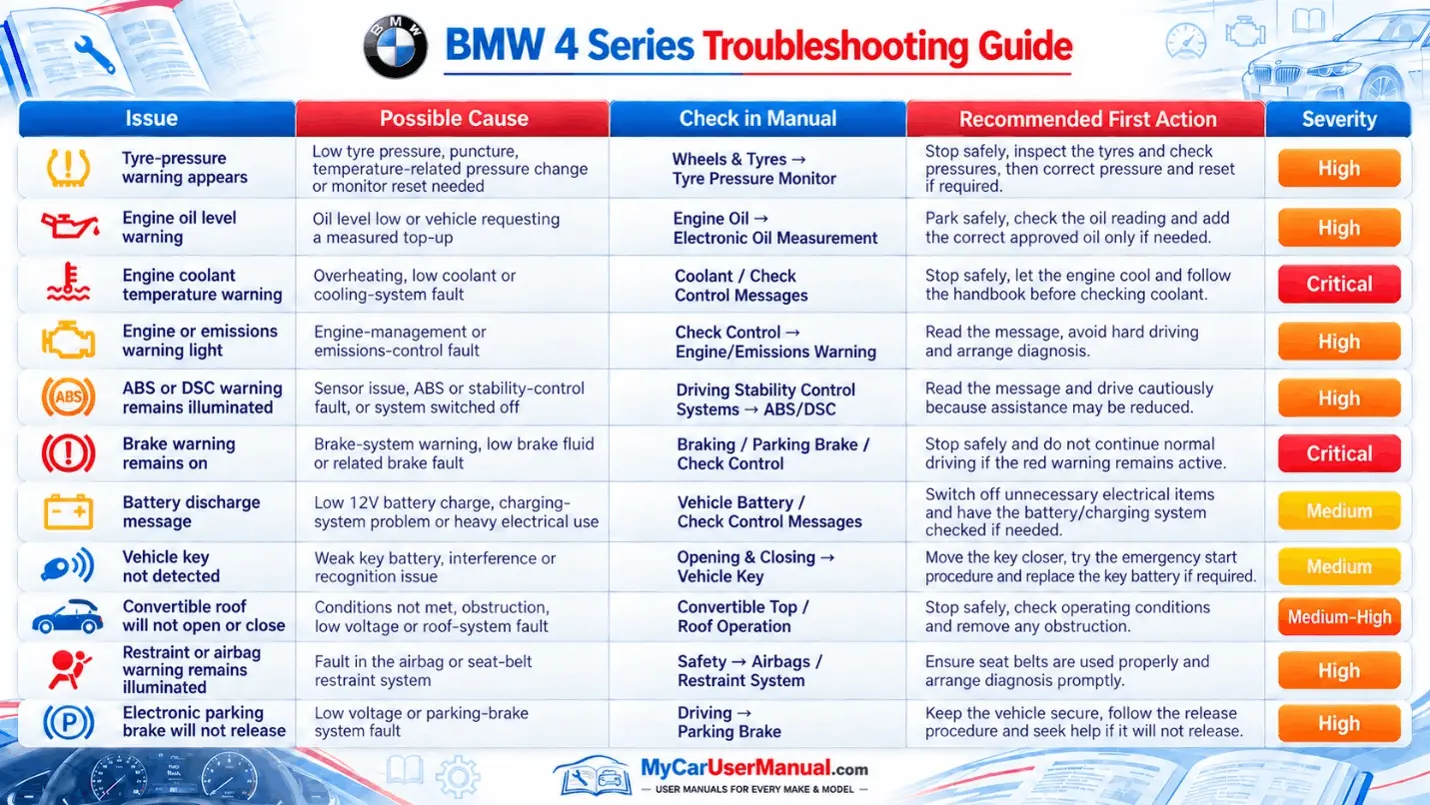
Use the owner’s manual as your first troubleshooting tool for common vehicle issues. Start with warning lights and check control messages because the manual explains severity, safe actions, and stop-driving triggers. For low oil pressure, overheating, or charging faults, it tells you when to shut down, reduce load, or call roadside assistance. For TPMS alerts, follow the inflate steps first, then use the exact reset path for your iDrive version. For service due messages, use the manual to identify what the reminder covers and where to check the service status screen. For iDrive glitches, follow the documented restart method and the correct settings path for restoring defaults.
Use manual-based checks for access, comfort, and electronics problems before you assume a failed part. If the trunk will not open, check key settings, central locking behavior, and the mechanical release location. If the convertible top will not move, confirm the required conditions like trunk separator position, battery state, and speed limits. If the car vibrates, pulls, or feels unstable, use the tyre and wheel sections to confirm pressure, damage signs, and uneven wear patterns. If start/stop seems inactive, the manual lists reasons like battery charge, cabin demand, and engine temperature. If you see battery discharge warnings, the manual explains energy management, consumer shutoff, and what loads can stay on after shutdown.