We offer BMW 7 Series owner manuals for free. The manuals are in PDF format that you can download for your year and model of BMW 7 Series. The manual uses official BMW terms for controls, indicators, and feature names, so the instructions match the vehicle. The user manual will help you confirm iDrive menu paths, button labels, warning light meanings, tyre pressures, fuel requirements, fluid types, and safety steps. You can view the manual online. You can read it on your phone. If you need to, you can also print out the required pages. You can also download the full manual for offline use. Every BMW 7 Series owner’s manual in our library is free. No purchase and no sign-up requirement.
Use the BMW 7 Series owner’s manual PDF as a problem finder and a reference file. Search by keyword for a specific section, warning, or symptom, then jump to the correct page fast. The common searches are keyless entry, remote key battery, phone pairing, Bluetooth audio, TPMS reset, coolant level warning, service reset, driving modes, towing, and jump starting. Save the PDF file on your device so you can access the manual in the garage or on the road. Print emergency pages and keep them in the glove box of your vehicle. These pages may include jacking points, fuse locations, wheel bolt torque, and towing hook placement. Manuals in the library are grouped by year and model. We keep updating the library as new manuals are released. You can use the PDF search box to find torque, fuse, fluid, and reset terms in seconds.
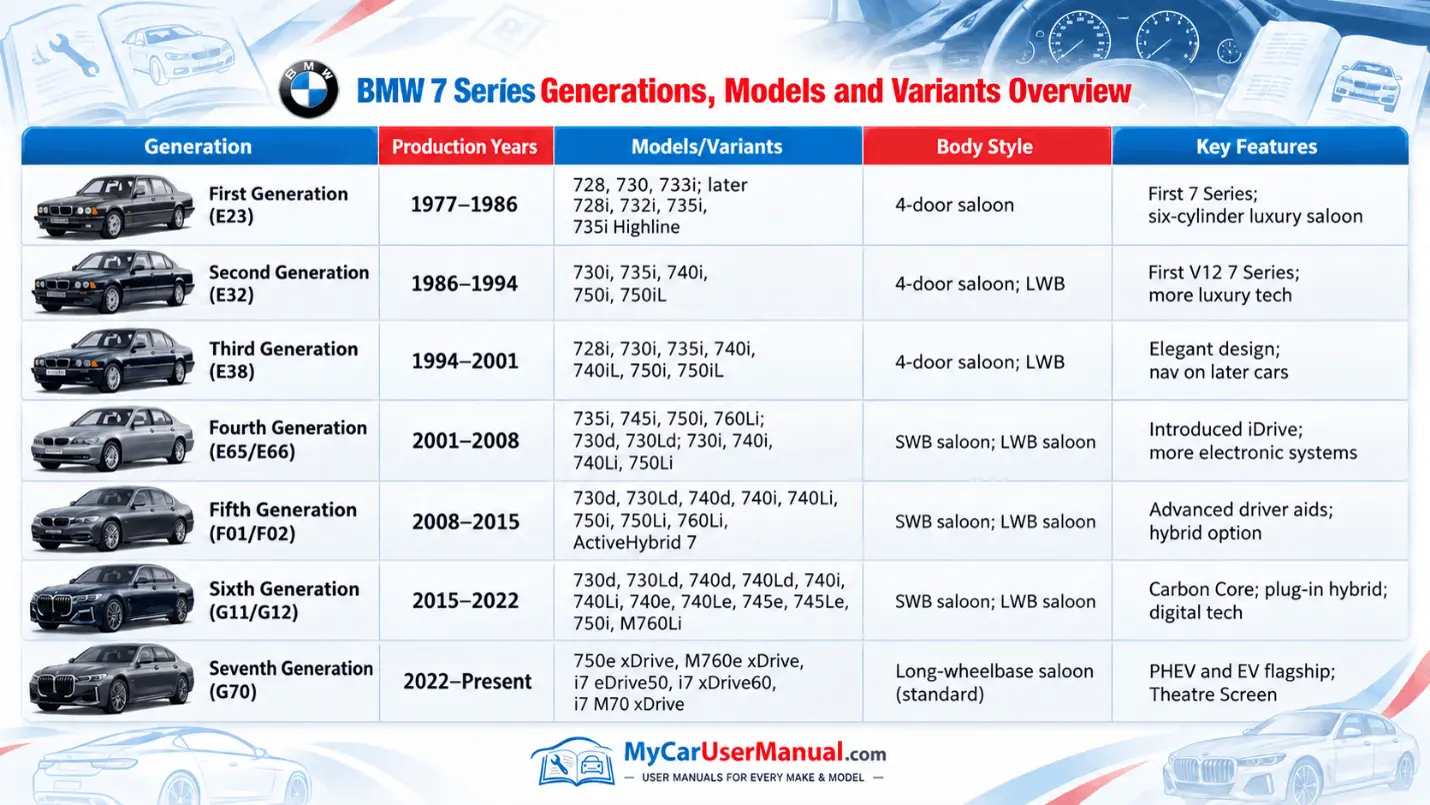
There are different BMW 7 Series models across generations. It is necessary to choose the right manual so that it matches your vehicle specs. Free PDF viewing supports older platforms like E23 and E32, later classics like E38, the early iDrive era like E65 and E66, and newer lines like F01 and F02, G11 and G12, and G70. Each generation uses different instrument icons, control layouts, iDrive screens, driver assistance names, and electrical systems. A generation-matched PDF user manual prevents wrong menu steps, wrong reset sequences, wrong fuse charts, and wrong specifications.
Open the BMW 7 Series PDF owner manual in a browser to use instant navigation and in-document search. Zoom in on diagrams for steering wheel buttons, center console controls, seat switches, and fuse panels. Use page thumbnails to move between chapters. If you prefer a manual in hardcopy, print only the pages you use often and keep them in the car. For offline access, download the full PDF. Save it in local storage and cloud storage. If a model year has multiple manuals, select the version that matches your engine, trim, and market.
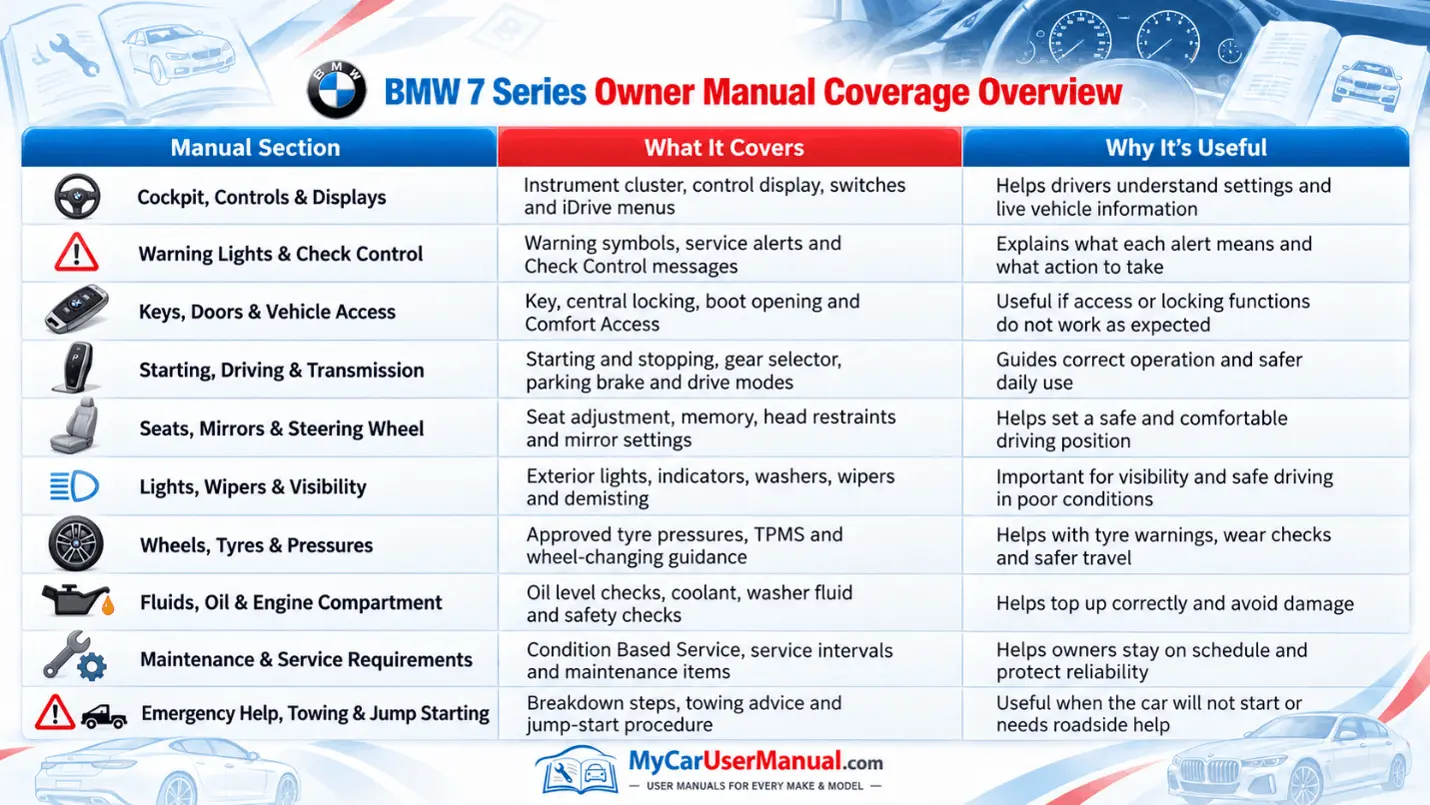
The 7 Series BMW owner’s manuals cover daily operation and vehicle setup from the driver's seat. It explains the instrument cluster, head-up display when equipped, warning symbols, and check control messages. It covers starting and stopping, transmission operation, parking brake behavior, steering and suspension settings, and drive mode selection. It explains iDrive features for audio, navigation, phone, apps, driver profiles, and system settings. It also covers seats, memory functions, mirrors, steering wheel adjustment, lighting, wipers, cameras, and key functions.
The manual also covers safety, maintenance, and basic care. It details airbags, belt systems, child seat installation, ISOFIX and LATCH anchors, and passenger airbag settings where available. It lists fuel type, engine oil specifications, coolant and brake fluid notes, washer fluid, and capacity information. It explains condition-based service logic, service indicator display, and checks that BMW owners can perform safely. It also covers a number of roadside steps like jack points, tyre mobility kit use, spare wheel notes where equipped, towing rules, and emergency release methods.
Start with the table of contents to map the manual structure, then use the index for exact terms. In a PDF, use search with BMW labels, not generic web phrases. Search for Check Control, iDrive, TPMS, Condition Based Service, Comfort Access, Driving Experience Control, or the exact icon name shown in your cluster. Use the search results list to jump between every mention of the same feature. Save bookmarks for high-use pages like tyre pressure tables, refueling instructions, service reset steps, and pairing steps, so you can repeat tasks without re-searching. Confirm the correct engine, chassis, and equipment package before you follow a procedure.
Move through the manual by system, not only by symptom, when an issue spans features. A no audio problem can involve iDrive settings, volume limits, Bluetooth routing, and steering wheel mute controls. Use the Controls chapter to confirm what each button does, then use Communication or Entertainment to follow the correct settings path. For driving warnings, use At a glance to decode the symbol, then go to Driving for the related system rules and limits. For physical tasks, use Mobility for tyres, tools, towing, jump starting, and emergency release procedures.
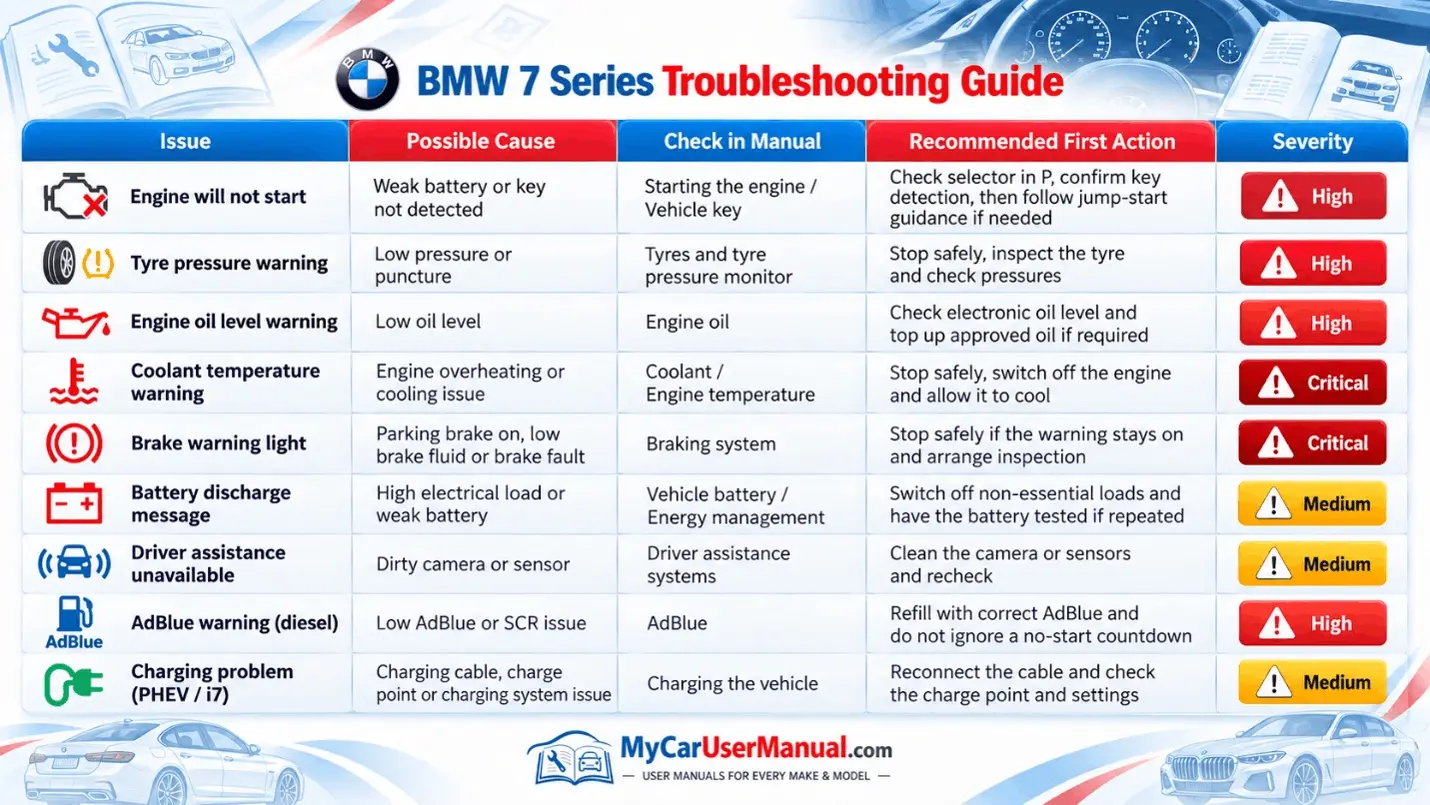
Use the BMW 7 Series owner’s manual as the first troubleshooting reference for common issues. When a warning light appears, the manual explains the symbol, priority level, and allowed driving action. For tyre pressure alerts, it gives the correct cold pressures, load conditions, and the exact TPMS reset path in iDrive. For starting issues, it explains key detection, brake pedal requirements, gear selector states, and ignition modes, which prevent false no-start steps. For battery concerns, it describes energy management, sleep mode, and common drain causes like accessories left on, short trips, and long parking.
For comfort, infotainment, and driver assistance problems, the manual provides checks that match your hardware. For Bluetooth pairing failures, follow the manual’s pairing order, device deletion steps, and permission prompts for contacts and audio. For climate control complaints, use the manual to confirm AUTO logic, air distribution, rear zone settings, seat heating and ventilation settings, and defrost operation. For parking sensors, cameras, lane systems, and adaptive cruise, the manual lists sensor limits, blocked sensor warnings, cleaning steps, and temporary deactivation conditions. Use the manual to confirm what you can do safely, then decide what needs service.