Get a BMW 8 Series owner's manual as a free PDF. Download it from our library for your specific year and model. The PDF lets you check controls, instrument cluster symbols, warning lights, and iDrive menu paths exactly as BMW names them. The manual supports real tasks like tyre pressure checks, TPMS reset steps, key fob battery type, fuse locations, jack points, towing eye storage, and roadside procedures. Open the PDF in your browser for quick access. Print only the pages you want to keep in the car. You can also save the PDF on your phone for offline access. You can take guidance from it during travel, service visits, or emergencies.
The BMW 8 Series PDF user manuals are grouped by year and model. You can match the right generation and equipment with ease. You can view, read, and download the manual without paying and without paying a printed book. If you need one topic, use the PDF search and jump straight to the section for your problem, like check control, engine oil, tyre pressure, or jump starting. We keep the manual list updated as new model years arrive and as BMW revises software and features. When an updated manual is added, replace your saved copy so your information stays current and accurate for your vehicle.
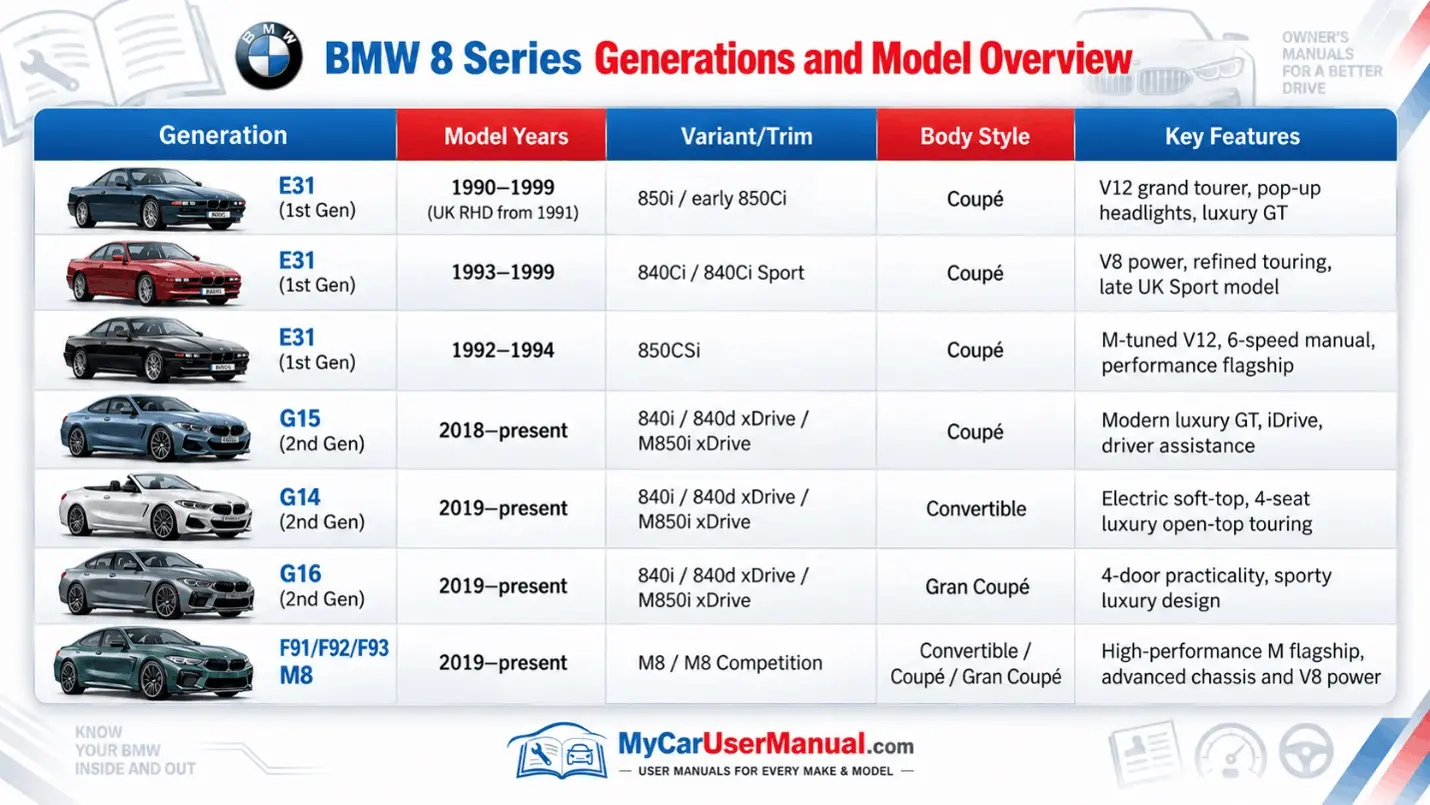
BMW 8 Series owner manuals are not universal across generations. A classic 8 Series uses different switches, warning icons, and service notes than a modern 8 Series. Modern models add iDrive functions, driver assistance, and electronic settings that change how systems behave. Free PDF viewing helps you confirm you are reading the right instructions for your generation, year, and body style, like coupe, convertible, or gran coupe. The correct PDF should match your dashboard layout, your menu wording, and your option set, so each step matches what you see in your car.
Use the year and model selector to open the right owner manual PDF for your BMW 8 Series. You can then download this PDF for access later on. If you are not sure which one to choose, you should check the VIN on your vehicle. It will help you find the right model year and variant in the list of manuals. Save the file on your device. Name it clearly that includes year and body style, such as BMW-8-Series-2021-G15-Coupe-Owner-Manual.pdf. Naming the file this way avoids mixing with other manuals. PDF viewing supports zoom, copy, and accessibility tools. It helps you with small diagrams, icons, and tables. Keep a copy on your phone for roadside use. Store a backup on a computer or cloud drive for fast retrieval during maintenance, travel, and planning.
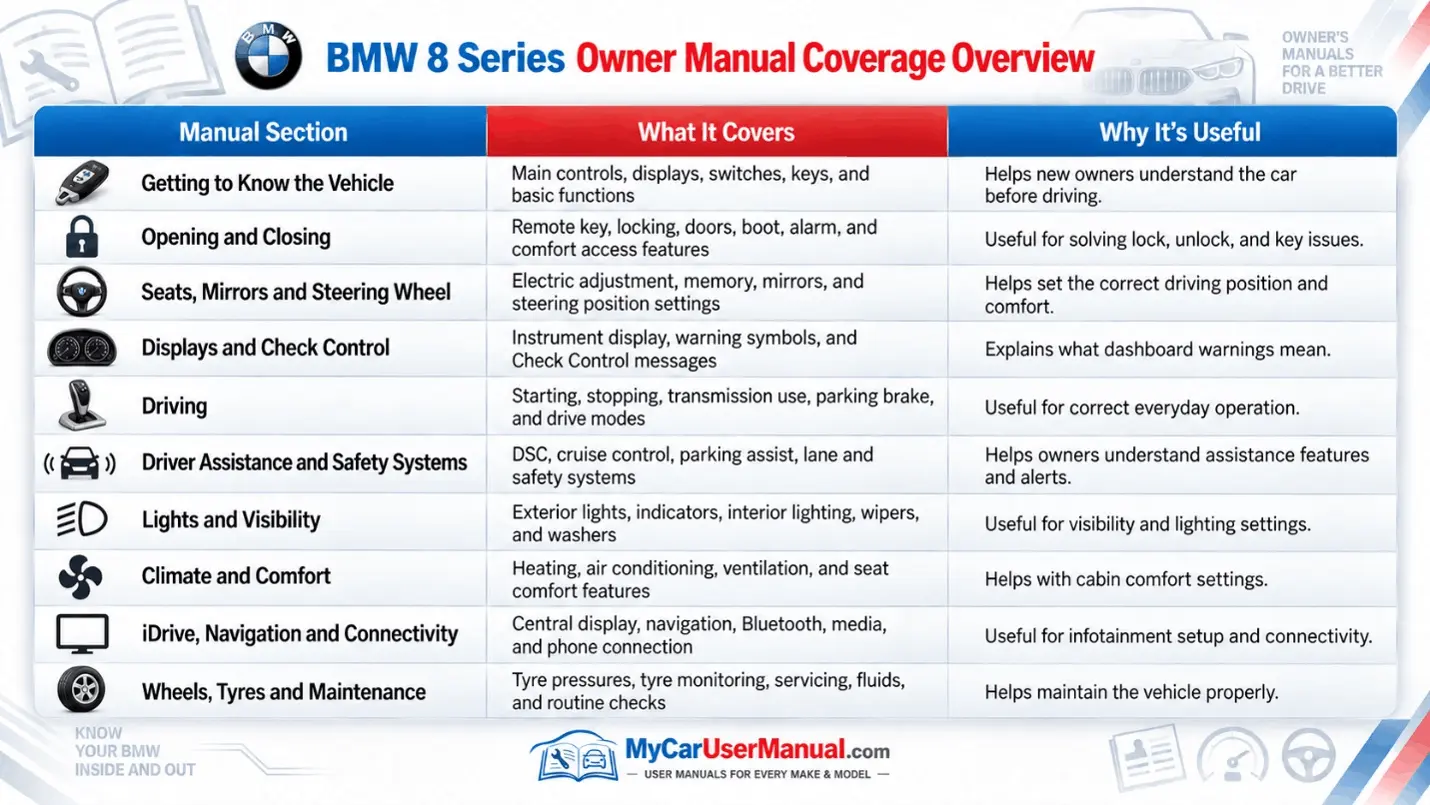
The BMW 8 Series owner’s manual covers daily operation, safety guidance, and system basics. It explains keys, Comfort Access, locking, alarm behavior, starting, and basic driving steps. It documents seats, seat memory, mirrors, steering wheel adjustment, lights, wipers, and climate control. It explains the instrument cluster, warning lights, and check control messages, including what each symbol means and what the car is monitoring. It also explains driving modes, traction and stability control, braking systems, and the limits of assistance features, so BMW owners know what the car can and cannot do.
The manual also covers technology, configuration, and specifications that reduce wrong settings and wrong service actions. It explains iDrive controls, audio, navigation, phone pairing, voice control, and menu paths for resets and preferences. It describes cameras, parking sensors, cruise control modes, lane support features, and how to switch features on and off. It lists tyre sizes, recommended tyre pressures, load guidance, and service interval reminders. It includes fluid guidance, fuse locations, battery notes, jump start points, towing instructions, and emergency steps after a flat tyre or breakdown.
Choose the BMW 8 Series manual that matches your year and model first, then navigate by structure. Use the table of contents for big topics. Use bookmarks for moving quickly between sections like Controls, Driving, Technology, Maintenance, and Emergency. When you need a specific solution, use PDF search with BMW wording. Some terms like TPMS, tyre pressure, check control, service required, start/stop, remote control key, towing, and fuse usually land on the right page. Copy the exact warning text from the cluster or iDrive screen before you search to reduce false matches and to match the manual description.
Use cross-references to follow cause and effect inside the manual. A warning icon page often points to a check control message, then to a recommended driver action, then to service limits and safety notes. For iDrive steps, match the menu names in the manual to your car’s software version, because menu wording can change after updates. Print only the pages you use often, such as tyre pressure charts, jump start points, towing steps, and fuse charts, then keep them in a small folder in the glovebox. Keep the full PDF unchanged so you always have the original guide and the full system description when a new issue appears.
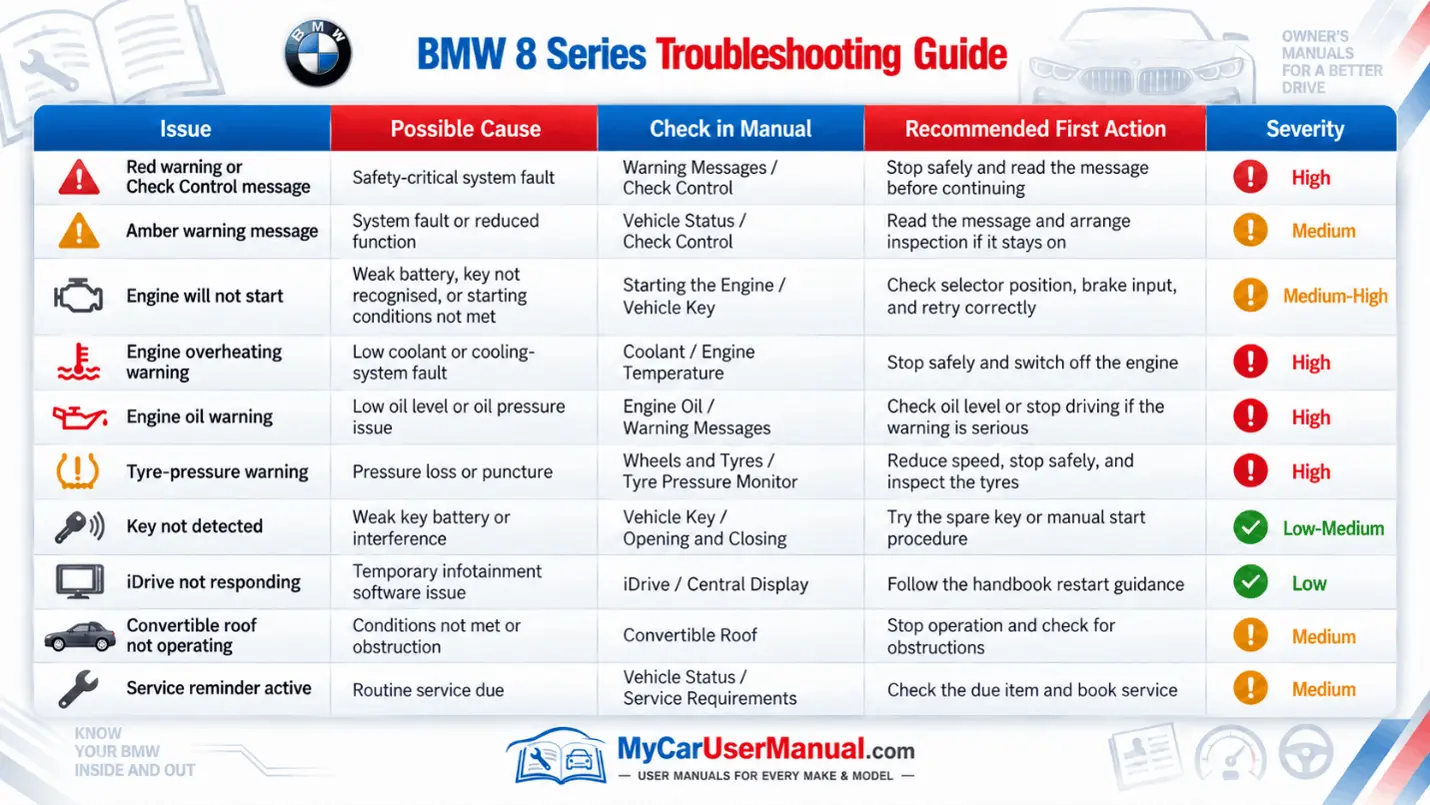
Use the BMW 8 Series owner’s manual as the first troubleshooting tool because it maps symptoms to actions. Use the manual before calling a shop, so you can name the system, follow safe steps, and avoid replacing parts that are fine for now. Start with the warning light or check control message, then find the exact entry in the manual. The manual states what the warning means, how urgent it is, and what you should do next. For tyre pressure warnings, it lists correct pressures and shows the TPMS reset workflow in iDrive. For engine temperature warnings, it outlines safe stopping and cooling steps and warns against opening hot systems. For battery and charging warnings, it explains power management, jump-start safety, and when to seek service.
For comfort and tech issues, the manual helps you separate a setting problem from a hardware fault. If Bluetooth pairing fails, follow the pairing sequence, delete old devices, and confirm the correct iDrive menu. If iDrive feels frozen, use the documented restart method and avoid random resets that change preferences. If parking sensors or cameras act incorrectly, check notes on sensor blockage, cleaning, and operating limits. If windows behave oddly after battery work, use the window initialization steps the manual specifies. For convertible roof operation, follow the listed conditions and stop if the system warns.