Here, you can get the BMW i5 owner’s manual as a free PDF download for the exact year and model you drive. You can open the PDF in your browser to view and read it. The built-in search will enable you to jump to a specific topic. You can print the pages you want and save the file for offline use. The PDF owner’s manual contains the same core driver information as the in-car guide. It includes controls, settings, warning lights, safety systems, charging steps, and basic care. Because it is a PDF file, you can keep it on your phone, laptop, or tablet. You can pull it up anytime you need a fast answer, such as the meaning of a warning message, the location of a control, the steps for a feature, or the correct workflow for a common task.
Every BMW i5 owner's manual in our library is free. No purchase, no subscription, no paywall. Just choose the BMW i5 model year and open the PDF in your browser. You can also print the required pages or download the whole manual to your device. You can use the manual to confirm safety rules, charging steps, driving modes, and cockpit controls. If BMW releases updated information or adds new manual files, the library updates by year and model, so you can always pull the current BMW i5 manual PDF.
Use free PDF viewing for BMW i5 manuals across all available generations and model years in the library. Select the BMW i5 year and open the PDF owner manual in your browser, then zoom and scroll like a normal document. This helps when you need quick access without downloading. It also helps when you want to compare changes between model years, like updated iDrive screens, revised driver assistance behavior, or new charging menus.
Each BMW i5 PDF owner manual supports reading, printing, and downloading. Viewing works well for fast checks like tyre pressure label guidance, wiper service position, or instrument cluster symbols. Downloading works best when you want offline access in a garage, on a trip, or in a low-signal area. Printing is useful for high-use pages like charging steps, emergency jump-start guidance, or key fob functions. The manual library stays organized by BMW i5 year and model, so you always land on the correct document.
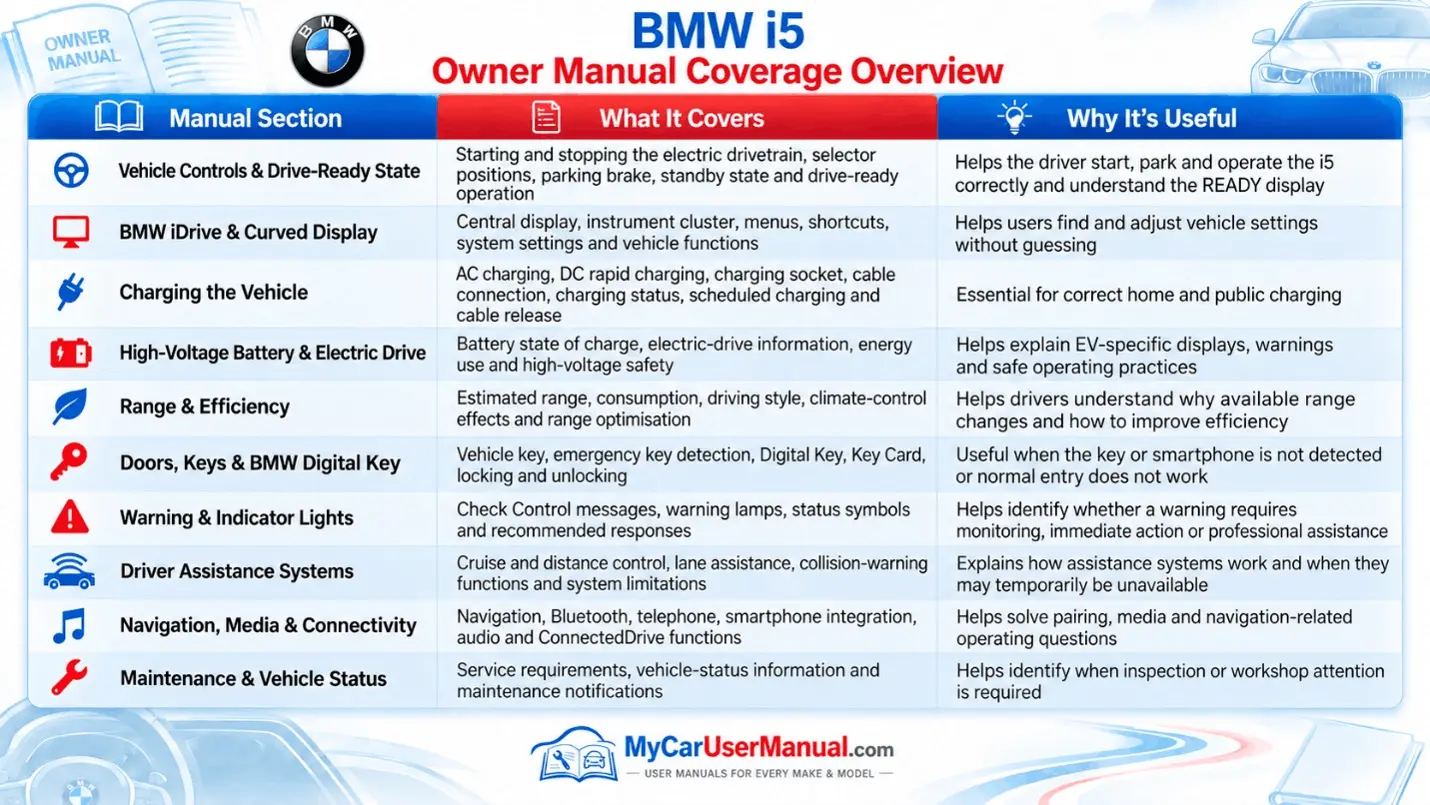
The BMW i5 owner’s manual explains vehicle controls, safety systems, and daily operating instructions. The manual shows you the function of all the buttons and controls. You can see what the cockpit of the BMW i5 looks like and where everything is. It talks about the iDrive system. It tells how to use the menus on the screen. The manual also explains the instrument displays and the controls on the steering wheel. It tells you how to change the settings on the BMW i5. It covers lighting functions, wipers and washers, mirrors and window operation, seat adjustments and memory, and climate control modes so you can set comfort features correctly. It also breaks down driver assistance systems with clear limits, conditions that disable features, and what to check when a system says unavailable. When you see a warning light, indicator symbol, or instrument cluster message, the manual helps you confirm what it means, what driving restrictions apply, and which steps are safe to try before you book service.
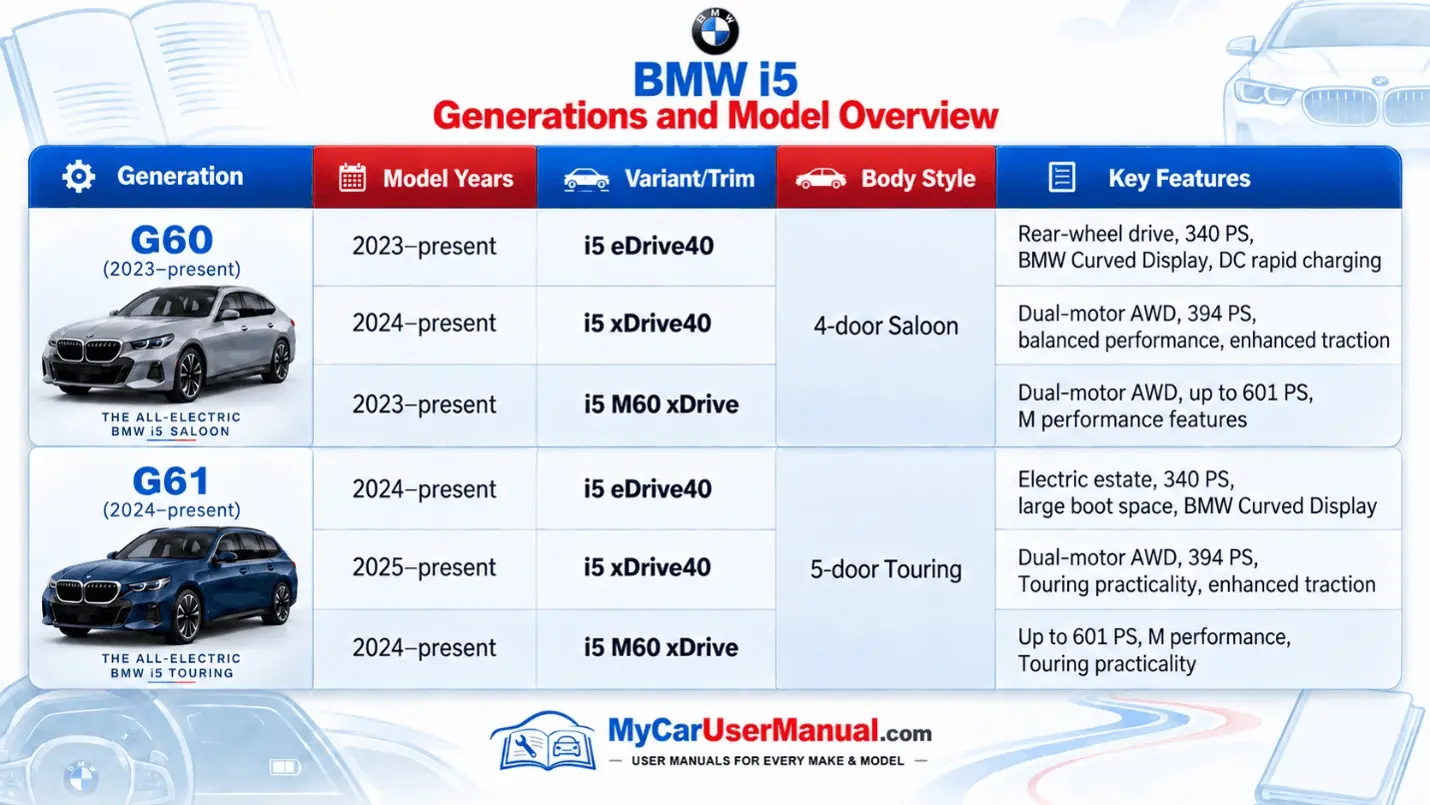
The BMW i5 manual also covers EV ownership topics that affect daily driving. Look for charging basics, charging port use, AC charging, DC fast charging, charge scheduling, charging status lights, and charge interruption causes. It also includes battery care, range factors, regenerative braking behavior, driving modes, and energy flow screens. You also get maintenance guidance like service intervals, tyre specs, fluid checks for supported systems, towing limits, wheel and tyre care, cleaning rules for sensors and cameras, and emergency procedures. If you drive a BMW i5 edrive40, the manual helps you understand edrive40 settings, screens, and energy features that apply to that product version of the car, and the VIN helps confirm exact equipment pages.
To find what you need, start by using the search function in the BMW i5 PDF owner manual. When you search, use the words that describe the issue you are having, such as "charging fault," “DC fast charging,” “tyre pressure monitor,” “driver assistance,” “parking assistant,” “range,” “regeneration,” “iDrive,” “Bluetooth,” or “key battery.” This will help you find the information in the BMW i5 PDF owner manual. If search results feel broad, tighten the query with a second keyword, like “charging status light,” “TPMS reset,” or “driver assistance unavailable.” This method beats random scrolling and reduces wrong-page mistakes.
Use the manual structure to move faster. Check the table of contents to find the main system, then use headings and subheadings to narrow the section. Bookmark high-use pages like warning symbols, charging steps, and infotainment pairing. When you print, print only the pages you need and keep them with your charging cable bag or glovebox folder. If your BMW i5 is a specific model year with a specific iDrive version, always confirm you are reading the matching year and model manual before applying steps.
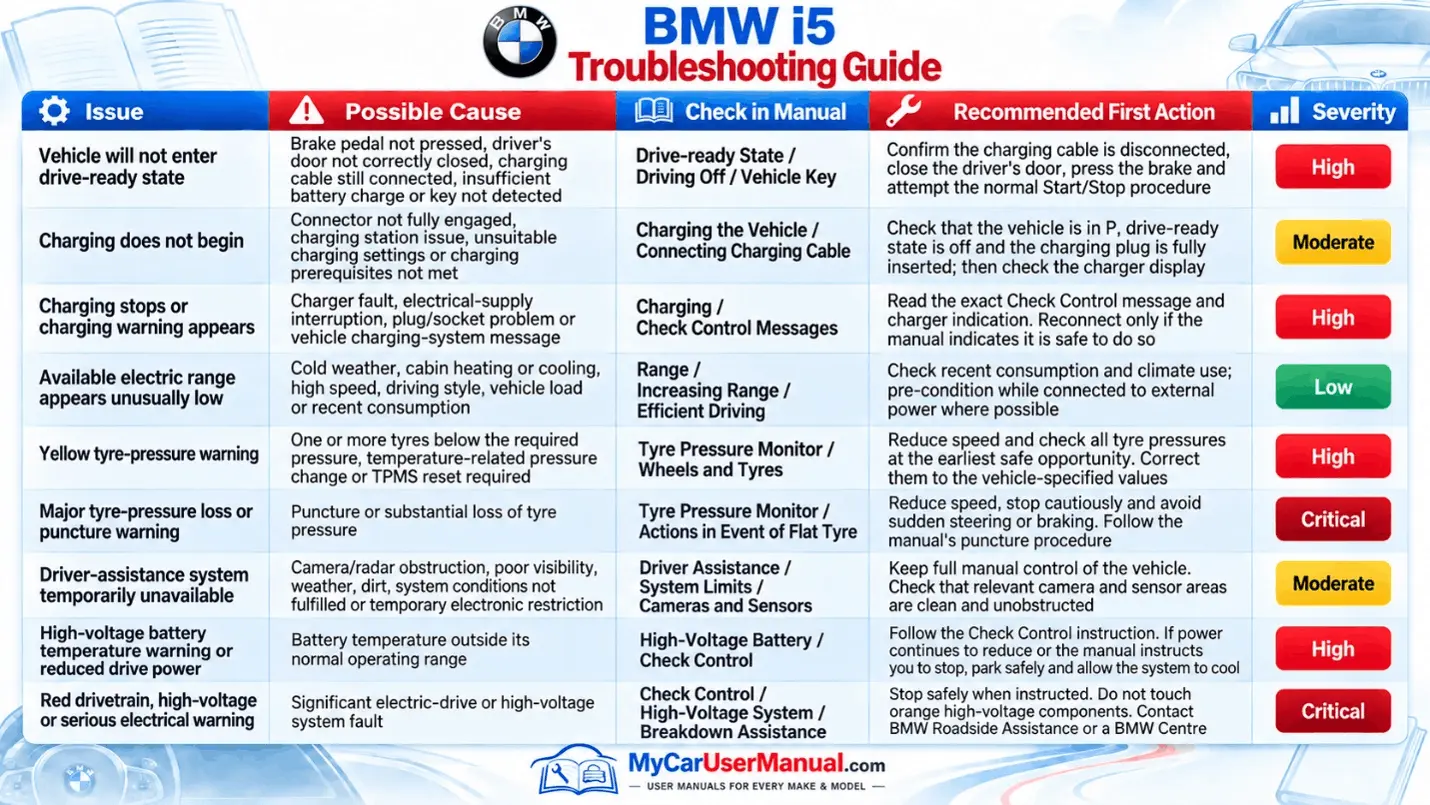
Use the BMW i5 owner’s manual to troubleshoot common alerts and behavior changes before you assume a hardware failure. Many “system unavailable” messages come from temporary conditions: sensor blockage, extreme weather, low 12V battery condition, or a startup sequence still running. The manual explains what each warning symbol means, what driving limitations apply, and what user steps are safe. Follow the manual’s order: verify settings, check status messages, restart the system if allowed, then recheck. This avoids pointless resets and reduces risk.
For BMW i5 charging issues, the owner’s manual is the primary reference for correct charge setup and common stop causes. It guides you through charging connector insertion, charge authorization, charge timer rules, and charge interruption triggers. For infotainment issues, use the manual to confirm pairing steps, profile selection, and media permissions. For tyre pressure warnings, use the manual section on TPMS to confirm inflation targets and the correct reset workflow. For driver assistance faults, use the manual to check camera and radar cleaning guidance, operating limits, and conditions that disable features.