A BMW X3 owner's manual is the fastest way to confirm how your BMW X3 is built and how each system is meant to work. Here, we provide BMW X3 owner manuals as free PDF files. These files are sorted by year and model. It makes it straightforward to select the exact owner’s manual for your production year and trim. The manual can be opened quickly in your browser. You can learn about iDrive menus, cockpit controls, warning lights, driver assistance settings, safety systems, and routine maintenance by using the manual. The manual lists tyre sizes, tyre pressure targets, recommended fluids, fluid capacities, and service intervals. It is necessary to match the manual year to your build date to avoid mismatched procedures completely.Every BMW X3 owner’s manual here is free. No purchase and no paywall. No login needed. PDF search makes the manual practical during a real problem. You can search for oil level, coolant temperature, TPMS reset, Bluetooth pairing, key fob battery, towing eye, fuse box, or iDrive reboot to jump to the right section. If your year is not available at the moment, check back. We keep updating the BMW X3 manual library by year and model as new manuals, corrections, and revisions are released. You can view, read, print, and download the PDF, or search for a specific section or problem.
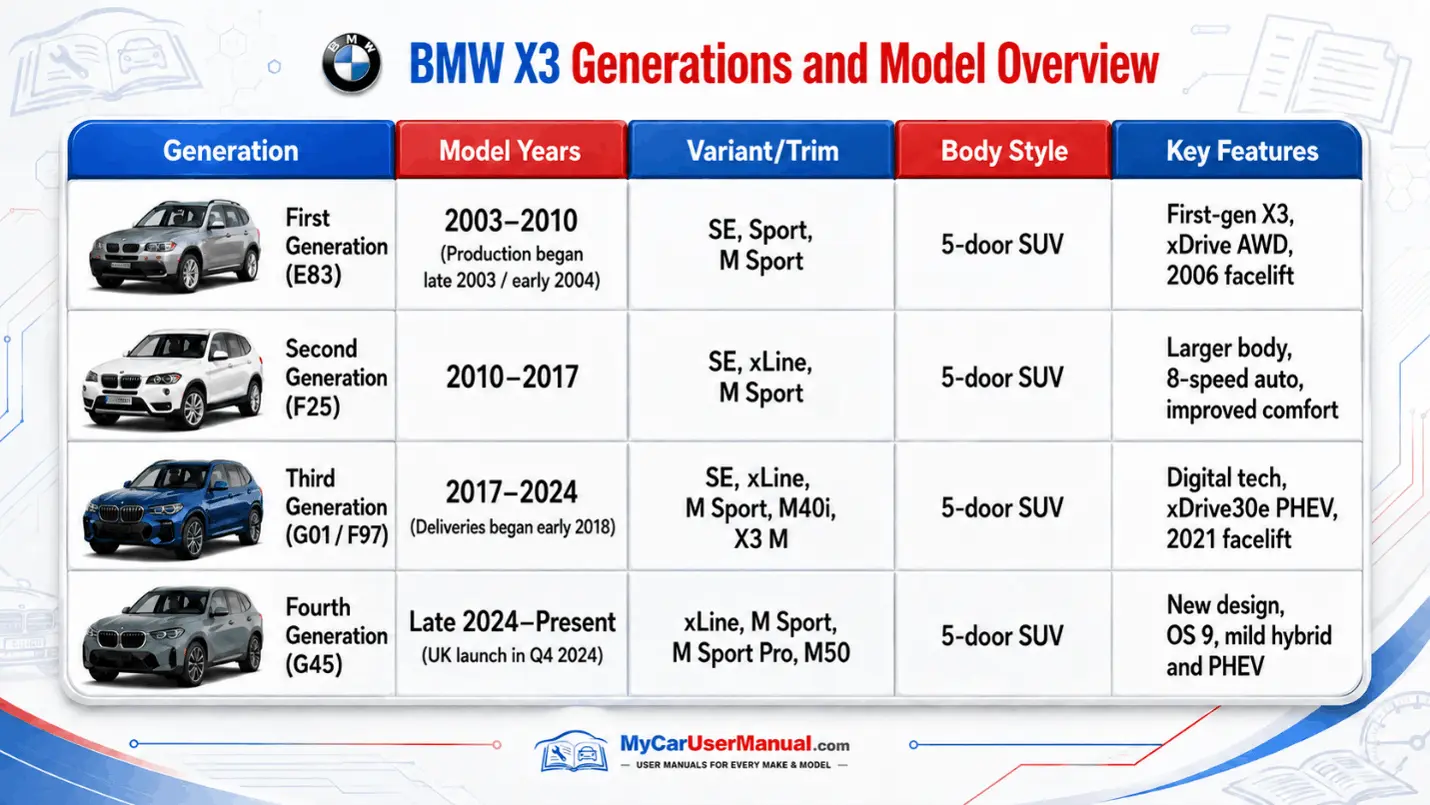
BMW X3 generations differ in controls, infotainment, driveline options, and safety technology, so the right manual matters. Our BMW X3 PDF owner manual pages have supported free PDF viewing for many years. It allows you to find a user manual for older BMW X3 models and newer BMW X3 models in one place. Use generation keywords like E83, F25, or G01 if you already know your X3 code. Select the year, then the model, then open the manual in PDF form. The PDF keeps diagrams, warning symbols, torque values, and tables in the same layout as the factory manual. It reduces confusion during maintenance and troubleshooting.Choosing the wrong year may cause different mistakes. Free PDF viewing across generations helps you prevent these mistakes. A mid-year update can change iDrive menu paths, button labels, sensor behavior, and warning icons. A different generation can change fluids, capacities, tyre pressure targets, or towing limits. Use the year-and-model list to find the correct manual PDF. Print the pages you require. Keep them in the glove box of your car. These pages may include fuse assignments, tyre pressure charts, maintenance schedules, and towing eye instructions. All the manuals are free. You never need to purchase access.
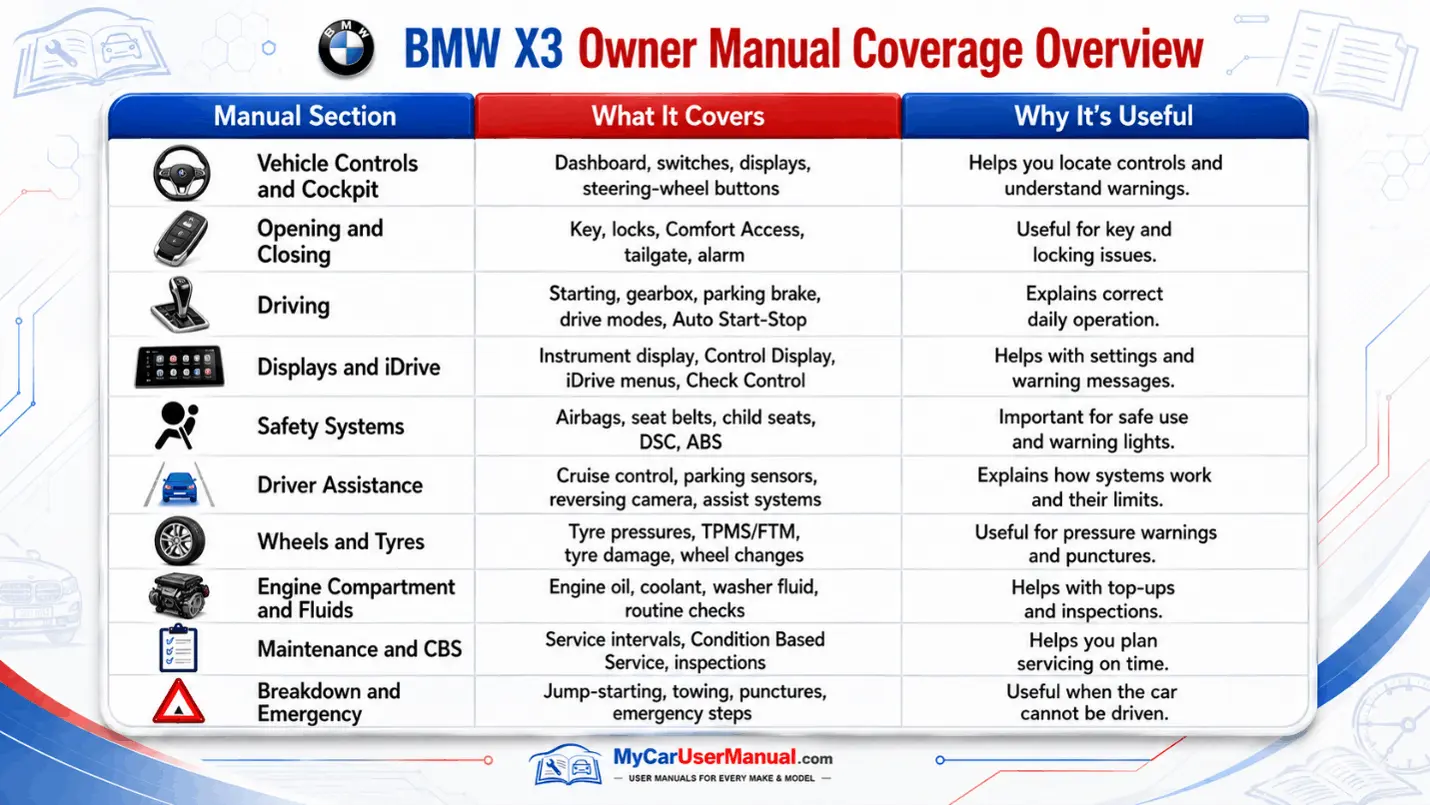
The BMW X3 owner’s manual covers operation, safety, and system behavior. All the sections are covered in a structured way. The manual explains the instrument cluster, check control messages, and warning lights so you can identify alerts and understand urgency. You will get the information about steering wheel buttons, lighting controls, wipers, mirrors, seats, child seat guidance, and airbag safety notes. The manual also covers iDrive functions such as media, navigation, phone pairing, voice control, and vehicle settings. Many manuals explain driving systems like xDrive, DSC, ABS, drive modes, cruise control, and parking assistance.
The manual also covers owner-level maintenance guidance and basic care. It lists service intervals, fluid recommendations, refill points, and capacity tables when the owner is allowed to top up. It includes tyre pressures for different loads, wheel and tyre fitment notes, and guidance for run-flat tyres, mobility kits, or spare equipment where applicable. It often includes jump-start terminal locations, towing procedures, jack points, and fuses or relays by position. You will also get towing ratings, roof rack limits, cargo load limits, and operating conditions.
Use the BMW X3 owner manual like a searchable technical reference. Start with the table of contents to learn chapter names, then use the index to find the official term BMW uses for a system. In the BMW X3 PDF owner manual, search for short keywords first, then narrow with a second keyword. For example, search Bluetooth, then pairing, then device. Search TPMS, then tyre pressure, then reset. Search service, then CBS, then inspection. For warning lights, search for warning, symbol, or the exact message text shown on the display.After you find a match, read the whole section around it. BMW X3 manuals often connect a warning icon to causes, safe actions, and follow-up steps, so context prevents wrong assumptions. Use PDF thumbnails or bookmarks to move between linked topics, like instruments, driving, comfort, and maintenance, without losing your place. Save key page numbers in a note app for fast reuse. Print the pages that you use often and keep them in the glove box of your car. These pages may include towing eyes, jump-start points, fuse assignments, tyre pressure tables, and mobility kit instructions.
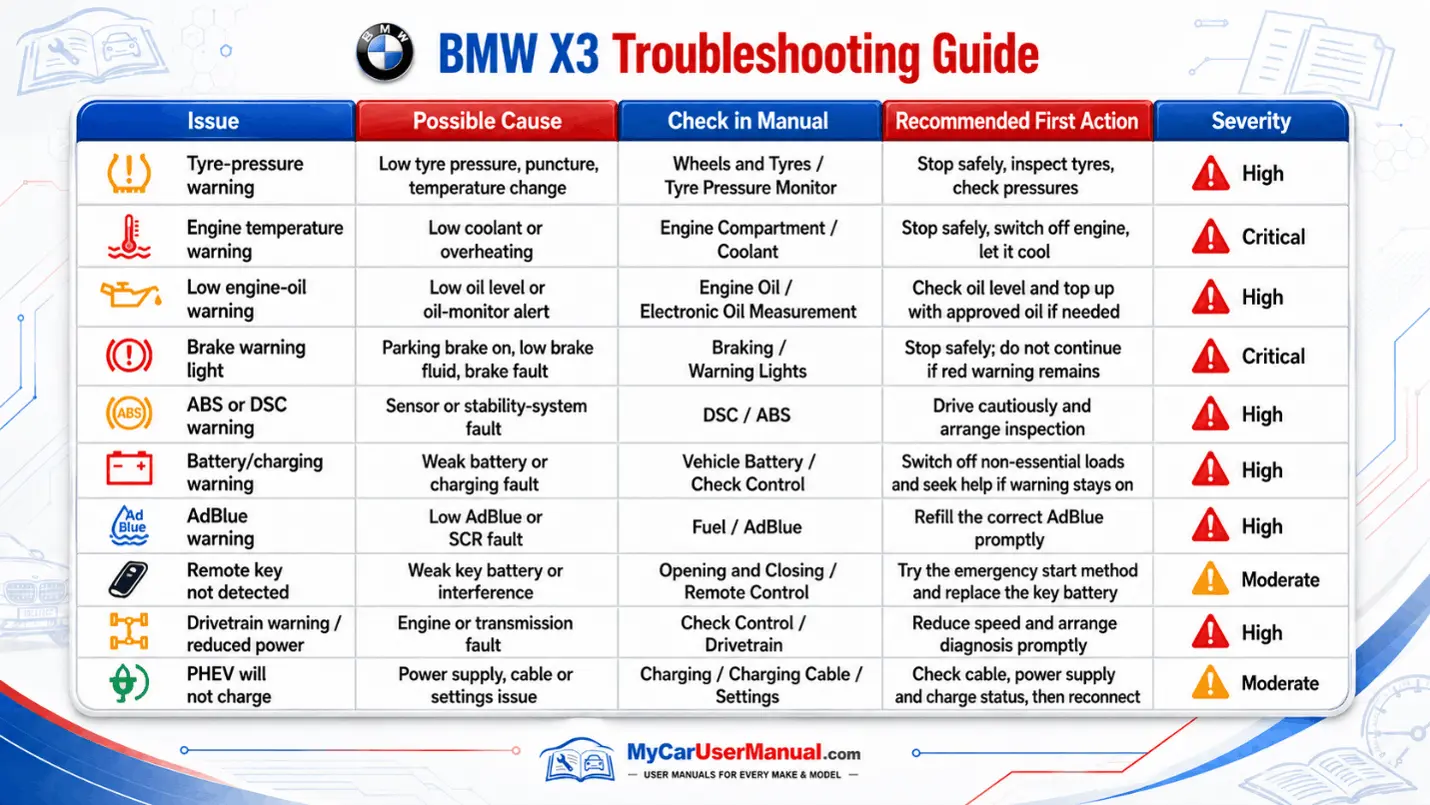
If you notice a warning light, check the control message, or sudden behavior changes in your BMW X3, check the manual for guidance before any further actions. Also, use the search function on the PDF to find the exact warning text. The manual will tell you the meaning of the symbol and how serious it is. It guides you on what should do to stay safe. It tells you whether to stop driving, slow down your car, or be careful and make a service appointment. It covers common BMW X3 issues like tyre pressure warnings, TPMS faults, low engine oil level messages, coolant overheating alerts, brake system warnings, battery discharge notices, and key not detected prompts. It also clarifies normal behavior that can look like a fault, such as auto start-stop changes, regenerative charging behavior, or assistance system limits.For fixes you can do yourself, the BMW X3 owner's manual provides step sequences, cautions, and location diagrams. It can guide tyre pressure checks, TPMS resets, mobility kit use, and correct jacking points. It often shows jump-start terminals, towing eye installation, and basic iDrive troubleshooting for Bluetooth, audio sources, and device permissions. When an issue needs workshop diagnosis, the manual helps you capture clean data like the exact message text, the warning symbol, the conditions that triggered it, and the steps you already tried. This detail helps a technician reproduce the fault and speeds diagnosis.