Download the BMW X5 owner manual in a PDF format and use the official reference for your X5. Each user manual explains controls, safety features, iDrive settings, warning lights, driver assistance, and specifications for your year and model. Use the manual to confirm oil grade, fluid capacities, tyre pressure, towing limits, and jack points. Open the manual on your phone in the browser for the quick checks. You can also print the important pages and keep them in the glovebox. The built-in PDF search helps you jump to sections such as oil level, TPMS reset, fuses, bulbs, towing hook, or emergency steps. Check fuel grade and capacity limits.
My Car User Manual provides BMW X5 owner manuals with free PDF viewing, printing, and downloading. There is no purchase or subscription required. You have to choose the user manual by year and model, so the instructions match your generation, trim, and options. Use the PDF search to locate a feature, a warning message, or a maintenance task fast, even from a symptom like low tyre pressure or a key not detected. We update the library with new model years and revised PDF manuals to expand coverage and capability. If your year is missing, check again soon. Save the PDF now for offline access during travel when needed.
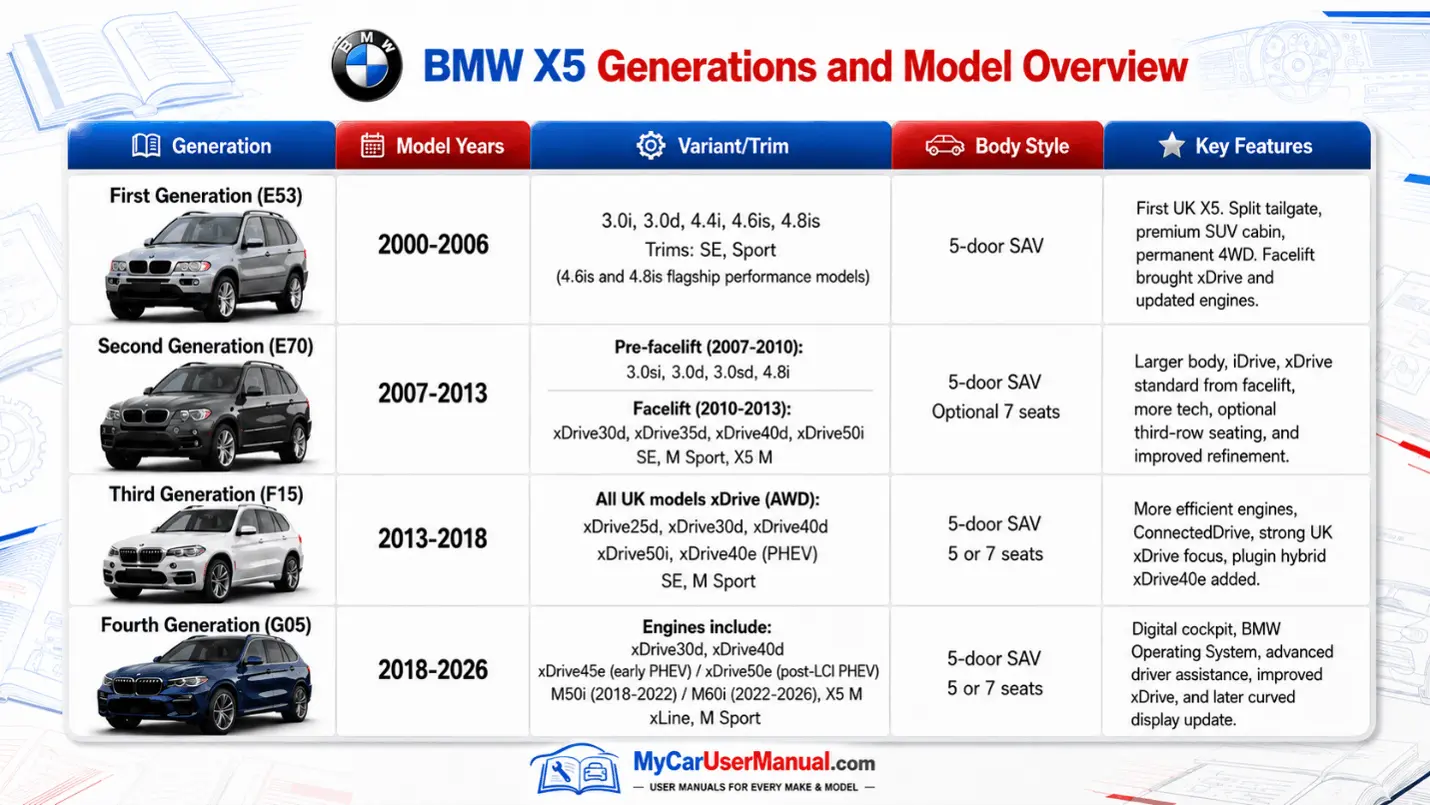
BMW X5 generations change hardware and service details, so the correct PDF owner manual matters. E53, E70, F15, and G05 use different clusters, switch layouts, iDrive versions, and assistance systems. If you select a manual for the wrong generation, then it can send you to the wrong menu, misread a symbol, or apply the wrong maintenance note. It is essential to choose the manual that matches your year. The right manual keeps instructions accurate for your engine, drivetrain, and options. Hybrid, diesel, and performance packages can change icons and limits. Free PDF viewing lets you verify details. Use the year selector before any procedure.
The workflow is the same for all the generations. First, choose the year, search for a keyword, and then print the pages you need. Use search terms with high match value, like TPMS, Check Control, xDrive, drive modes, remote key, comfort access, jump start, towing, fuses, coolant, and service reset. You can download a PDF file for offline use. It will allow you to access instruction in weak or no signal areas and in workshops without Wi-Fi. Name the file by year, trim, and engine, then store it with service records. Use PDF zoom for diagrams and tables, and print in black and white for a shop copy fast.
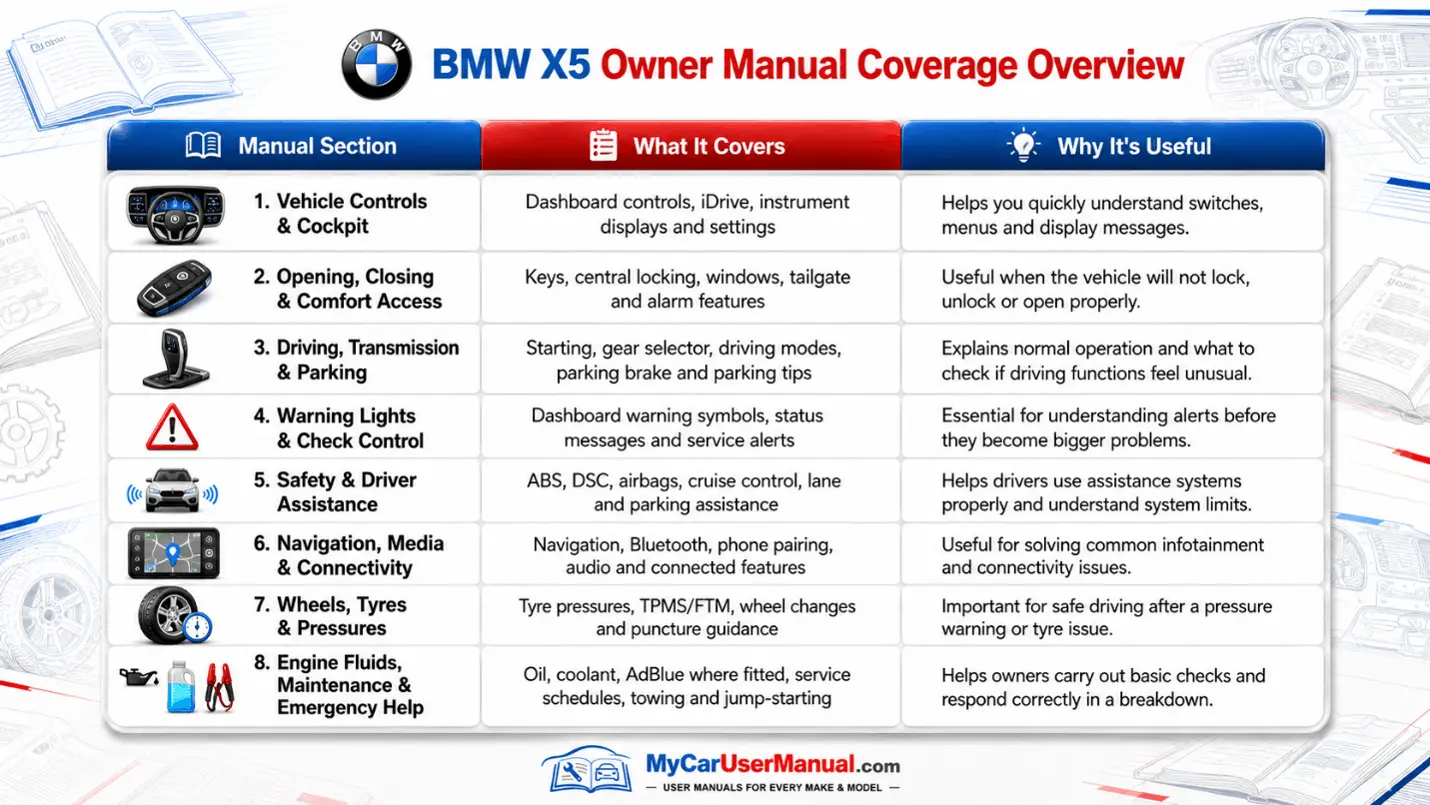
The BMW X5 owner’s manual covers daily operation and safety guidance. It explains starting and stopping, key use, locking, unlocking, window controls, tailgate operation, and cargo settings. It documents seats, mirrors, steering wheel buttons, lighting, wipers, washers, and climate control. It includes charts for symbols, warning lights, and Check Control messages, with the action BMW recommends. It outlines iDrive basics, audio sources, Bluetooth pairing, navigation steps, and voice control, where equipped. It also explains profiles, memory settings, seat belts, airbags, and child locks. Look up parking sensors, camera views, and assistance settings in iDrive.
The manual also covers the maintenance schedule and specifications that support reliability. It lists approved engine oil types, oil level checks, service reminders, and Condition-Based Service rules where applicable. It provides you with information about tyres and wheels. It guides you about tyre pressure, load limits, and provides notes on winter tyres or chains when allowed. It explains fluid top-ups for washer fluid and coolant, with safety warnings and cap locations. Many BMW X5 manuals include roadside steps for jump starting, towing hooks, flat tyre support, fuse access, and emergency equipment storage. Use these sections to prevent damage and reduce repair costs, and to understand what may affect warranty coverage.
To navigate the BMW X5 owner's manual effectively, start with the table of contents. Then, use the PDF keyword search for quick results. Search exact BMW terms like Check Control, Condition Based Service, tyre inflation pressure, flat tyre monitor, or service reset. When you notice a message on the instrument cluster, search for the exact message text. It is because manuals often repeat display wording. Use the index to find alternate names, since feature labels change by year and region. Bookmark the pages that you use often. Use page thumbnails to scan diagrams and charts quickly.
Read the prerequisites before any step, because ignition state, gear position, and parking brake status can change procedures. Many tasks require ignition on, engine running, or vehicle stopped, and skipping that condition causes errors. Use diagrams to confirm the correct button, especially for steering wheel controls, center console switches, and iDrive controller actions. If the search fails, try synonyms, like key fob for remote, pairing for Bluetooth, or battery for jump start. Print emergency pages for jump-starting, towing, and tire instructions, then keep them in the car for emergencies. Store printed pages in a plastic sleeve.
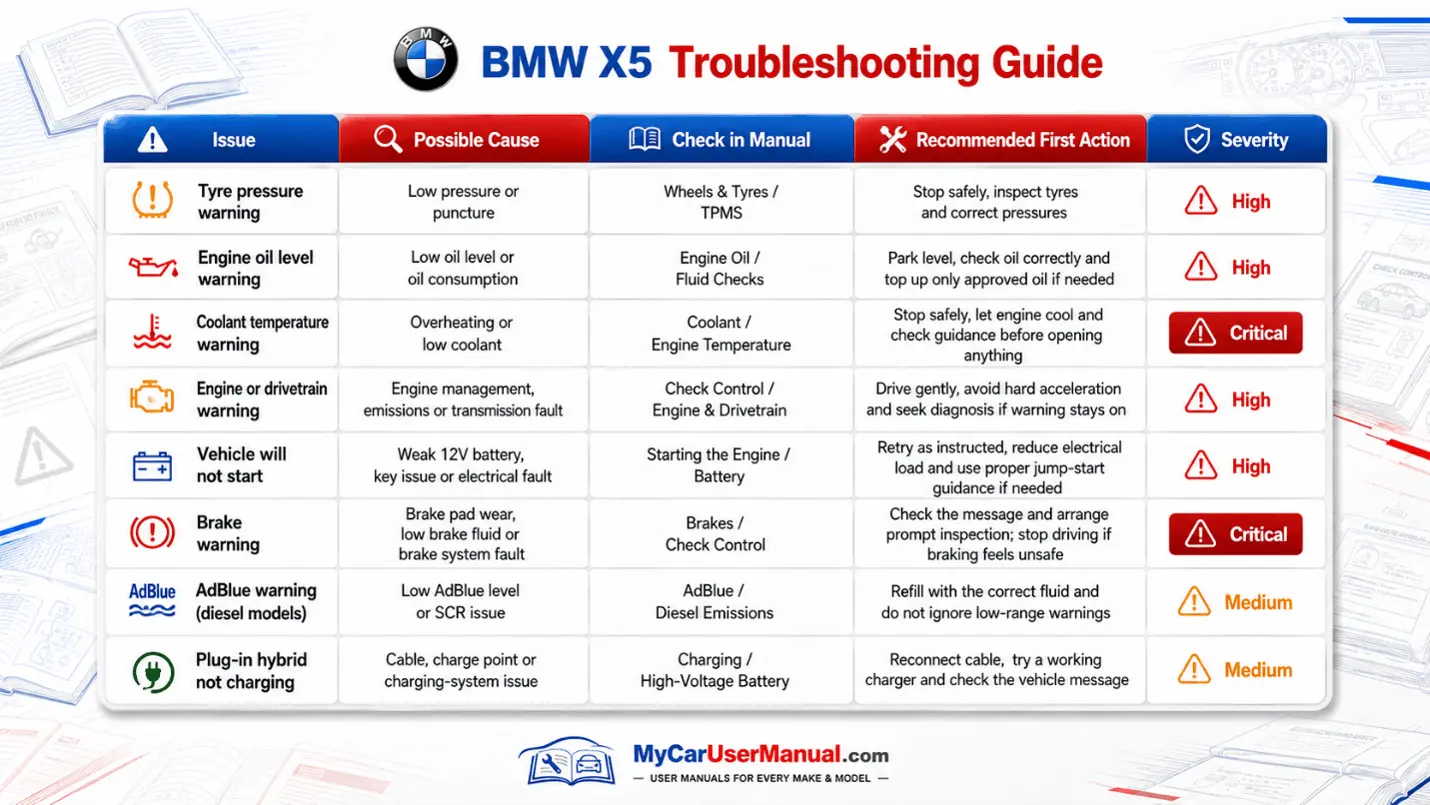
Use the BMW X5 owner's manual for on-screen troubleshooting before replacing parts. Start with the warning light section, then follow the manual’s severity notes and next actions. For a no-start issue, check brake pedal requirements, key detection, immobilizer notices, and remote key battery replacement steps. For battery or charging warnings, review power management behavior, accessory limits, and jump start instructions, including terminal locations and safety orders. For TPMS alerts, follow the tyre pressure adjustment and reset steps, then verify correct pressures for your tyre size. Check low oil level and brake pad wear messages too.
For drivability problems, check settings first because they can look like faults. Drive modes, traction control, hill descent control, and auto start-stop can change throttle response, brake feel, and shift behavior, and the owner’s manual explains what is normal. For iDrive problems, use the manual steps to pick the right media source, re-pair Bluetooth, and restore settings when available, since many issues come from setup errors. For overheating messages, follow safe stopping rules and coolant warning actions, then check the specification section for the correct coolant type and refill limits. For the camera, parking sensor, and lane assistance warnings, follow the cleaning and limitation notes tied to each driver assistance system.