Get the BMW X6 owner's manual as a free PDF. Download the manual from our library for your exact year and model. You can view the PDF manual in your browser, read it on mobile, print pages, and save the file for offline use. Every BMW X6 owner’s manual here is free. There is no price to access the manual, and there is no sales step or checkout flow. This is information access, not a product listing, so there is no store cart, no shipping, and no payment screen. The PDF owner manual keeps the core topics together: controls, iDrive settings, warning lights, dashboard symbols, service intervals, tyre pressure specs, fluid specs, and safety guidance. Use the built-in PDF search to find a specific section or problem in seconds, then read the full procedure. Use the manual to confirm fuse numbers, light functions, and basic maintenance checks before you touch hardware.
The BMW X6 has different features and menu paths across model years. So it is necessary to choose the right manual by year and model. A correct year match prevents wrong steps for tyre pressure reset, key functions, iDrive pairing, or driver assistance settings. If you notice a message on the instrument cluster, use the manual to avoid guesswork. Print the pages you require, like the fuse chart, towing points, jump start terminals, or tyre pressure table. We keep updating the BMW X6 owner manual library by year and model as new manuals are released and older PDFs get replaced, with fresh information added as available.
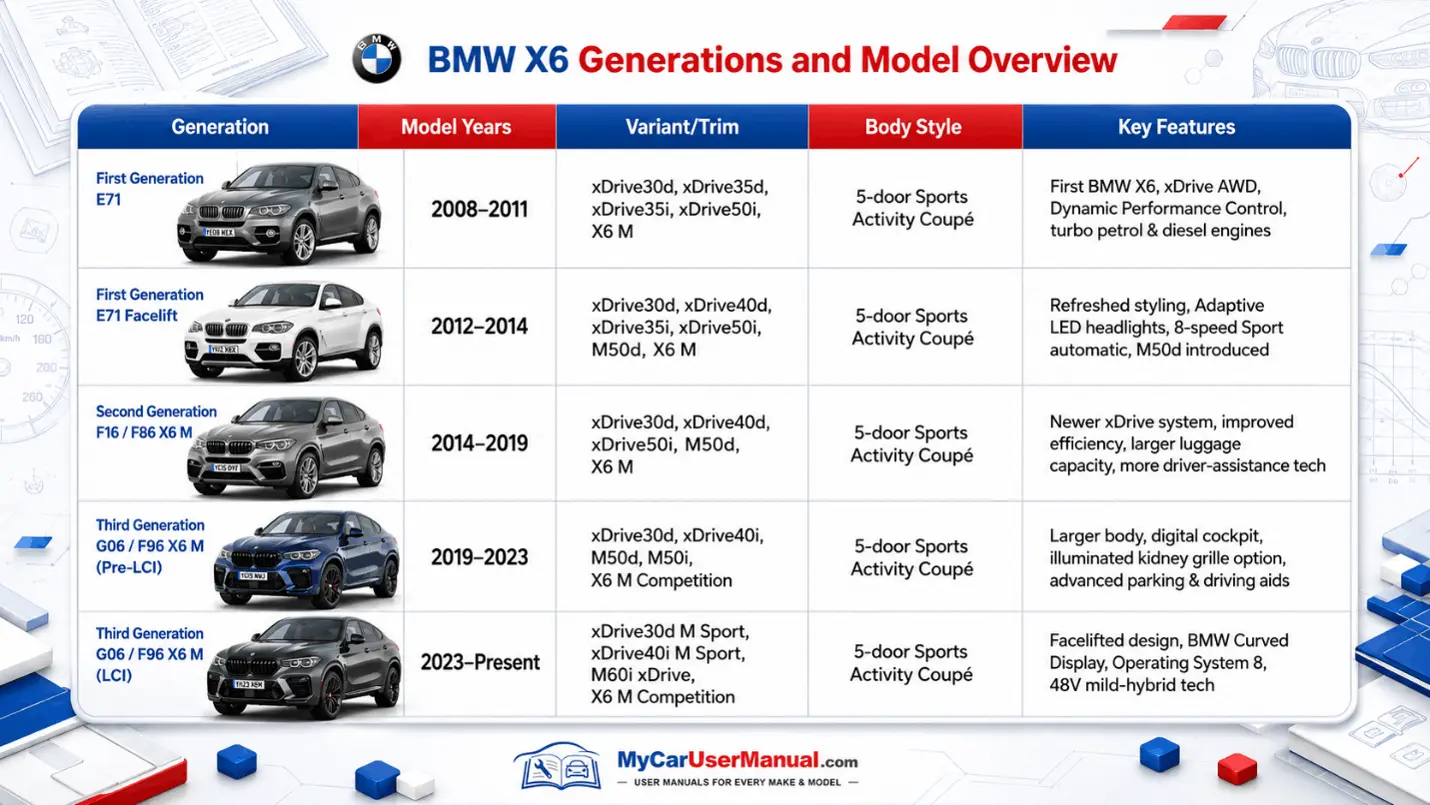
BMW X6 PDF owner manuals are available for all generations, but each generation uses different hardware and software. The BMW X6 E71 manual uses older iDrive layouts, older warning icon sets, and older option wording. The BMW X6 F16 manual covers newer infotainment flows, updated steering wheel controls, and revised service menu screens. The BMW X6 G06 manual covers digital displays, newer driver assistance systems, and different settings paths inside iDrive. Pick the PDF manual that matches your generation. The right manual keeps instructions aligned with your buttons and menus. Generation matching also changes how you reset settings, update software, and read assistance limits.
Open the BMW X6 PDF owner manual for your year. View it online, or print or download it. Viewing works for quick checks. Printing works for high-use reference pages. Downloading works for offline access in the car. For single questions, use Ctrl+F or the PDF search field and type the exact term, like TPMS, oil level, key battery, service due, towing, pairing, or iDrive reset. If your BMW X6 has regional equipment or option packages, read the notes that limit what applies, because two cars from the same year can differ. Search by exact warning name first.
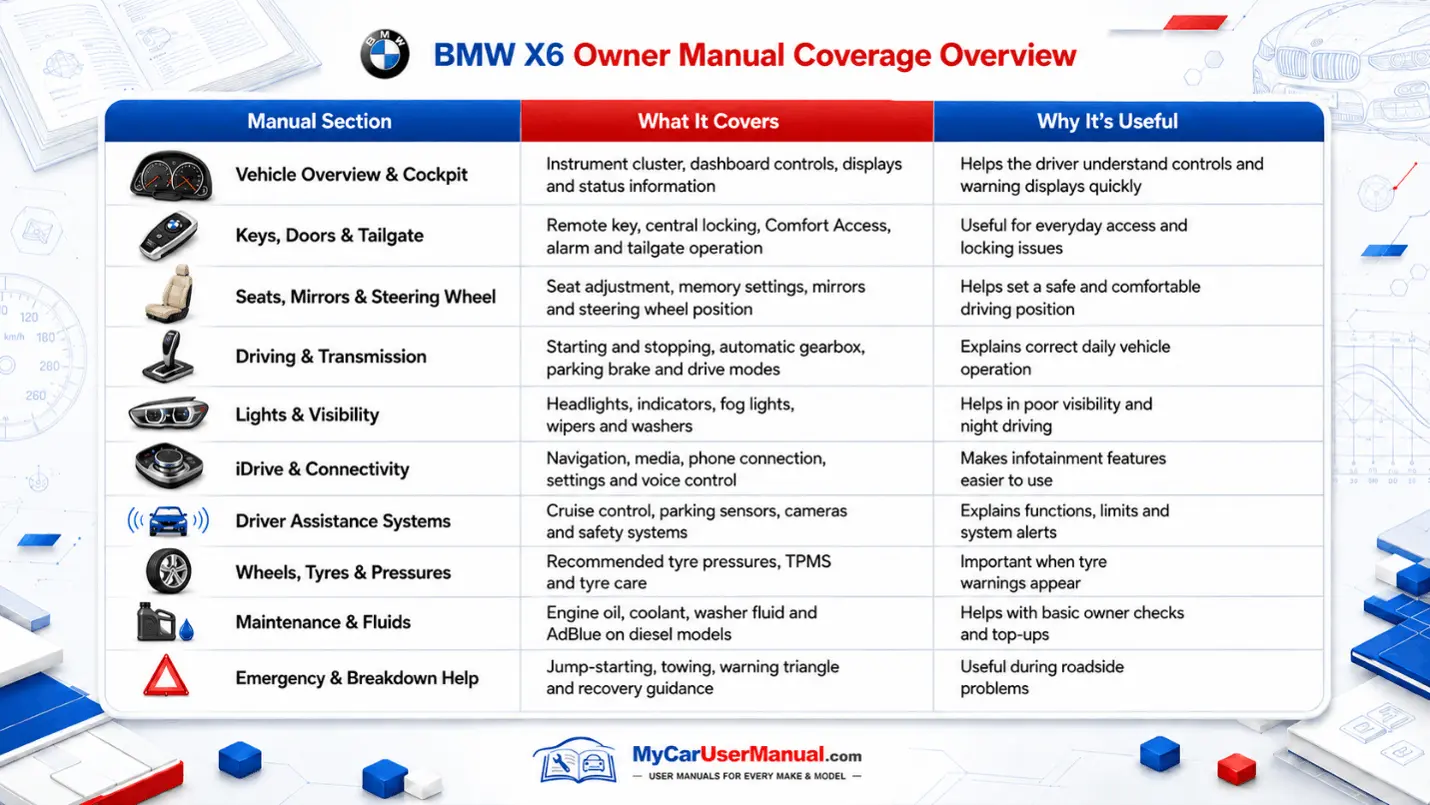
The BMW X6 owner’s manual explains daily operations. It guides on how to use the vehicle systems safely. It covers starting and stopping, drive modes, transmission behavior, and basic driving limits. The X6 manual explains keys, comfort access, locking, alarm behavior, and seat memory. It maps cabin controls for steering wheel buttons, stalks, lights, wipers, mirrors, windows, climate control, and driver display controls. It explains iDrive basics, media, audio, phone, and Bluetooth, navigation if equipped, and vehicle settings, with clear terms for each menu item.
The BMW X6 owner’s manual also covers maintenance, service, and specifications. It explains Condition-Based Service and how service reminders are triggered. It lists tyre sizes, tyre pressure targets, load notes, wheel care, and tyre damage guidance. It explains approved fluids, refill points, and the correct oil level check method, including electronic oil measurement steps on many BMW X6 models. It covers refueling rules, battery care, safe jump starting, towing procedures, tow hook locations, and emergency steps you should follow on the roadside.
Navigate the BMW X6 owner’s manual by starting with the contents page, then using bookmarks, headings, and the index if included. Keyword search is fastest, but accuracy comes from matching the exact on-screen phrase. Search the manual for the message you see, like Drivetrain malfunction, Tire pressure loss, Driver assistance restricted, or Parking assistant unavailable. Read the whole section because BMW places limits, prerequisites, and safety warnings around the step sequence. If a step references another topic, follow the cross-reference so you do not miss a required setting or reset condition.
Use a repeatable method for faster answers. Keep the BMW X6 PDF manual saved on your phone and a second copy on a laptop or tablet. Print only the pages you need often, such as tyre pressure charts, towing points, jump start terminals, and fuse diagrams. When you search, try BMW grouping terms, such as Check Control, CBS, initialization, calibration, energy management, pairing, and flat tyre monitor. When you find a section, note the page number and heading, then use bookmarks or highlights so you can return to the same procedure quickly.
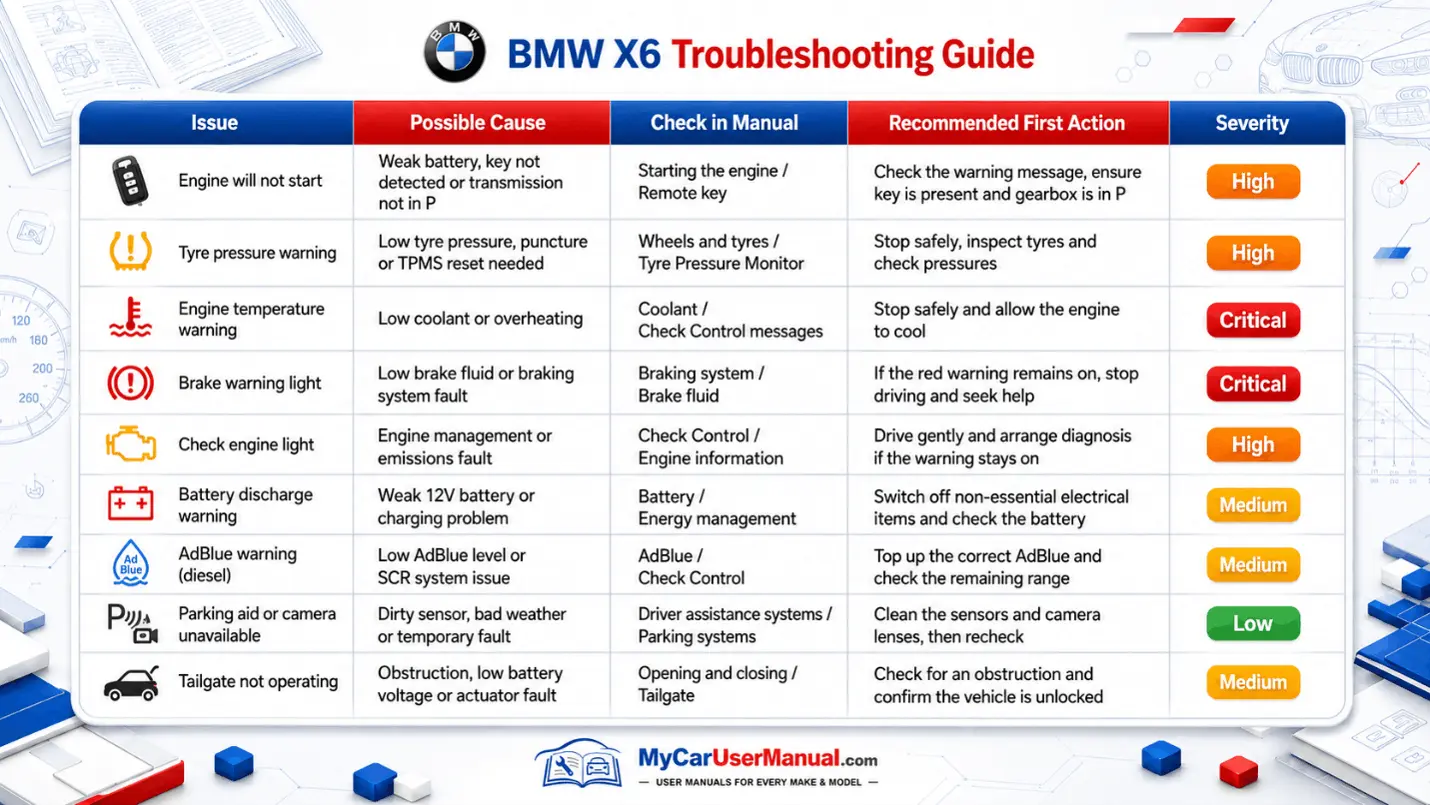
Use the BMW X6 owner’s manual for troubleshooting because it connects symptoms to specific actions. Start with the warning light color and message text, then follow the priority rule in the manual. Red warnings mean stop when safe, because the system reports an immediate risk. Yellow warnings mean use caution and plan service. For tyre pressure warnings, the manual lists target pressures and the reset or initialization steps required after correcting pressure. For oil level, coolant, or brake warnings, the manual tells you what to check, what to avoid, and when to stop.
The manual also helps with common BMW X6 iDrive and sensor issues. For Bluetooth pairing failures, it lists the delete and re-pair steps and the device limits. For camera, parking sensor, or driver assistance alerts, it lists cleaning checks, blockage causes, and weather limits that can trigger temporary faults. For service due messages, it explains where to view CBS details and what each service item means. Use the manual to decide what you can do safely at home versus what needs a workshop. If warnings return after a reset, or the manual says immediate action is required, contact a qualified BMW service center.