Here, we provide BMW XM owner manuals in a free PDF. The manuals give you official BMW XM instructions that you can access anywhere. The manual helps you in learning controls, menus, and settings without trial and error. You can view the manual in your browser and read it on your phone or laptop. You can also print the required pages or the complete manual. Moreover, there is an option to save a free PDF download for offline use. This helps in a garage, at a charger, or on the road. Keep the BMW XM manual file ready for quick checks on charging steps, iDrive paths, driver assistance settings, xDrive behavior, and warning light meanings.
Our library keeps BMW XM owner manuals organized by year and model. You can choose the right manual from the library easily without wasting your time on the wrong document. BMW updates features, software, and option packages across model years. Those changes can shift a menu path or change a system message. Every BMW XM owner's manual here is free. You do not need to purchase anything. Choose the user manual by model year, trim, and market. After finding the right PDF file, open, print, or download it. Use PDF search to find a specific section or problem in seconds. We keep adding BMW XM manuals by year and model and replacing files when BMW publishes revisions, so the PDF matches the latest wording for your year.
The BMW XM PDF user manual is made for fast viewing and fast navigation. You can open the required PDF manual quickly in your browser. The built-in search tool will help you find the exact terms like charging, high voltage battery, hybrid drive, drive modes, iDrive, profiles, Bluetooth, tyre pressure, or Check Control. PDF viewing also helps with diagrams because you can zoom button maps, screen layouts, ports, icons, and safety symbols. If you prefer the instructions in hard copy, print only the pages you need, such as emergency procedures, towing limits, child seat setup, or fuse and tool locations. You can also download the manual and keep it on your device for offline reference during emergencies.
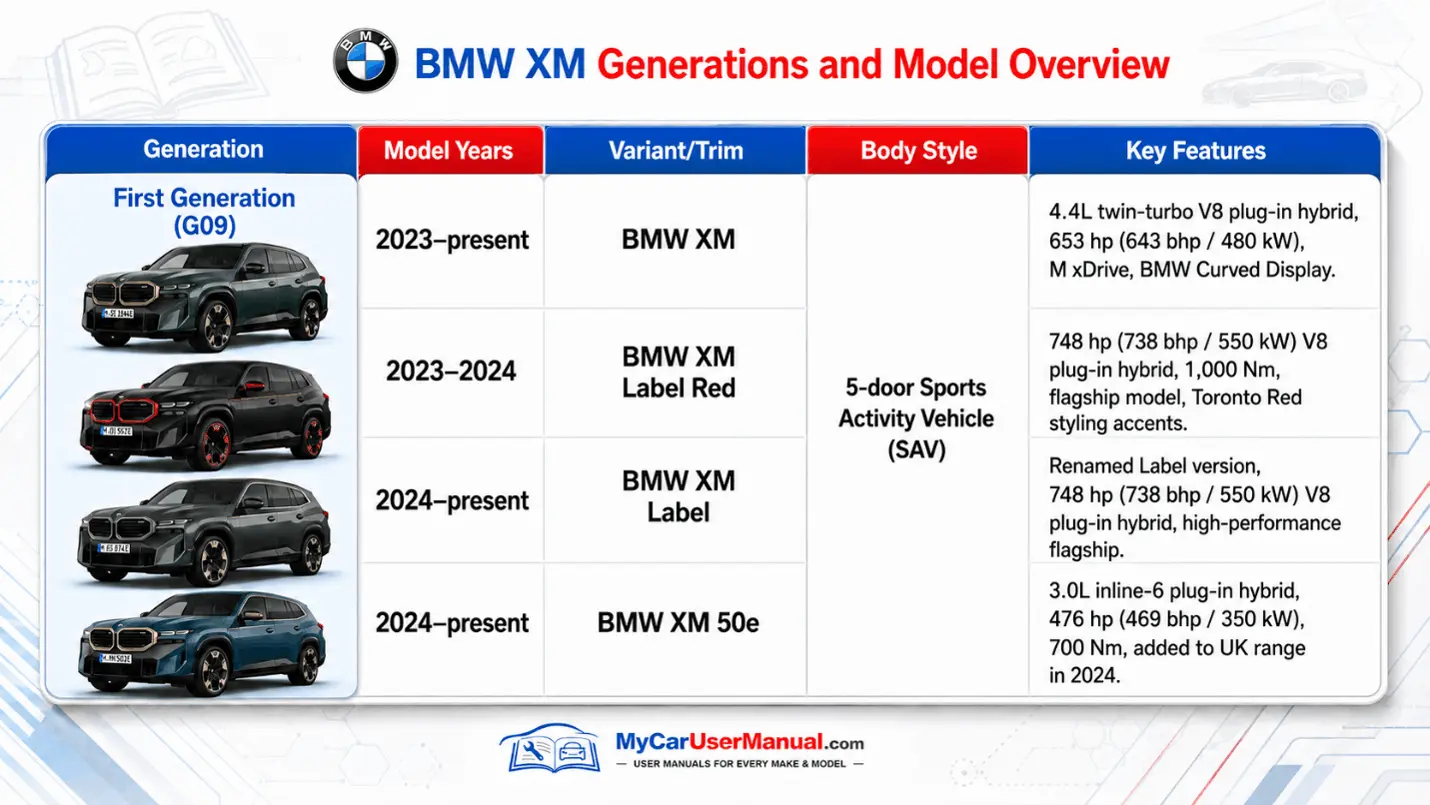
All BMW XM generations and yearly updates should be handled as separate owner manuals, even if the badge still says BMW XM. A small software change can rename a setting, move a charging menu, or change a driver assistance screen. That is why we list BMW XM manuals by year and model, not as one generic file. If you are unsure which PDF matches your vehicle, compare anchors: model year, iDrive layout, charging menu labels, and warning message wording. Then open the year-and-model manual that matches those details. If the match still feels unclear, a dealer can help verify your exact configuration using the Vehicle Identification Number (VIN), then you can pick the right manual for your year.
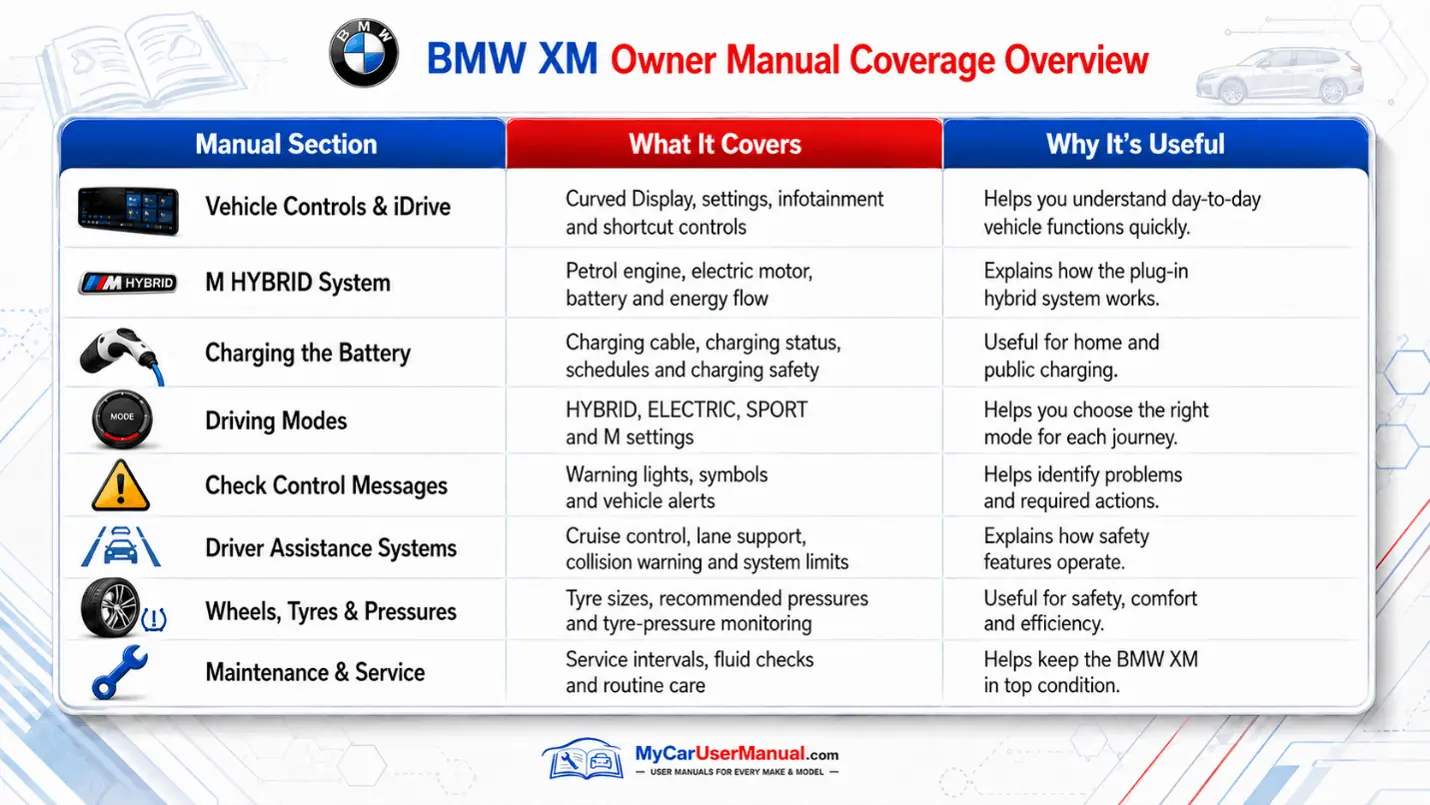
A BMW XM owner's manual covers daily operation, safety guidance, and system limits for the vehicle. It explains driver controls, the instrument cluster, and iDrive. The manual also tells how to adjust vehicle settings and save driver profiles for BMW owners with multiple drivers. It covers starting and stopping, selecting the drive modes, and understanding stability and traction, and control. It explains hybrid drive basics, charging behavior, and what the car needs before it will enter the drive-ready state. It also explains driver assistance features, sensor locations, and conditions where support may be reduced, such as rain, snow, glare, or blocked cameras.
The BMW XM user manual also covers maintenance basics, and owner checks that reduce common issues. It includes tyre pressure guidance, tyre and wheel specifications, and how to respond to tyre warnings. It explains service reminders, inspection intervals, and which resets are allowed through the vehicle menu. For plug-in hybrid operation, it covers charging safety, charging indicator meanings, cable handling, and timer or schedule settings. It also includes practical guidance on cleaning, washing, and protecting sensors, trim, and paint.
Initialize with the table of contents when you need a broad topic. Then use PDF search when you need a precise answer. Search works best when you type the exact wording shown in the BMW XM display, because BMW repeats the same labels in the manual. Use terms like Tyre pressure Monitor, Check Control, charging fault, driver assistance, or personal profile. If your first search returns many hits, add a second term, such as charging plus indicator, or iDrive plus profiles. Use bookmarks, internal links, and page thumbnails to move between sections and diagrams fast.
Match the manual to your BMW XM year and model before you follow any steps. BMW can change menus through model year updates and software versions, so a similar-looking instruction can still be wrong. When you open a procedure, scan for prerequisites like vehicle speed, gear position, battery state of charge, key presence, and door status. Read warnings first for anything related to the high voltage system, charging ports, or under-hood checks. Save the PDF to your device and print a short set of key pages for charging, tyres, towing, and warning lights.
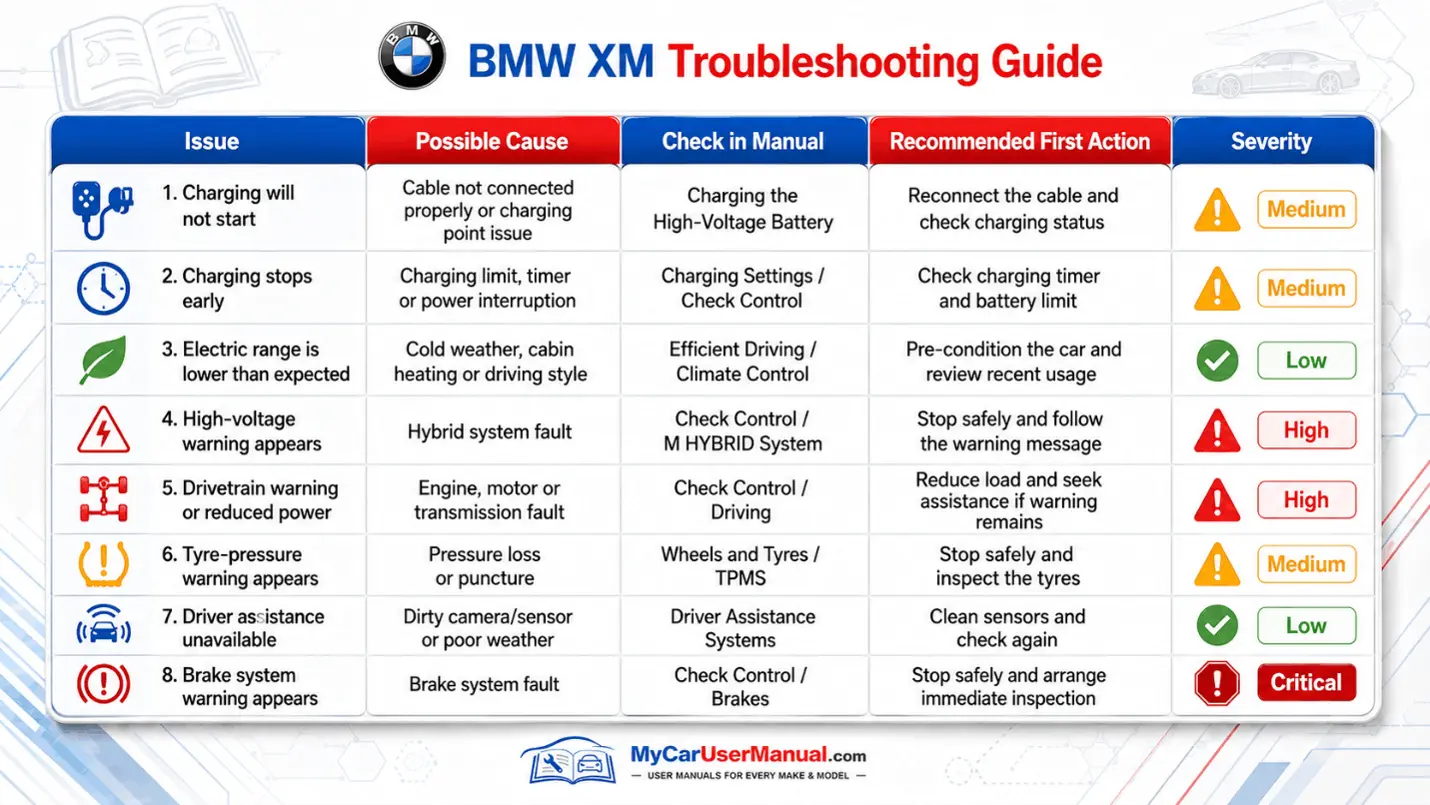
Use the BMW XM owner manual as your first troubleshooting tool because it maps symptoms to BMW-approved checks. Start with what you see, such as a warning icon, a Check Control message, a charging error, a driver assistance unavailable alert, or an iDrive notification. Then search that exact message or keyword in the PDF, and confirm the section matches your year. The manual usually explains severity, whether driving is allowed, and what immediate action to take. Common issues you can screen quickly include low tyre pressure, a charging session that will not start, a key not detected message, or a dropped Bluetooth connection.
Treat troubleshooting like a decision path and do the simple checks before deeper steps. Confirm settings, confirm correct use of the control, and confirm the vehicle state, such as drive-ready, parked, or charging. For charging problems, verify connector seating, latch status, and any timer or schedule setting that could delay charging. For iDrive issues, follow the manual steps for restart, pairing, and profile login, and review permissions if the manual points to privacy controls. If the manual directs you to stop driving or contact service, follow that instruction and do not improvise.