If you know about the BMW cars that you have the knowledge that it is a very special car especially its Z4 model. The BMW Z4 is an art of engineering because of its look and comfortable driving experience. The manual is the important book of your vehicle that knows everything about your car. With this, you can know the hidden gems of your vehicle that no one tells you. Whether you want to know about the dashboard icon lights mean or need the info about how to fix a small issue with your car. But what happens when you need this book, but at that moment, you can't find it anywhere else. This guidebook is small in size and easily gets lost. No one cares about its unit they need it. For that moment, your first instinct might be to go to Chrome and type the terms like "BMW Z4 Owner Manual Free in PDF" or something like that. You will see that there are a lot of options appear. Some of them are the BMW official website, and some are third-party dealers. but the thing is, they require your vehicle VIN, email sign-up, or registration/subscription fees, and these all feel very frustrating.
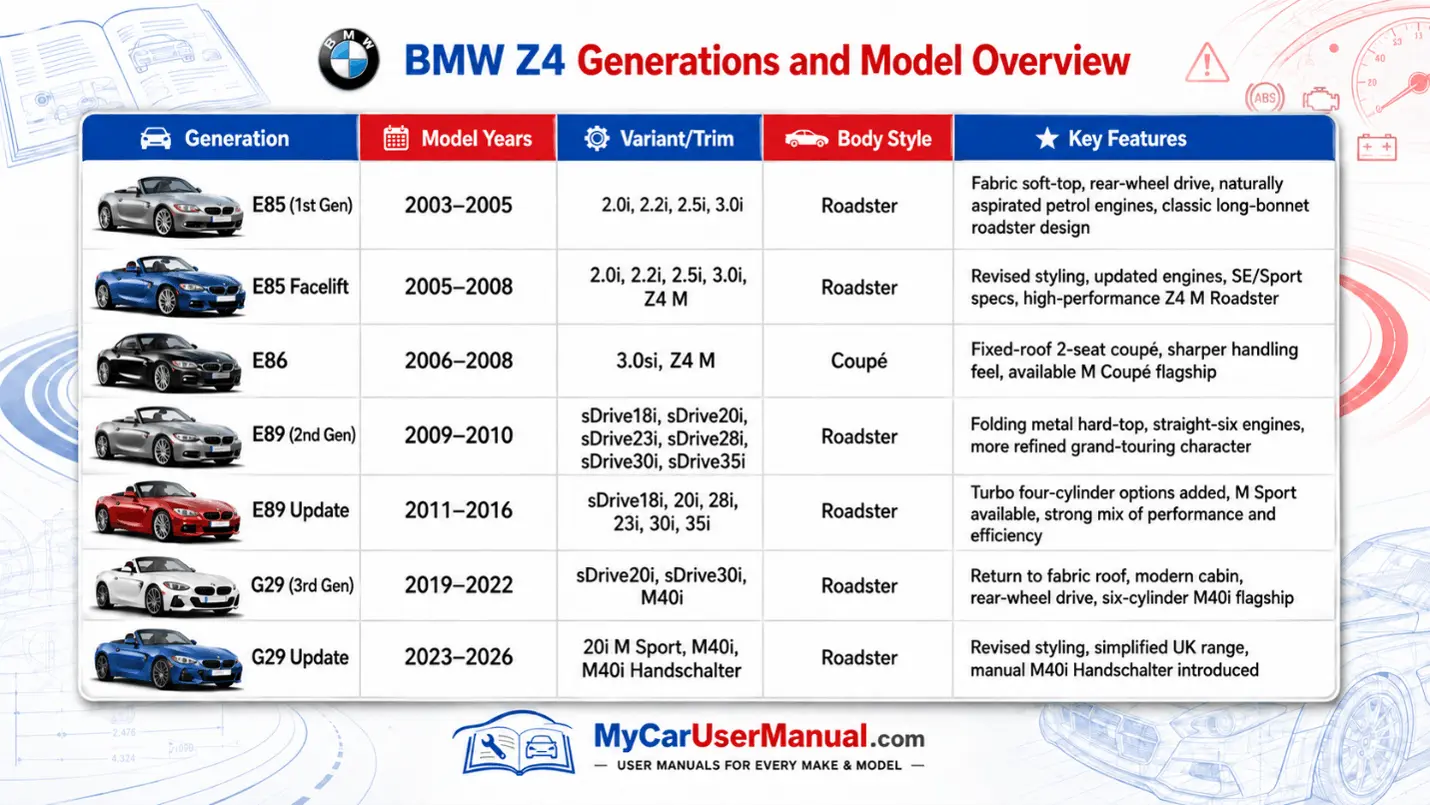
As BMW owners know, a good car manual is essential for understanding every switch and setting on your roadster. My Car User Manual makes the official BMW Z4 owners manual PDF available as a free download for every generation, including the E85 roadster, the E86 coupé and the later E89 and G29 series. On our site you don’t have to create an account or enter a VIN – a contrast to the official digital manuals that ask you to type in the 17-digit vehicle identification number or use a bespoke Driver’s Guide app. We collect genuine manuals from sources where BMW warns that their PDF files are official documents and may differ in safety or emission details for US spec vehicles and where many manuals are offered for free download. By bringing these PDFs together in one place, BMW owners can find the user guide for their vehicle — from the early 2005 3.0i and 3.0si models through the 2009 E89 sDrive series to modern M40i variants — without having to buy a paper manual or worry about region codes. Our manuals cover the technical details, controls and safety instructions you need to keep your BMW in top condition, and you can view them online or download the file for offline reading. Whether you’re checking a sensor code, looking up control functions or simply learning how to use your convertible roof, My Car User Manual aims to be the best digital tool for accessing BMW Z4 documentation.
Our library offers a PDF user manual for every model and year of the BMW Z4. We host manuals for the 3.0 i, 3.0 si and M40i versions of the E85, E86 and E89 series, plus later G29 roadsters. You can search by year or model to quickly find the right guide and then either view the book online or download it. Many sites list different Z4 manuals for free, but they scatter them across several pages and make you chase down each link. At My Car User Manual, we organise them by generation – the 2003–2005 E85, the 2006–2008 E86 and the 2009–2016 E89 – and clearly label each file so you know whether it’s for the 3.0 si roadster or the sDrive35i. We constantly add new manuals, so when BMW releases a new model or updates the digital handbook, you’ll see it here first. Because everything is hosted as a PDF, you can pinch zoom on a smartphone, print out a page or run a full text search for a term like “clutch control” or “brake fluid”.
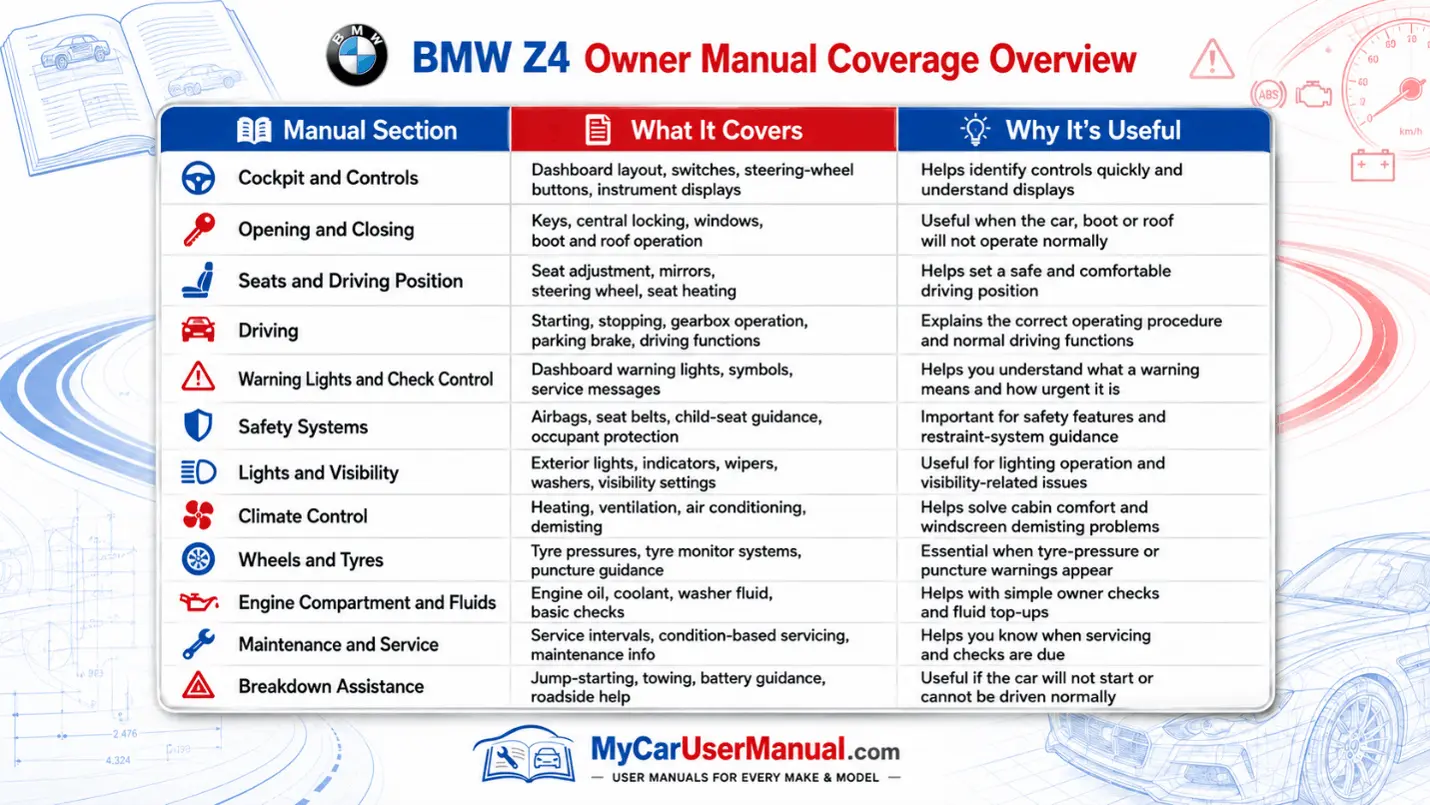
BMW’s own handbook explains that reading the manual before driving helps you “make full use of the technical features available” and contributes to operating reliability and road safety. The Z4 manual’s contents include a detailed cockpit overview, controls for opening and closing the roof, seat adjusting instructions, and information on transporting children safely. It covers driving stability control systems, climate functions, interior equipment, storage compartments, entertainment systems and telephone connectivity. Later chapters explain mobility topics such as refuelling, wheel and tyre care, the engine compartment and scheduled maintenance. There are sections on replacing components, breakdown assistance, technical data and an A to Z reference list. Because the manual describes all equipment and country variants, you might see features not fitted to your car; nevertheless, it is the definitive instruction book for your BMW Z4 E85, E86 or E89, whether it’s a 2005 2.5i, a 2009 sDrive30i or a 3.0 si coupé.
The Z4 manual provides several ways to get to the right page quickly. BMW recommends using the index or A to Z section to locate topics fast, and notes that the index is the fastest way to find information on a particular subject. Symbols throughout the manual highlight safety warnings, environmental tips and voice activation prompts. At My Car User Manual, we go a step further: our digital viewer lets you jump straight to a chapter and run a keyword search, turning a 100 page file into an easy to navigate resource. You can even bookmark pages so that the next time you need to check a fuse diagram or verify a tyre code, the information is a click away. Unlike the official BMW digital manual, which only works for select years and requires a VIN or the Driver’s Guide app, our manuals are open access and don’t tie the guide to one vehicle.
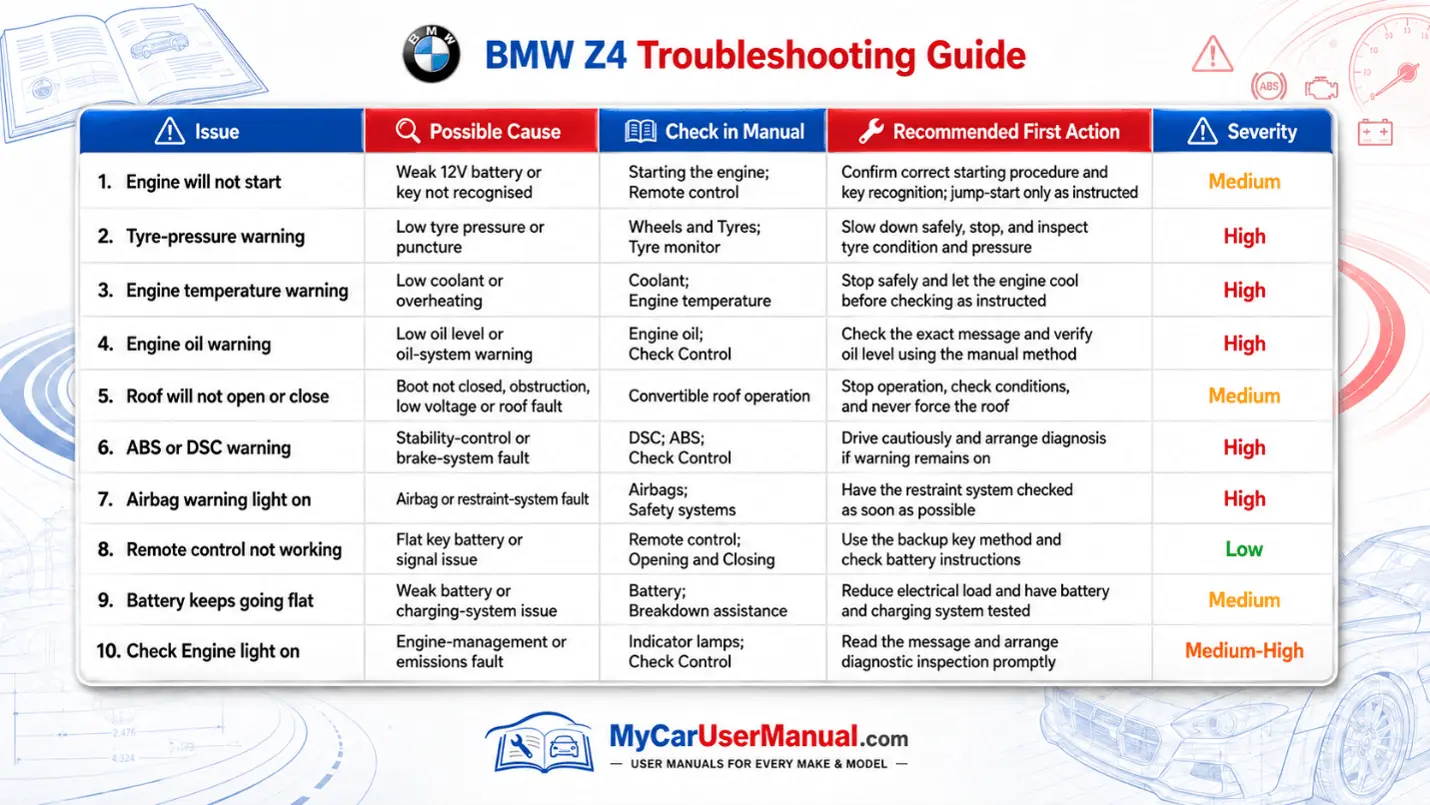
Every owner occasionally encounters dashboard lights or mechanical quirks, and the Z4 manual is designed to help. The handbook contains detailed sections on engine oil service, inspection intervals, battery care, corrosion protection and other maintenance topics. It also includes pages on indicator/warning lamps and what each symbol means. These chapters let you diagnose faults before booking a service, saving you time and money. If an error code appears on your instrument cluster, you can look it up in the manual, read the technical explanation and decide whether you can address it yourself or should contact a BMW centre. The manual advises that advanced repairs should be carried out by authorised workshops using genuine parts, but simple checks like tyre pressures, fluid levels and fuse replacement are well within reach for the home mechanic. By keeping the user manual on your phone or in the glovebox, you always have a reliable tool for troubleshooting that helps you keep your BMW running smoothly and safely.