Count on My Car User Manual to get Cupra owner manuals in PDF format. Access the information you need in seconds. No need to search through a missing or damaged printed handbook. The manual library is organised by model and generation. Choose your Cupra model and production year to find the correct owner's manual.
Our manual library focuses on vehicles launched from or after 2000. The manual PDF can be viewed or read online for quick access. You can also download or save the PDF for offline use. You can also print specific pages or the full PDF manual. No purchase or account required.
Find Cupra Owner Manuals by Model, Generation, and Production Year
Here you can get the owner manual for any Cupra vehicle launched from or after 2000. Always match a manual PDF to the exact model, generation, and production year. It is important, as features can change between model years. Selecting the right Cupra manual by year helps you avoid following instructions intended for a different version of the vehicle.
Key Cupra Models and Production Years
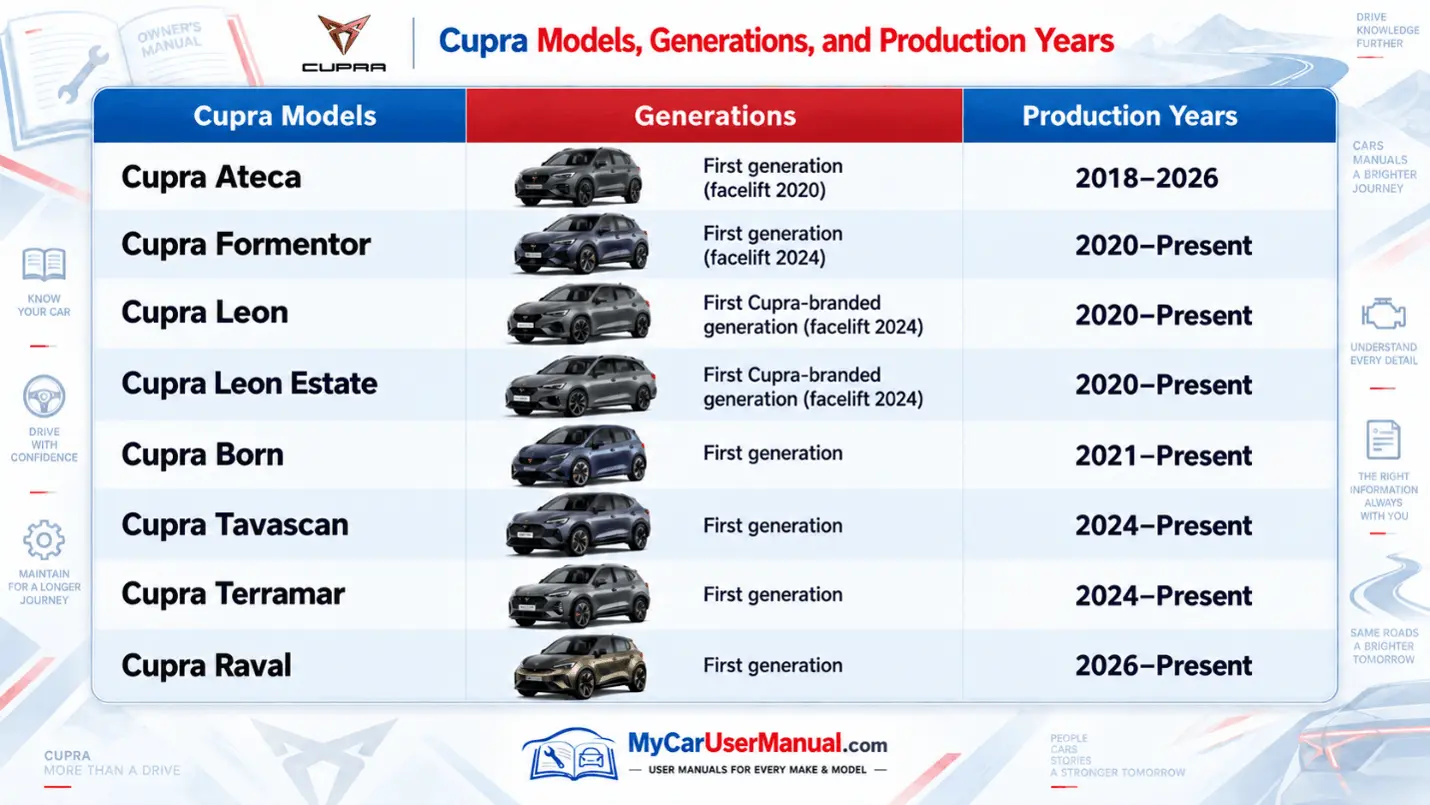
Cupra Ateca: First generation, facelifted in 2020, produced from 2018–2026.
Cupra Formentor: First generation, facelifted in 2024, produced from 2020–Present.
Cupra Leon and Leon Estate: First Cupra-branded generation, facelifted in 2024, produced from 2020–Present.
Cupra Born: First generation, produced from 2021–Present.
Cupra Raval: First generation, introduced from 2026–Present.
What Cupra Owner Manuals Cover Across All Cupra Models
A Cupra handbook explains how to operate the vehicle correctly. It explains how the main systems of the vehicle should behave. Although the exact information varies by model, engine, equipment level, and production year, most Cupra owner manuals cover controls, instrument displays, seats, lighting, locking, driving systems, infotainment, climate control, and routine vehicle care.
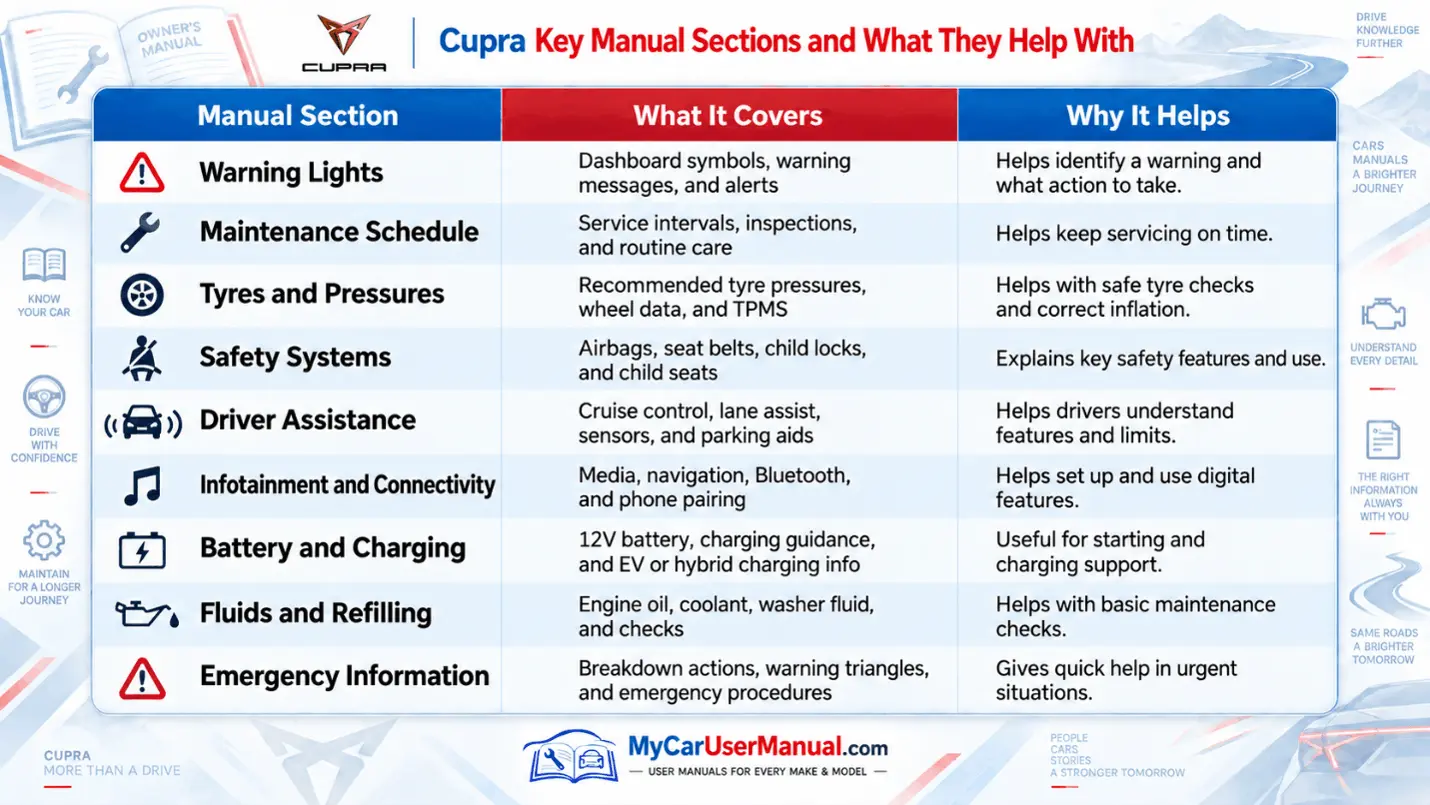
The Cupra factory manual contains more than basic driving instructions. It can explain the correct maintenance checks, fluid information, tyre guidance, vehicle safety features, and the meaning of dashboard symbols. The correct Cupra maintenance schedule or service information should always be checked against the model and production year.
Cupra warning lights are particularly important. If a red warning light appears, stop when it is safe to do so. Check the owner's manual before continuing. Do not ignore warnings relating to braking, engine temperature, oil pressure, electrical systems, or other safety-critical functions.
Important Manual Information at a Glance
Use the dashboard light section to identify warning and information symbols.
Check the maintenance section for servicing and inspection guidance.
Refer to fluid information before checking or topping up operating fluids.
Use the tyre section for pressure monitoring and tyre-related information.
Read the safety section for airbags, seat belts and driver assistance systems.
Check infotainment instructions for navigation, Bluetooth and connectivity help.
Use the controls section to understand switches, displays and vehicle settings.
Electric and plug-in hybrid models include additional charging and high-voltage guidance.
How to Navigate the Cupra Owner Manual PDFs Effectively?
Select the correct Cupra model and production year.
Use the contents page to find key sections quickly.
Search the PDF for terms such as warning lights, tyres, or servicing.
Use bookmarks or page numbers to return to important sections.
View the manual online or save it for offline use.
Open it on mobile, tablet, or desktop.
Print only the pages you need.
Check model-specific instructions before following any procedure.
Troubleshooting Cupra Common Issues Using Owner Manuals
Cupra owner manuals can help with many everyday problems. Start with the warning message or symptom. Check the relevant manual section for model-specific instructions and recommended actions.
The manual is helpful for basic checks. However, it cannot replace a professional diagnosis. Some problems need expert attention. For complex repairs, always contact an authorised or qualified technician.
Quick Cupra Troubleshooting Checks
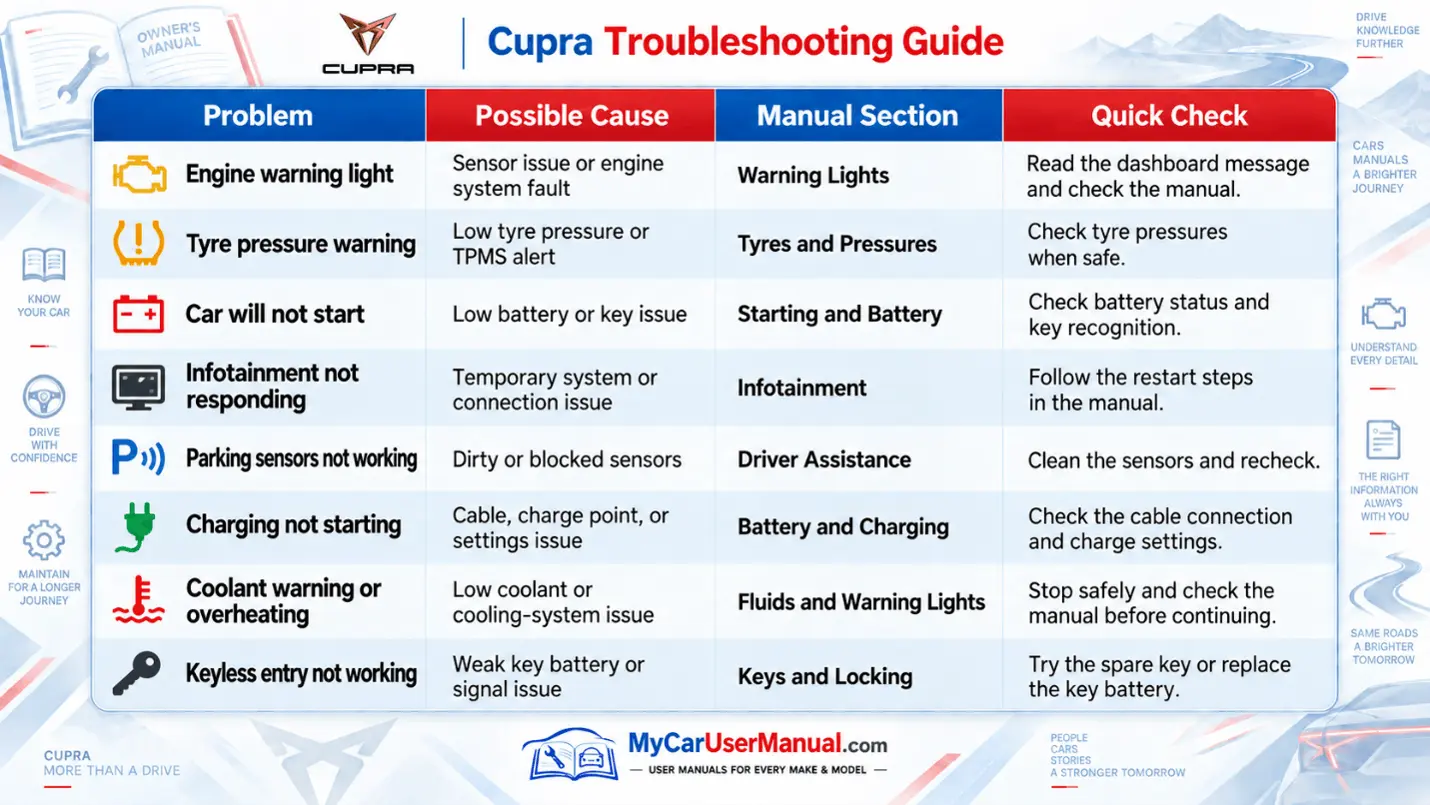
Engine light: Check dashboard warnings and the manual.
Tyre warning: Check tyre pressure and TPMS.
Starting issue: Check the battery and key.
Charging/overheating: Check charging settings or coolant level.
Other faults: Restart systems, clean sensors, or check the key battery.
Basic Troubleshooting Steps
Note the warning light, message, or symptom.
Use the correct Cupra manual for your model and year.
Search the PDF using the displayed warning text.
Follow only the recommended basic checks.
Stop safely if a red warning light appears.
Avoid high-voltage or safety-critical repairs yourself.
Seek professional diagnosis if the issue continues.