Find free Mazda 3 owner manuals for different generations and model years. Choose the correct Mazda 3 manual PDF to view or read, or search online. You can also print useful pages or download the complete manual PDF. No purchase. No registration. No email sign-up walls.
Our Mazda 3 manual PDF collection is regularly updated. It makes it easier to find the correct handbook for your car. Select your model year to access information on controls, warning lights, maintenance, safety systems, and everyday operation.
Mazda 3 Owner Manual PDFs for All Generations
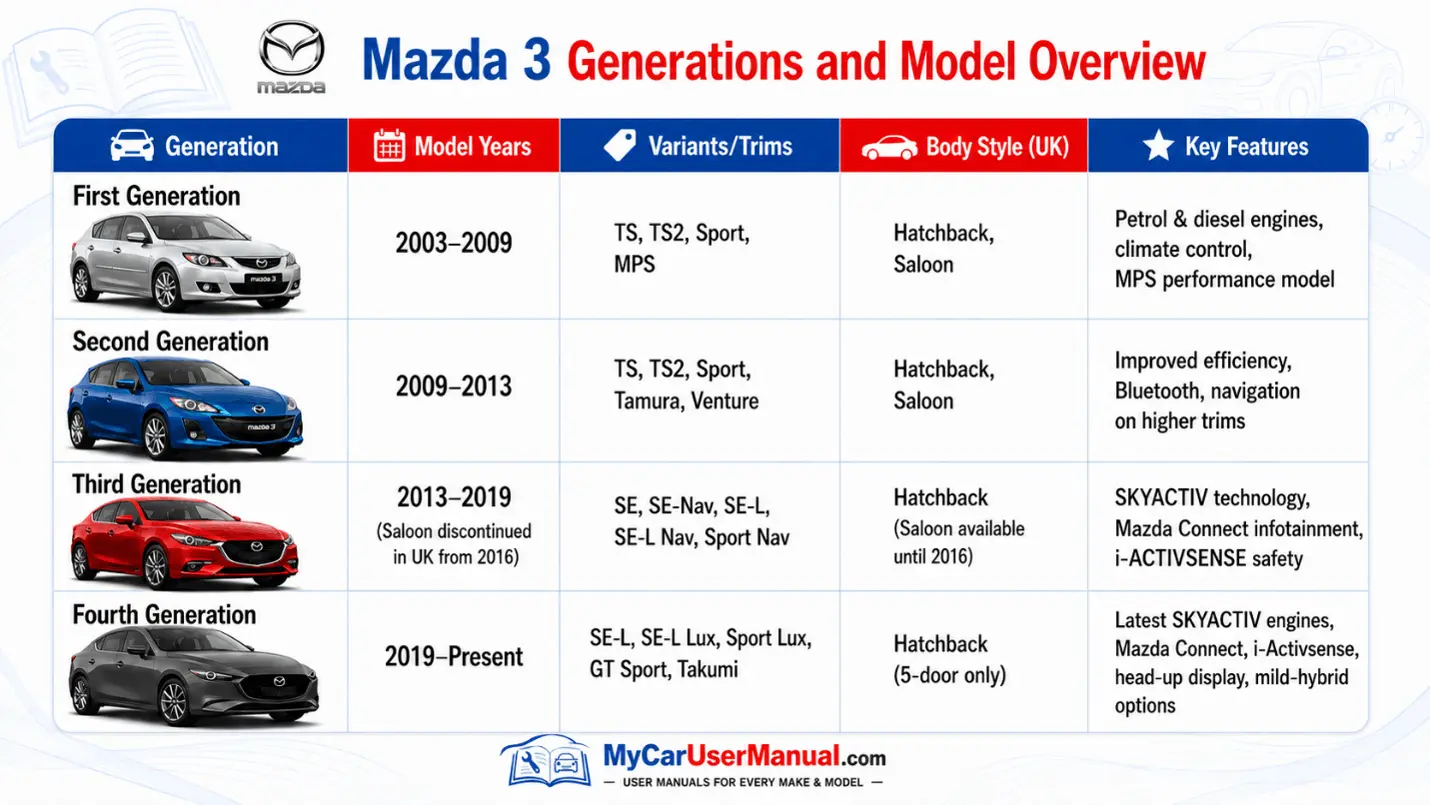
The Mazda 3 has been sold in several generations. Each generation introduced changes to the engines, equipment, safety systems, and in-car technology. Here, you can get a manual PDF for any Mazda 3 generation. Always selecting a manual by year. It helps you find instructions that match the controls and features fitted to your vehicle.
Mazda 3 Generations at a Glance
First generation: 2003 to 2009, including S, TS, TS2, Sport and MPS models.
Second generation: 2009 to 2013, with later Tamura, Venture and Sport Nav versions.
Third generation: 2013 to 2019, featuring SKYACTIV engines and SE-L Nav and Sport Nav trims.
Fourth generation: 2019 onwards, with advanced connectivity, mild-hybrid technology and i-Activsense safety systems.
What does the Mazda 3 Owner's Manual Cover?
The Mazda 3 user manual explains how to operate the vehicle correctly. It covers everyday controls as well as features that may only be needed occasionally. The exact information varies by generation and specification.
Key Information Covered in the Manual
Dashboard controls and instrument displays
Starting, stopping and driving procedures
Automatic and manual transmission operation
Mazda Connect and infotainment functions
Bluetooth, navigation and smartphone connectivity
Warning and indicator light meanings
i-stop and mild-hybrid systems where fitted
i-Activsense driver assistance features
Tyre pressures and tyre monitoring
Engine oil, coolant and other fluid checks
Routine servicing and maintenance
Emergency procedures and roadside problems
Vehicle specifications and recommended fluids
Mazda 3 Warning Lights: Find Meanings in the Manual
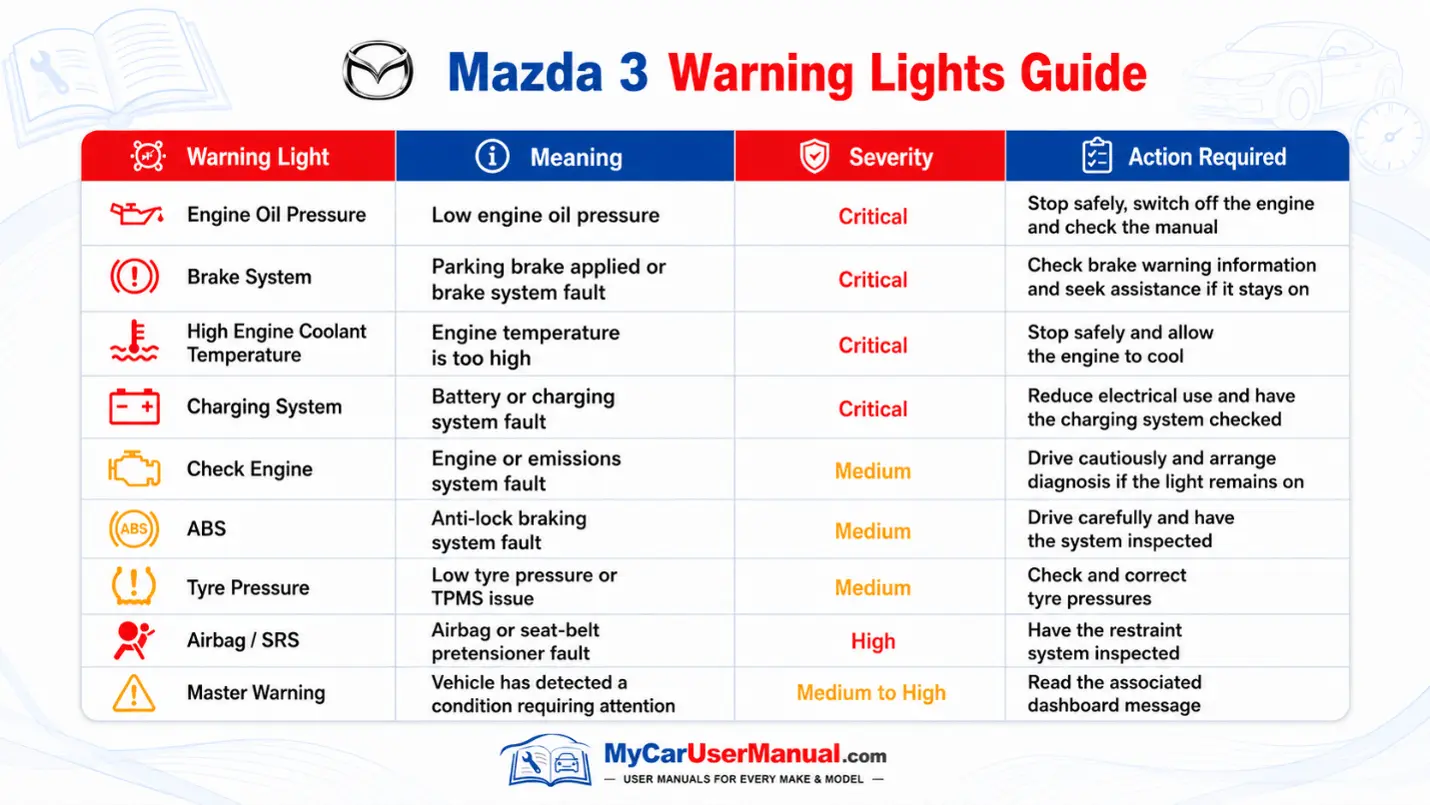
Dashboard warning lights tell you when a system needs attention or when a feature is operating. The manual explains each symbol, why it appears, and what action to take.
Red warnings normally require more urgent attention than amber indicators. Warning symbols and their behaviour can vary between model years. Always check the Mazda 3 handbook for your exact vehicle.
Important Warning Light Information
Red oil pressure warnings require prompt attention.
A red brake warning can indicate a braking system or parking brake issue.
An overheating warning means the engine temperature is too high.
An amber engine warning indicates a fault that should be investigated.
ABS and airbag lights indicate faults within their respective safety systems.
Tyre pressure warnings mean one or more tyres should be checked.
Diesel models may display DPF-related warnings.
Mazda 3 Maintenance Schedule: Manual Checks
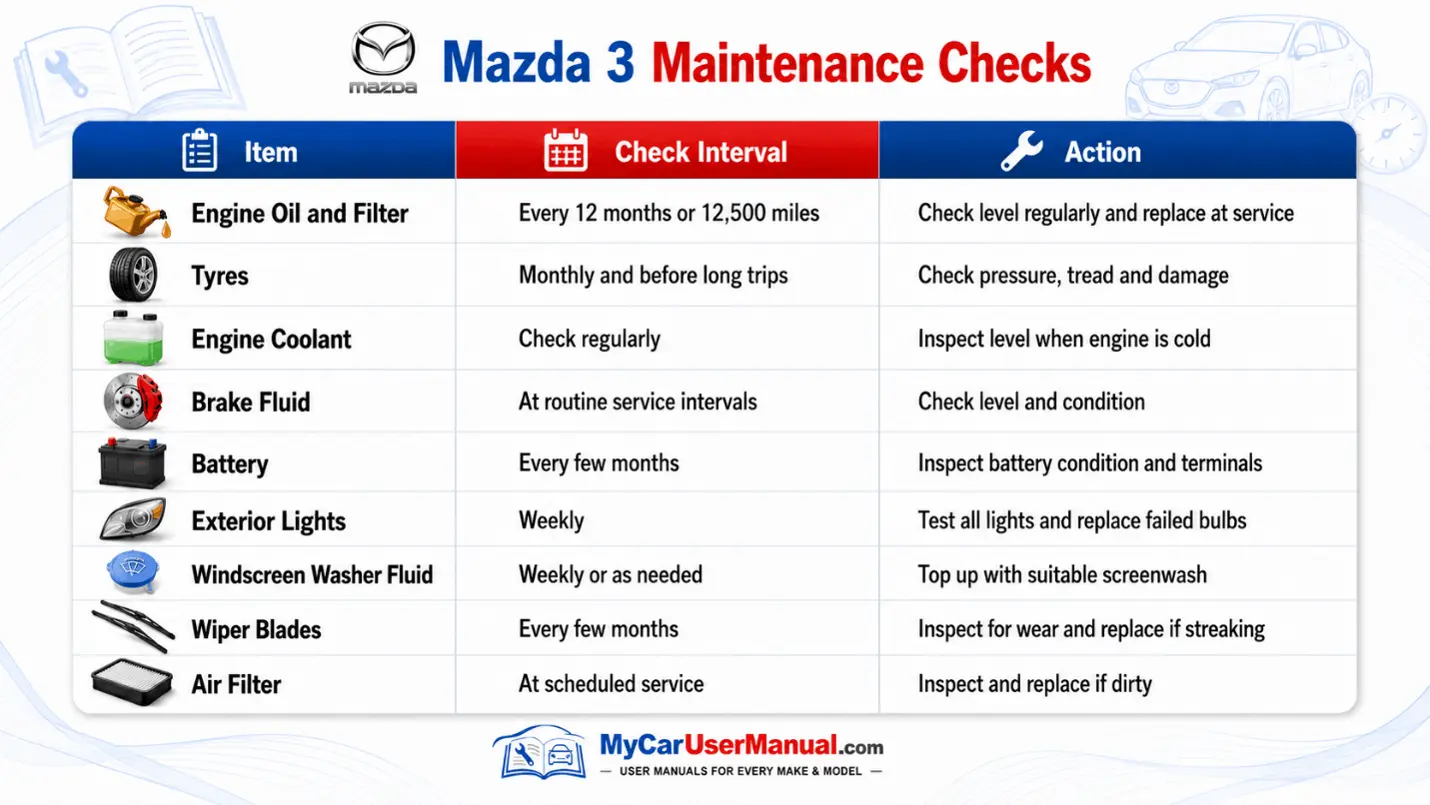
Regular checks help keep the Mazda 3 safe, reliable and efficient. The manual contains the maintenance schedule. It explains which items should be inspected, replaced or adjusted.
Service requirements can differ by engine, age and model year, so use the maintenance schedule in the correct Mazda 3 handbook. It is particularly important to follow the specified oil and fluid requirements.
Key Maintenance Checks
Check engine oil level regularly and before longer journeys.
Inspect coolant level only when the engine is cool.
Check tyre pressures and tyre condition regularly.
Keep screenwash at the correct level.
Inspect exterior lights for failed bulbs or faults.
Follow the manual's schedule for oil and filter servicing.
Have brakes inspected during scheduled maintenance.
Follow the specified replacement schedule for filters and other service items.
How to Navigate the Mazda 3 Owner’s Manual Effectively?
The Mazda 3 manual PDF is easier to use when you search for a specific system, warning, or control rather than reading the complete handbook from the beginning.
Use the contents page and index when you need broader information. Always confirm that the manual matches your Mazda 3 model year.
Steps to Find Information Quickly
Select the Mazda 3 model year that matches your vehicle.
Open or download the correct Mazda 3 manual PDF.
Check the contents page for the relevant section.
Use the PDF search function for a specific warning, component or feature.
Review nearby instructions, notes and safety warnings.
Print the required pages if you want a copy for the vehicle.
Save the full manual for offline reference when needed.
Troubleshooting Mazda 3 Common Issues Using the Owner's Manual
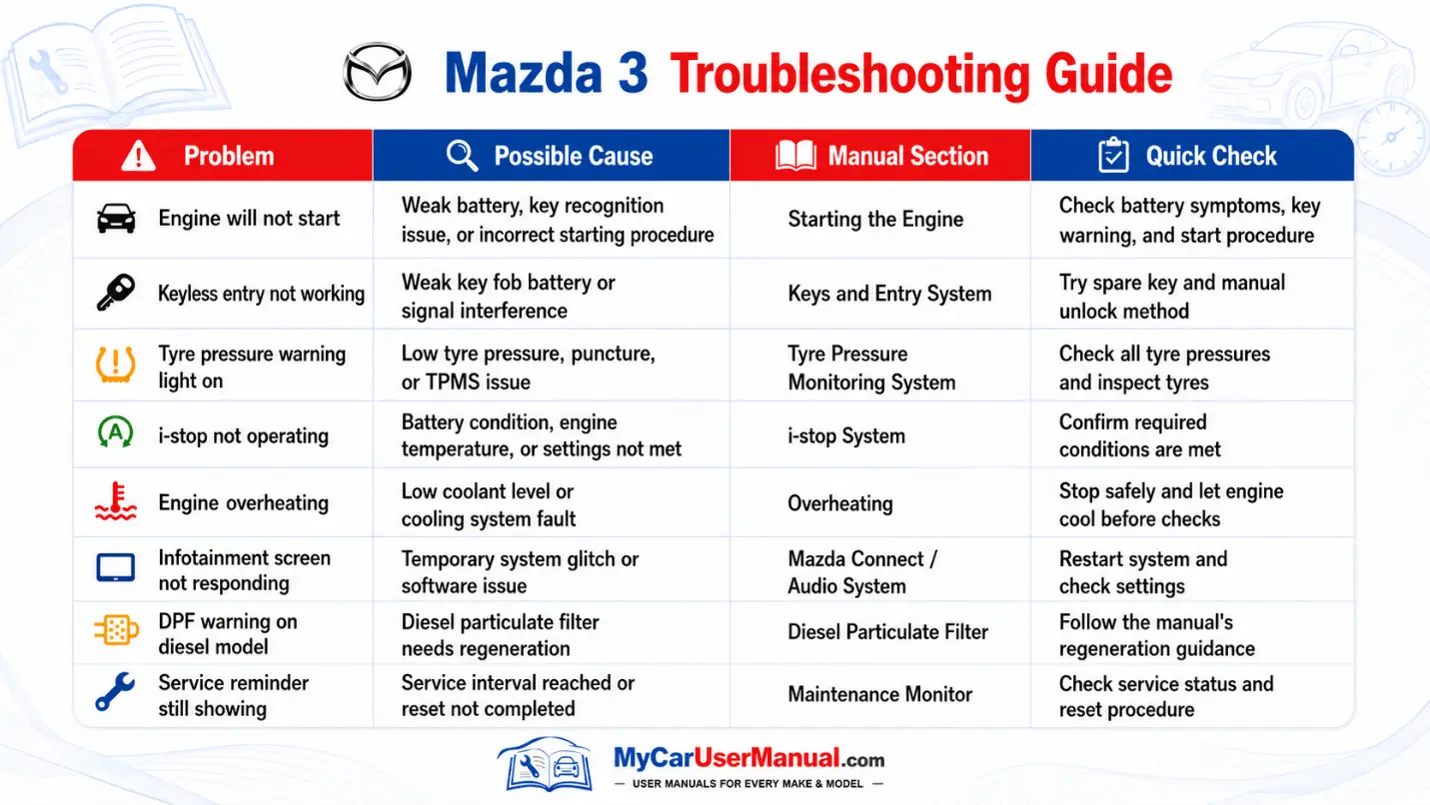
The owner’s manual can help with many everyday Mazda 3 problems before professional diagnosis is needed. It provides checks for starting problems, warning lights, keyless entry, tyre pressure alerts, overheating and infotainment issues.
Start with the relevant warning message or symptom. Follow the manual procedure in order. Do not continue driving if the handbook indicates that the fault could cause engine damage. Do not continue driving if it could affect braking or vehicle safety.
Common Mazda 3 Problems to Check
Engine does not start
Keyless entry or key fob does not respond
Tyre pressure warning stays on
i-stop does not activate
Engine temperature becomes too high
Infotainment system does not respond
Diesel particulate filter warning appears
Maintenance reminder remains displayed
Quick Troubleshooting Steps
Identify the warning light, message, or symptom.
Locate the relevant section in the Mazda 3 manual PDF.
Check any fluid levels, tyre pressures or basic settings mentioned.
Follow the manual's reset or operating procedure where appropriate.
Restart the vehicle only if the handbook says it is safe.
Stop driving and seek qualified assistance if a critical warning remains active.