Nissan X-Trail Owner Manuals: Free PDF Download

Select your Nissan X Trail

Looking for a Nissan X-Trail user manual? At My Car User Manual, you can get free Nissan X-Trail owner manual PDFs for different generations and model years. You can view or read the manual online on any device. You can print useful pages or download the complete PDF for offline use.

Our Nissan X-Trail manual PDF collection is organised by model and year. You can find the correct handbook easily. Manuals are regularly reviewed and updated as additional documents become available.

Nissan X-Trail Owner Manual PDFs for All Generations

Here you can get owner manual PDFs for different Nissan X-Trail generations and model years. Always choose the correct model year to match the handbook with your car. This is important because controls, engines, safety systems, and equipment can differ between generations, trims, and model years.
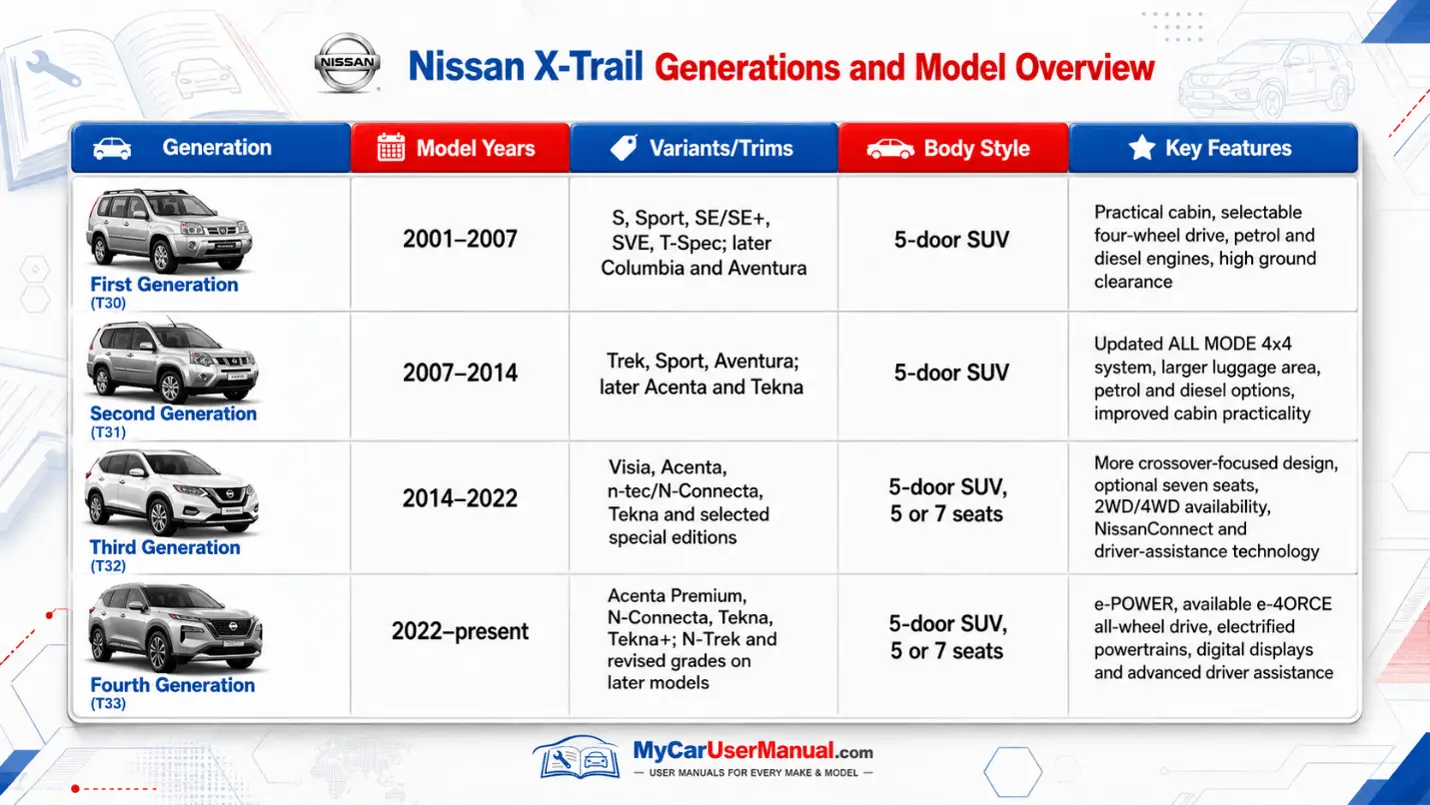
Nissan X Trail Owner Manual PDF

What does the Nissan X-Trail Owner's Manual Cover?

The Nissan X-Trail user manual explains how to operate the vehicle correctly and understand its main systems. It can also help you locate controls, check specifications, and follow important safety information.

Depending on the generation and model year, the manual may cover:

  • Dashboard controls and instrument displays
  • Seats, doors, windows and mirrors
  • Starting, driving and parking procedures
  • Four-wheel-drive and drive-mode operation
  • e-POWER and e-4ORCE systems on applicable models
  • NissanConnect and infotainment functions
  • Driver-assistance and safety systems
  • Tyres and recommended tyre pressures
  • Fluids and routine maintenance checks
  • Warning and indicator lights
  • Emergency procedures
  • Fuse locations and replacement
  • Vehicle specifications and capacities

Nissan describes its current X-Trail owner's manual as containing information on vehicle operation and maintenance, with dedicated sections for controls, warnings and troubleshooting.

Nissan X-Trail Warning Lights: Find Meanings in the Manual

Check dashboard warnings in the manual for your exact model. Symbols and messages may differ between generations.

A red warning usually needs more urgent attention than an amber warning. Always follow the instructions in the Nissan X-Trail handbook.
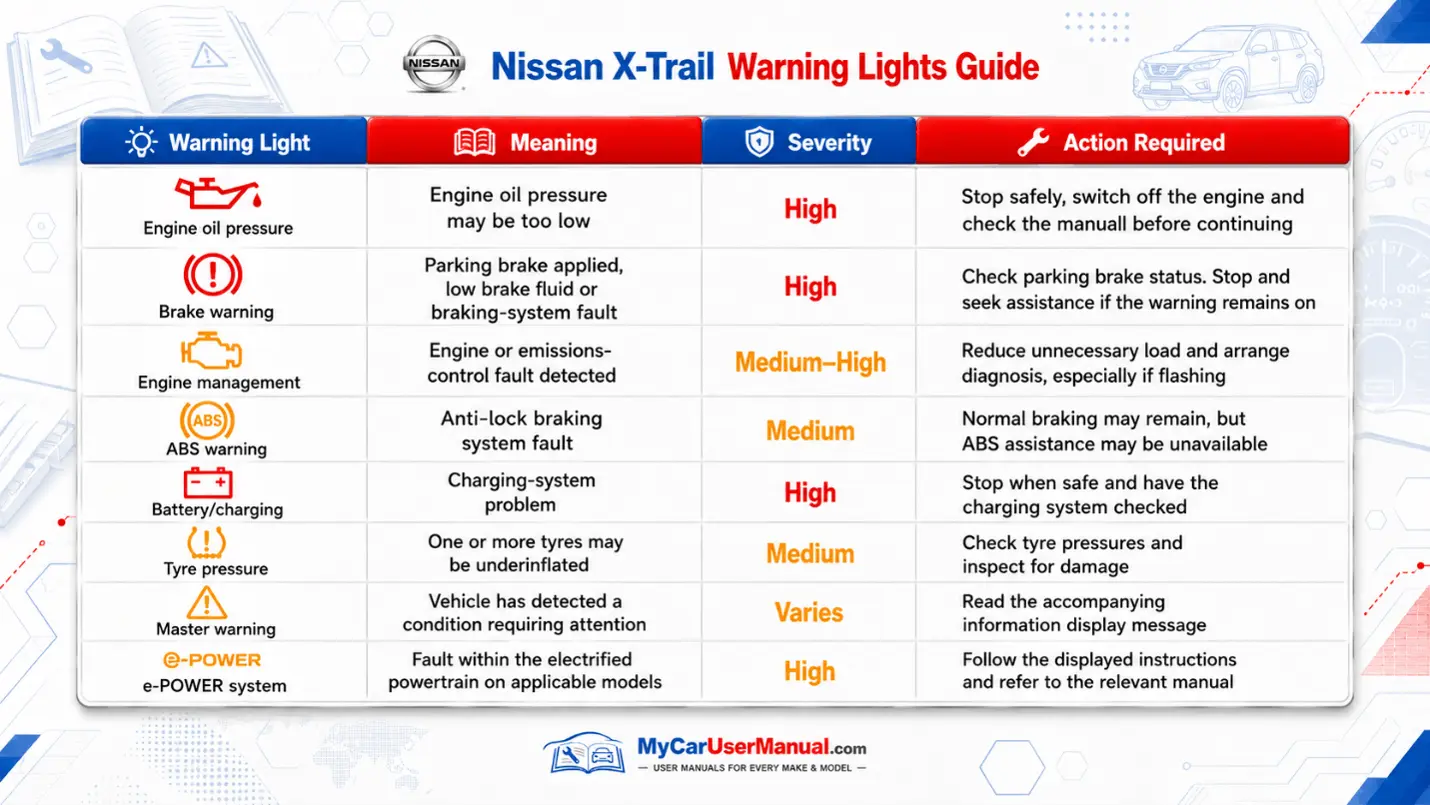
Nissan X Trail Manual PDF

Nissan X-Trail Maintenance Schedule: Manual Checks

Maintenance requirements vary by engine, model year and driving conditions. The correct manual PDF can help identify routine owner checks, while the vehicle’s service schedule should be followed for workshop maintenance.

Do not rely on a universal service interval for every X-Trail. Diesel, petrol, mild-hybrid and e-POWER versions can have different maintenance requirements.
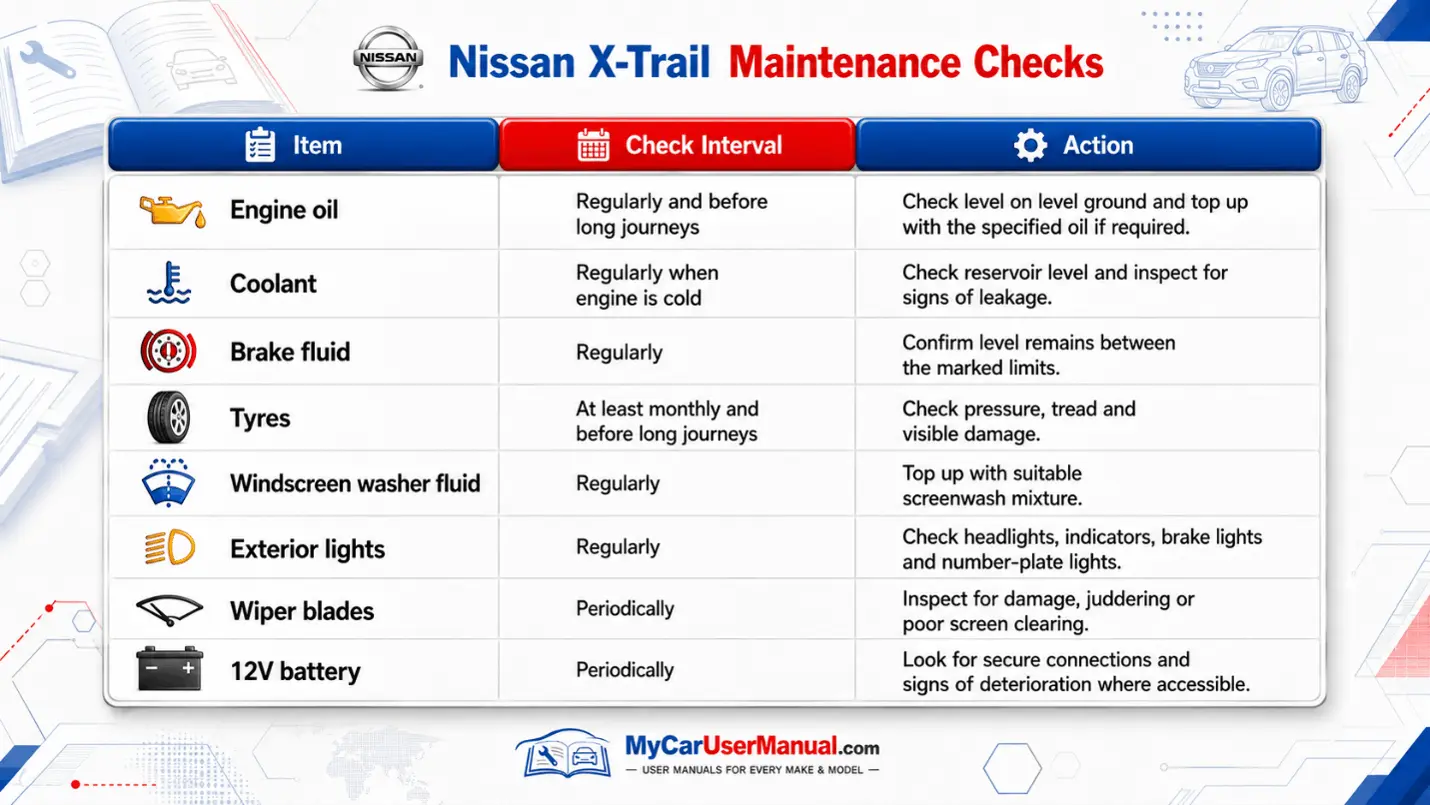
Nissan X Trail User Manual PDF

How to Navigate the Nissan X-Trail Owner’s Manual Effectively?

The Nissan X-Trail handbook can contain hundreds of pages. Using the index, contents page, or PDF search function makes it much quicker to find the information you need.

Finding Information Quickly

  • Select the Nissan X-Trail manual by year that matches your vehicle.
  • Check the generation, engine or powertrain where several manuals are available.
  • Open the contents page to identify the relevant main section.
  • Use the PDF search function for terms such as “tyre pressure”, “warning light”, “fuse” or “key”.
  • Check diagrams carefully because equipment may differ between trim levels.
  • Print individual pages if you want maintenance or emergency instructions in the vehicle.
  • Download the manual PDF to your phone, tablet, or computer for offline access.

Troubleshooting Nissan X-Trail Common Issues Using the Owner's Manual

The owner's manual can help with basic checks when a fault or unusual message appears. It is particularly useful for identifying dashboard warnings and procedures that can be completed without specialist equipment.

Common Problems to Check in the Manual
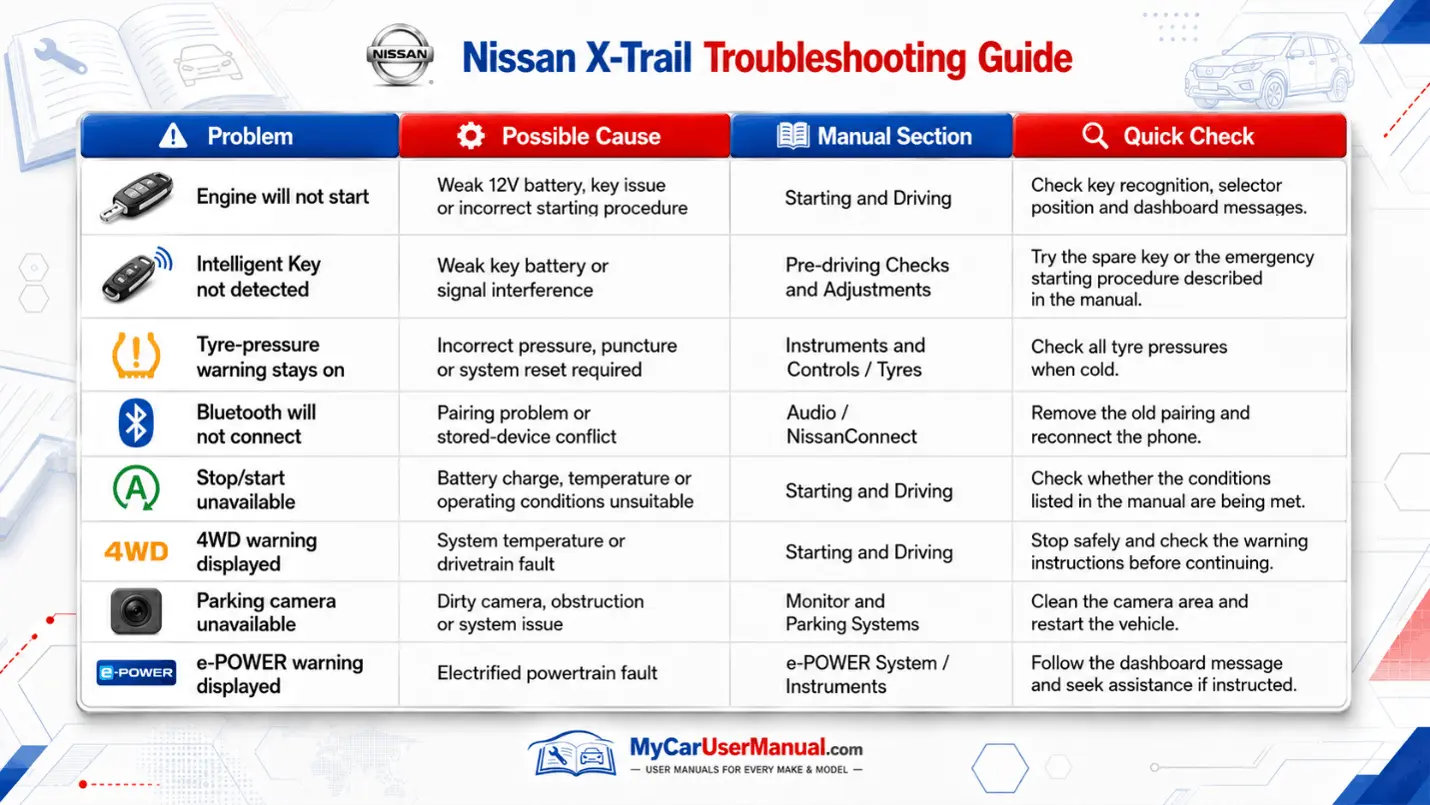
  • Engine does not start
  • Intelligent Key is not detected
  • Tyre pressure warning remains illuminated
  • Battery becomes discharged
  • Power window automatic function stops working
  • Infotainment or NissanConnect does not respond
  • Warning light remains on after starting
  • Four-wheel-drive warning appears
  • e-POWER system warning appears on applicable models
Nissan X Trail Handbook & Service Guide

For basic troubleshooting:

  • Note the exact warning symbol or dashboard message.
  • Stop the vehicle safely if the warning indicates an urgent fault.
  • Find the matching symbol or problem in the manual.
  • Follow only the owner checks recommended for that situation.
  • Do not reset or ignore safety-critical warnings simply to clear the display.
  • Arrange professional diagnosis if the problem continues or the manual advises against further driving.

Popular Owner Manuals









