Find Peugeot Bipper owner manuals in free PDF format. You can view, read, print, or download it. No account required. No payment required. The PDF is supported on all devices. You can quickly open the full document or a specific section.
The library covers multiple model years of the Peugeot Bipper. Manuals are added and updated regularly as new years and editions are confirmed. If the manual for your year is not listed yet, it may be added soon.
Peugeot Bipper Owner’s Manual PDF for All Model Years
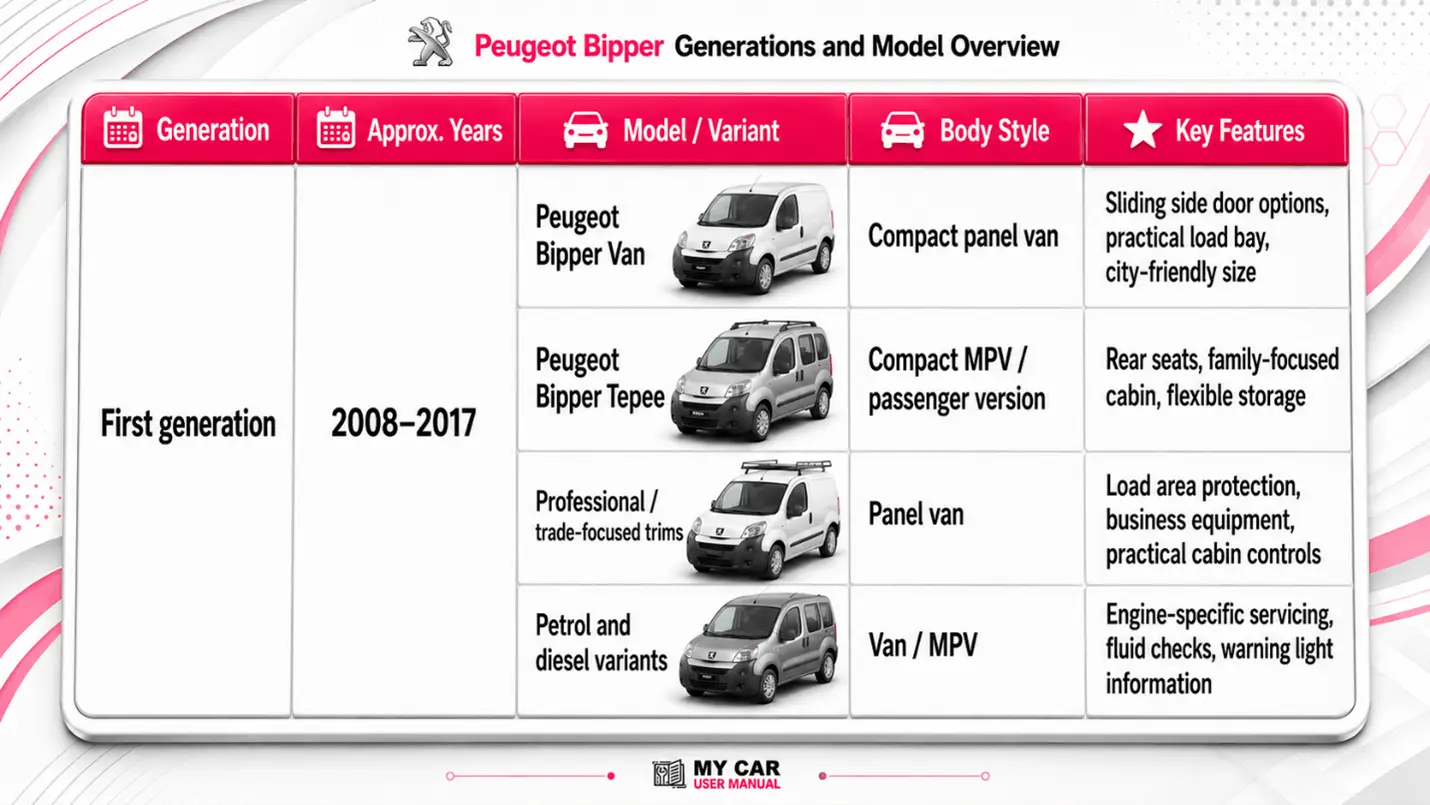
The Peugeot Bipper was sold as a compact van and the passenger-focused Bipper Tepee. Here you can get manual PDFs for all Peugeot Bipper model years. Use the Peugeot Bipper owner’s manual by year to match your vehicle. Check the registration year, trim, engine, equipment level, and body style.
Some manuals cover several years, while others are specific to one model year. Specifications, warning lights, features, and equipment may vary by market and model year. Always use the manual that matches your vehicle as closely as possible.
What does the Peugeot Bipper Owner's Manual Cover?
The Peugeot Bipper handbook is designed for everyday use. It explains what each control does, how to operate vehicle systems, and what to check before driving, servicing, or troubleshooting.
Typical Peugeot Bipper owner manuals cover:
Dashboard instruments and display messages
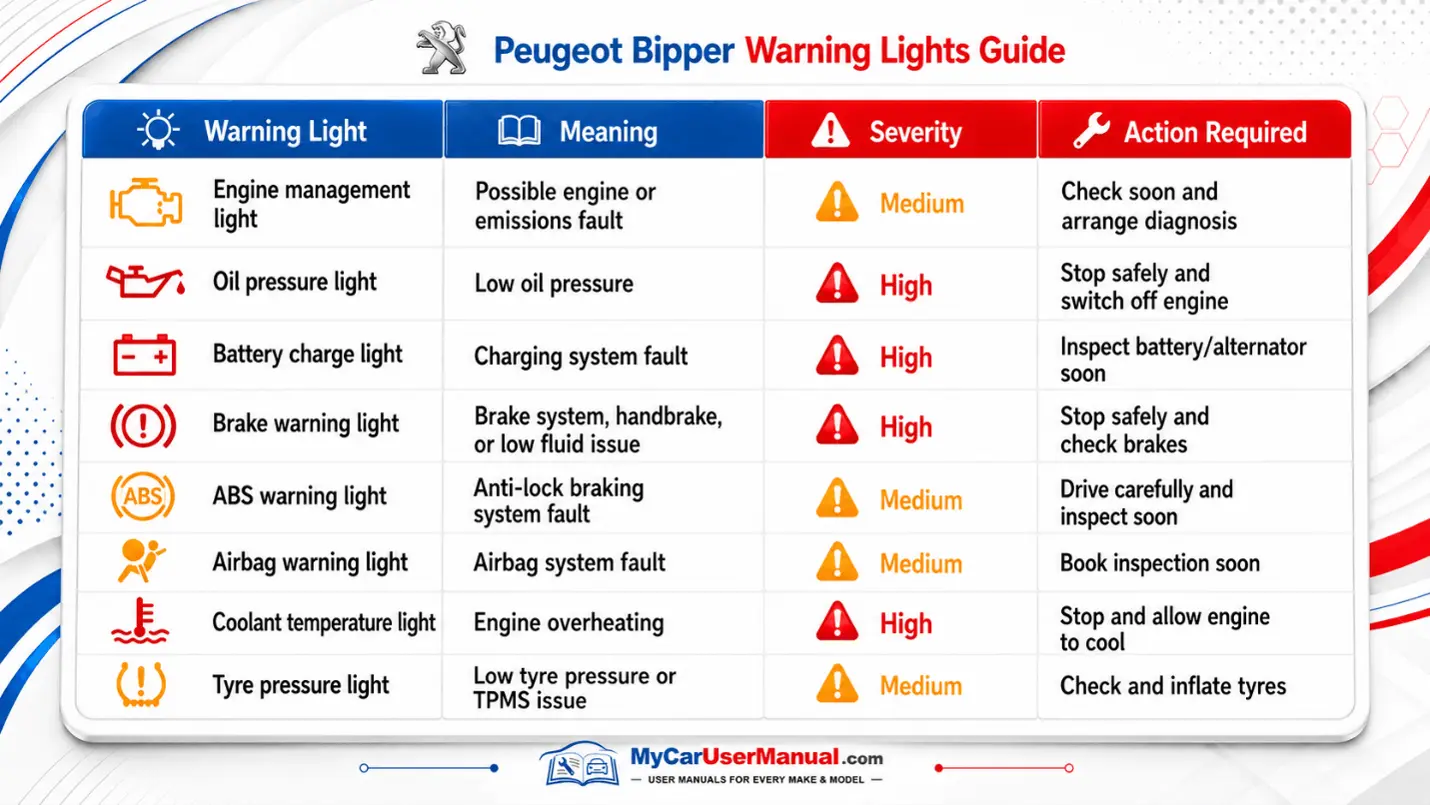
Warning lights and symbols
Starting, driving, parking, and locking
Seat adjustment and seat belts
Airbags and child restraint information
Heating, ventilation, and air conditioning
Radio, audio, Bluetooth, and trip computer controls
Lights, indicators, wipers, and washers
Fuel filling and fuel type guidance
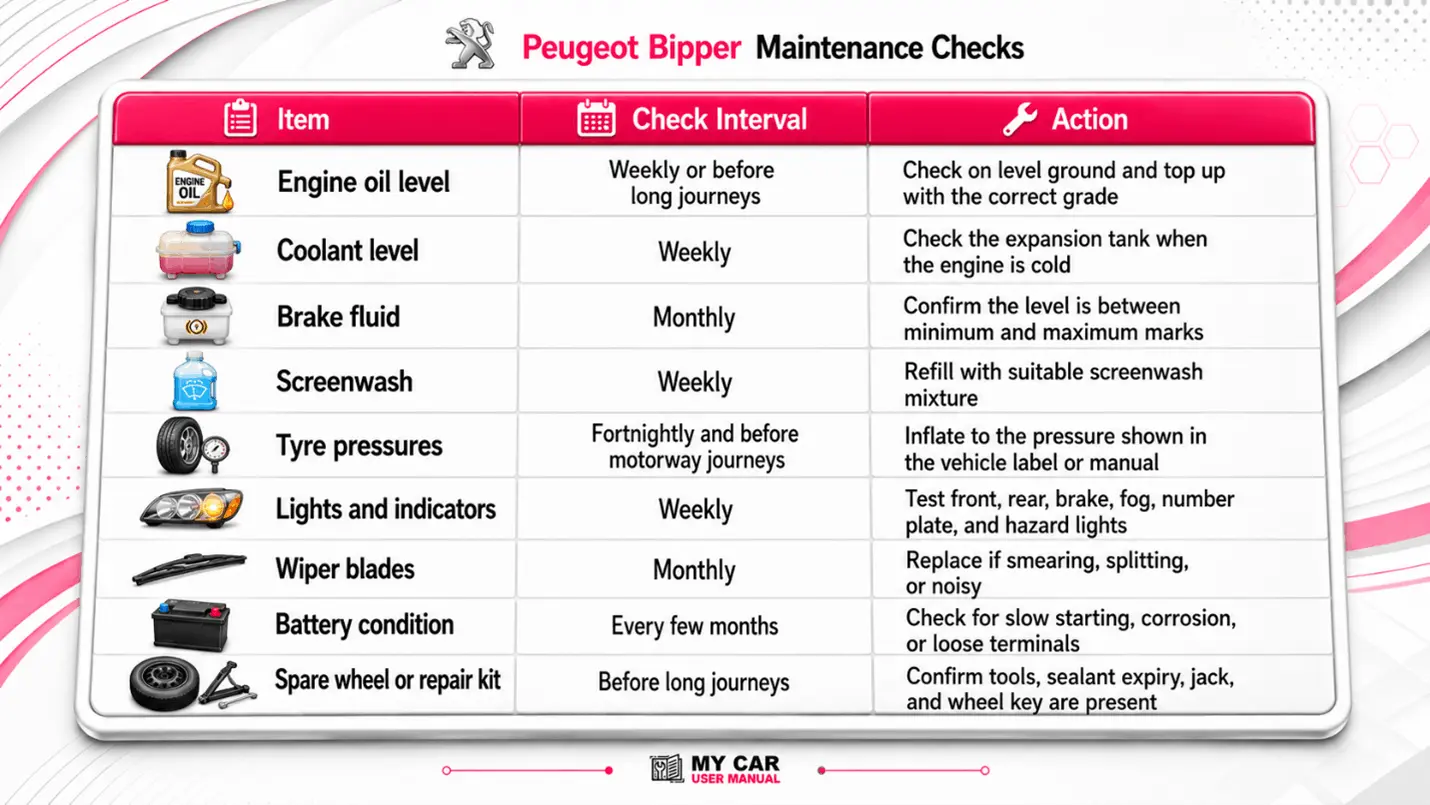
Engine oil, coolant, brake fluid, and screenwash
Tyre pressures, spare wheel, and puncture repair
Fuse boxes and bulb replacement
Towing, loading, and payload guidance
Service intervals and routine inspections
Emergency procedures and recovery advice
For best results, choose the manual that matches the car registration year and specification. A later PDF may describe features that are not fitted to an earlier model.
Peugeot Bipper Warning Lights: Find Meanings in the Manual
Dashboard warning lights can show routine reminders, minor faults, or urgent safety issues. The manual explains what each symbol means and what action to take.
Some lights may appear briefly when the ignition is switched on. This can be normal. A light that stays on, flashes, or appears with a message should be checked using the correct manual section.
The maintenance section helps you keep the vehicle reliable between services. Exact service intervals can vary by engine, usage, year, and operating conditions, so use the manual and service book supplied for your model.
How to Navigate the Peugeot Owner’s Manual Effectively?
The Peugeot Bipper handbook is easier to use when you search by system, symptom, or symbol rather than reading from start to finish.
Use these steps:
Select the correct Peugeot Bipper manual by year and model.
Open the PDF on your phone, tablet, or computer.
Use the contents page for main sections such as instruments, driving, safety, and maintenance.
Use PDF search for terms such as “tyre pressure”, “oil”, “fuse”, “warning light”, or “Bluetooth”.
Check diagrams carefully, especially for fuse boxes, dashboard symbols, jacking points, and fluid reservoirs.
Print only the pages you need, such as tyre pressures, warning lights, fuse layouts, or maintenance checks.
Save the PDF offline, so it is available without a mobile signal.
Keep a downloaded copy with your service records and MOT documents.
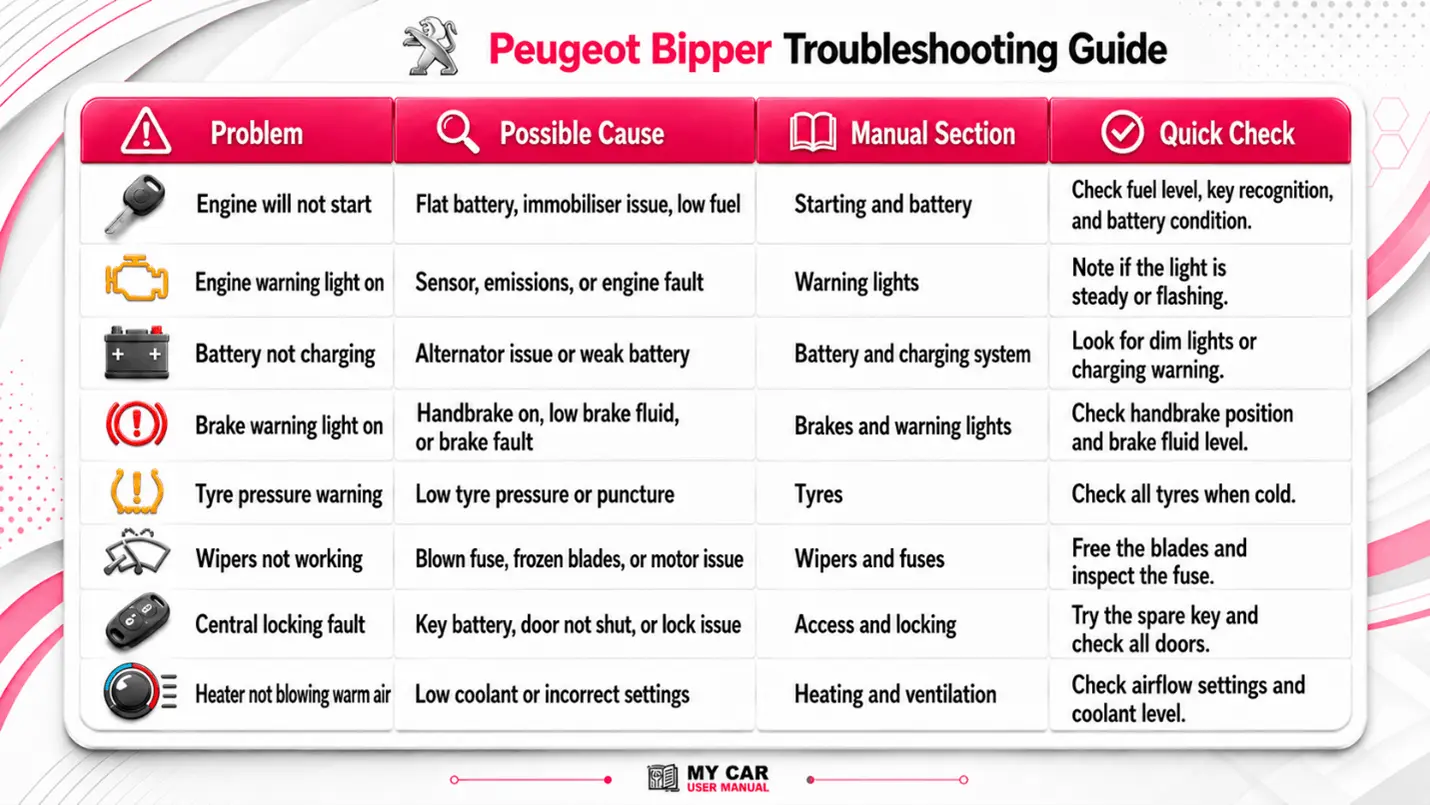
Troubleshooting Peugeot Bipper Common Issues Using the Owner's Manual
The Peugeot Bipper user manual is a useful first step when something does not work as expected. It will not replace professional diagnosis, but it can help identify simple checks before a garage visit.
Common problems to check in the manual include:
A warning light staying on after start-up
The engine is not starting
Central locking is not responding
Radio or Bluetooth problems
Flat battery symptoms
Poor demisting or heating
Wipers not clearing the windscreen
Bulbs failing repeatedly
Tyre pressure warnings
Fuse-related electrical faults
Sliding door or rear door issues
Diesel starting or glow plug warnings
Troubleshooting steps
Identify the exact symptom, warning light, sound, or message.
Stop safely if the manual marks the issue as urgent.
Find the matching section in the Peugeot Bipper owner manuals.
Check simple items first, such as fluid levels, doors, tyres, fuses, and battery condition.
Follow only the procedures shown for your model year and equipment.
Do not ignore red warning lights, brake warnings, oil pressure alerts, or overheating messages.
Record the warning light, mileage, conditions, and recent work before contacting a garage.
Use the Peugeot Bipper owner’s manual PDF as a reference when discussing the fault with a technician.