At My Car User Manual, you can get free SEAT Leon owner manuals for different generations and model years. You can view the manual online. You can read it on any device like a mobile, laptop, or desktop. You can print or download the PDF for offline access. No payment. No account.
Our SEAT Leon manual PDF library is organised by year and model. You can find the right handbook quickly. Always choose the manual by year for the exact information about your vehicle. You can choose the manual for any SEAT vehicle launched from the year 2000 onwards. Manuals are regularly updated as more documents become available.
SEAT Leon Owner Manual PDFs for All Generations
Here you can get SEAT manual PDFs for different generations. Always choose the right manual by year. It is important, as equipment, controls, engines, infotainment systems, and safety features can change between generations. The right manual provides you with the right information that matches your vehicle.
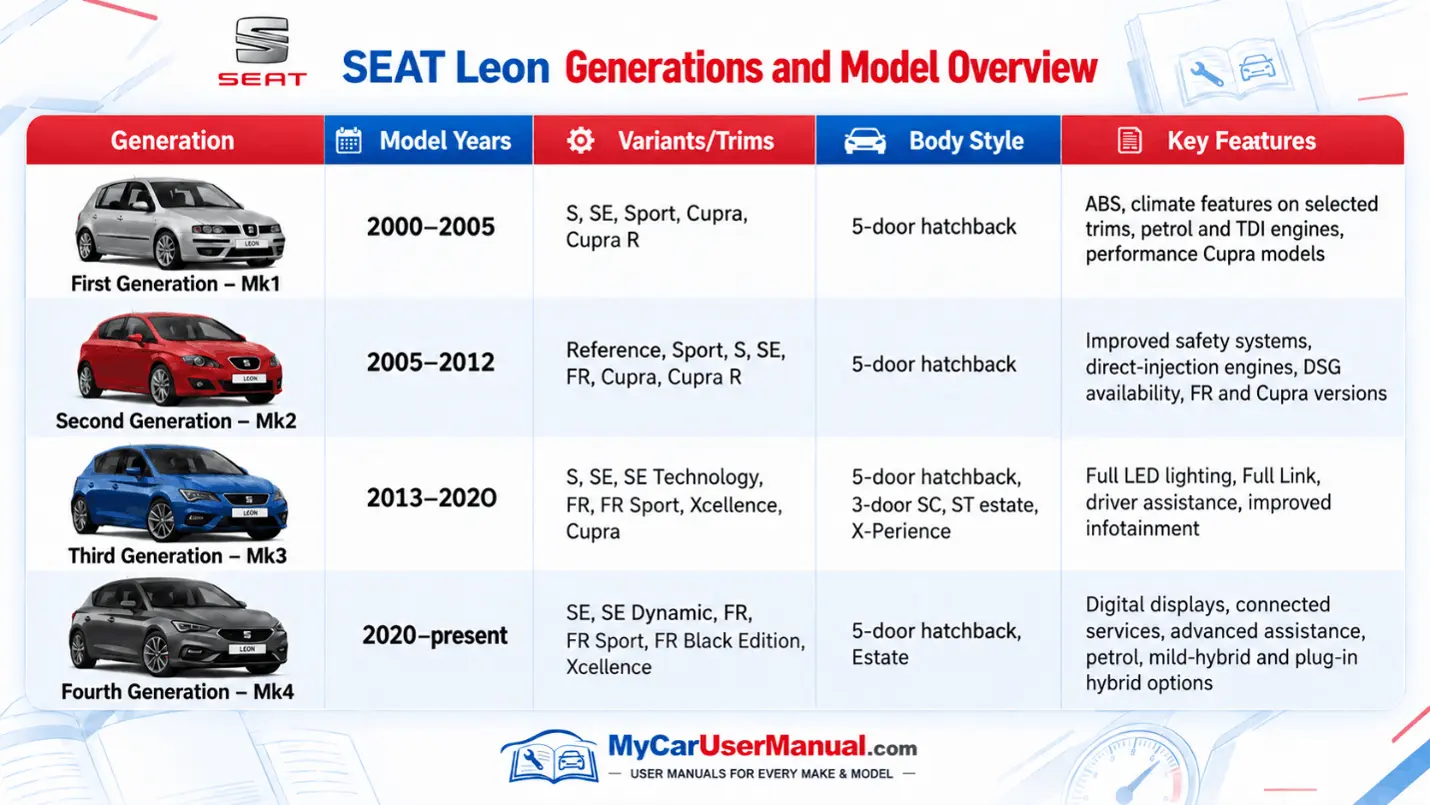
SEAT Leon Generations Overview
4 generations from 2000 to present.
Mk1 (2000–2005): Hatchback with Cupra variants.
Mk2 (2005–2012): Added FR, DSG and improved safety.
Mk3 (2013–2020): Hatchback, SC, estate and X-Perience.
Mk4 (2020–present): Digital tech, connected services and hybrid options.
What does the SEAT Leon Owner's Manual Cover?
The SEAT Leon user manual explains how to operate the vehicle safely and use its main systems. It covers everyday controls as well as functions that may only be needed occasionally.
The exact content depends on the year, engine, gearbox, and equipment level. Always use the SEAT Leon owner’s manual PDF that matches your model as closely as possible.
Main Information Covered in the SEAT Leon Handbook
Dashboard controls and instrument displays
Starting, stopping and locking the vehicle
Seats, steering wheel and mirrors
Exterior and interior lighting
Heating, ventilation and air conditioning
Infotainment, Bluetooth and smartphone connectivity
Driving assistance and parking systems
Manual and DSG gearbox operation
Tyres and recommended pressures
Engine oil, coolant and other fluid checks
Fuses and electrical equipment
Towing and vehicle recovery
Child seats, airbags and other safety systems
Technical data and vehicle specifications
SEAT Leon Warning Lights: Find Meanings in the Manual
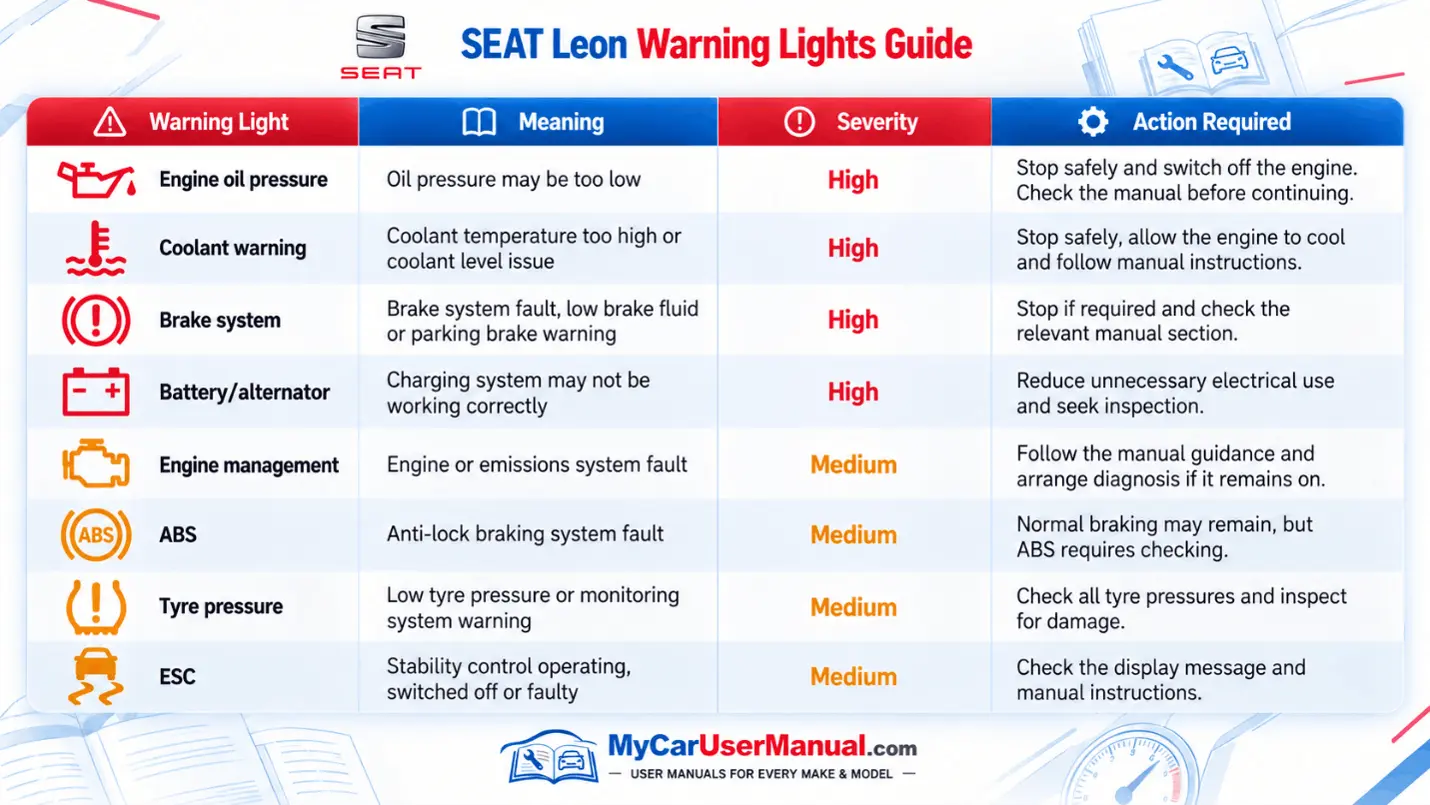
Dashboard warning lights are important. They show when a system is active. They also warn you when something needs attention. The warning colour helps show how urgent the issue may be.
Warning symbols can vary between Leon generations and equipment levels. Check your SEAT Leon handbook for the exact symbol, message, and instructions before deciding what to do.
Important Warning Light Checks
Red oil, brake and coolant warnings should not be ignored.
An amber engine-management light normally requires diagnosis.
ABS warnings indicate a problem with the anti-lock braking system.
Check tyre pressures when the tyre-pressure warning appears.
Diesel models may provide specific DPF instructions in the manual.
SEAT Leon Maintenance Schedule: Manual Checks
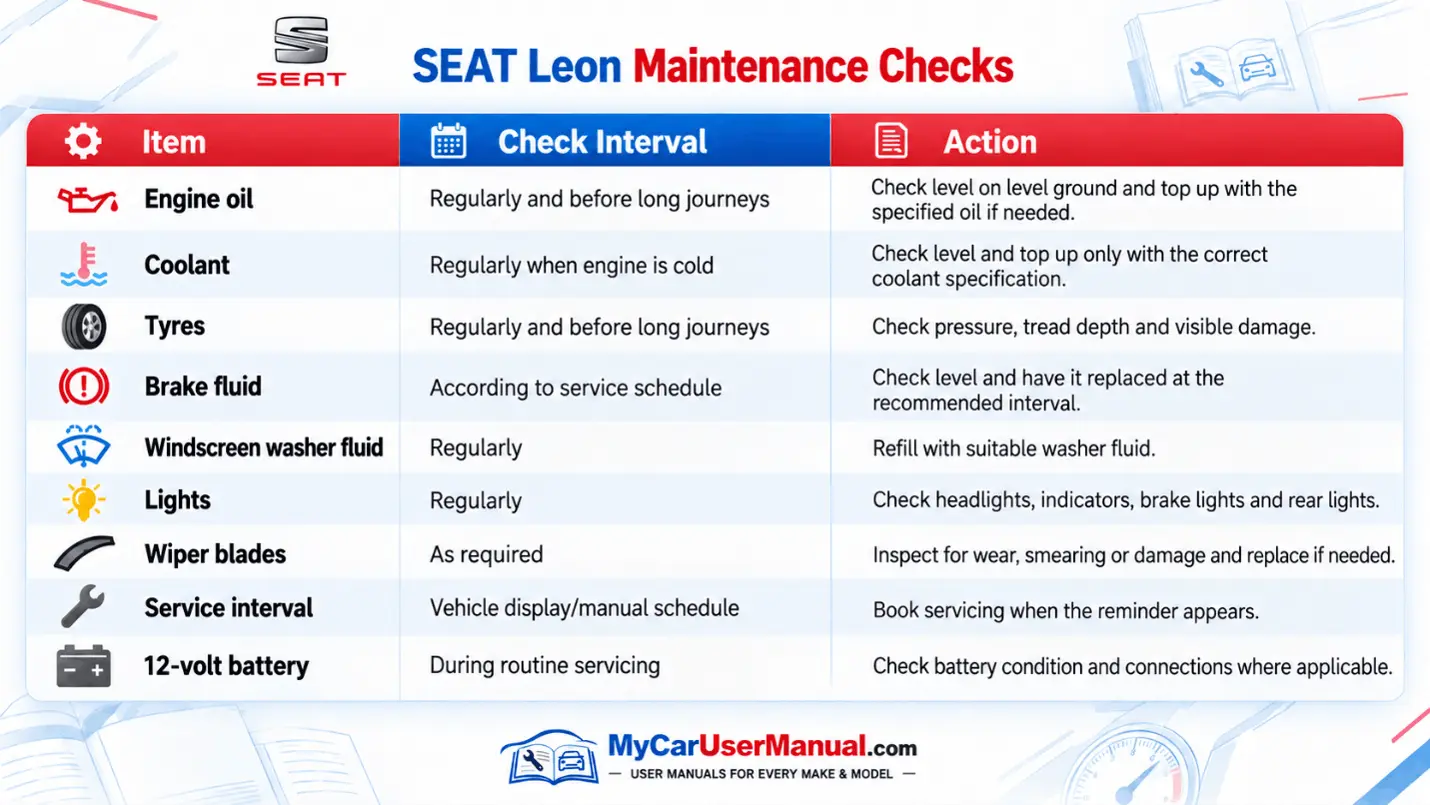
Regular checks help keep the Leon safe and operating correctly. The manual explains fluid specifications, tyre information, service reminders, and basic inspection procedures.
Service requirements differ between engines and model years. Some Leon models use fixed servicing while others use a flexible service interval display, so the vehicle display and correct manual should take priority.
Important Maintenance Points
Follow the service interval shown by the vehicle.
Use fluids that meet the specification stated in the manual.
Keep tyre pressures at the values specified for the vehicle and load.
Check oil and coolant levels using the correct procedure.
Do not reset a service warning unless the required work has been completed.
How to Navigate the SEAT Leon Owner’s Manual Effectively?
For quick navigation, start with the contents page, index, or PDF search function. Search using the warning message, component, or feature you need.
Steps to Find Information Quickly
Select the SEAT Leon manual by year that matches your vehicle.
Confirm the generation, body style, and model year.
Open the PDF and check the contents or alphabetical index.
Use PDF search for terms such as “tyre pressure”, “engine oil”, “fuse” or “warning light”.
Read the full section, including warnings and notes.
Check whether the instructions apply to your engine or equipment version.
Save or download the manual PDF for future use.
Print individual pages if you want important instructions available offline.
Troubleshooting SEAT Leon Common Issues Using the Owner's Manual
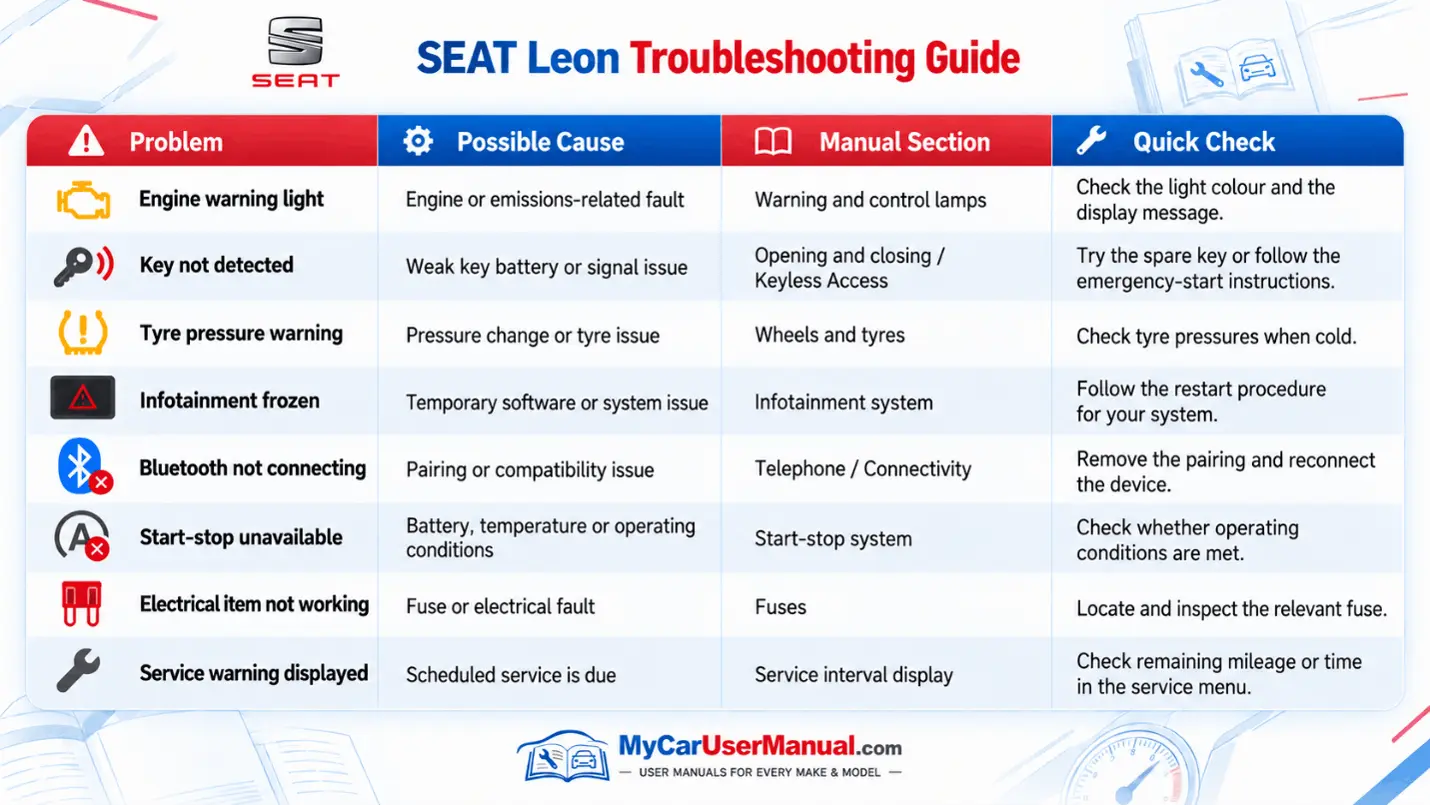
The owner’s manual can help with many everyday problems. It can explain dashboard messages, key problems, infotainment settings, tyre warnings, and basic electrical checks.
The manual should be used as a reference rather than a confirmed fault diagnosis. If a warning remains active, the vehicle behaves abnormally, or the manual advises professional inspection, arrange the appropriate checks.
Common Problems to Check in the Manual
Warning light appears on the dashboard
Key or remote is not detected
Tyre pressure warning remains on
Infotainment system is not responding
Bluetooth or smartphone connection fails
Start-stop system does not operate
A light or electrical feature stops working
Service reminder appears
12-volt battery has been disconnected or discharged
Basic Troubleshooting Steps
Note the exact warning symbol or message.
Stop the vehicle safely if the warning requires immediate action.
Find the matching section in the user manual.
Read the listed causes and safety instructions.
Carry out only the basic checks permitted by the manual.
Restart or reset a system only when the manual gives a procedure.
Do not continue driving when the manual advises the vehicle should be stopped.
Arrange professional diagnosis when the fault remains or cannot be identified safely.