Find Tesla Model Y owner manuals for different model years. You can view and read the manual online in your browser. You can also print specific pages or download the full PDF. No purchase or registration is required.
Each Tesla Model Y owner’s manual covers key vehicle features and controls. It also includes information on charging, safety, maintenance, and troubleshooting. We regularly update our manual collection as newer versions become available. It makes it easier to find the correct Tesla Model Y user manual PDF.
Tesla Model Y Owner Manual PDFs for All Generations
Here, you can get manual PDFs for Tesla Model Y generations and model years. Each year has its own manual because features, software menus, and hardware differ by build. Choose the manual by year. This helps you find instructions that are more relevant to your vehicle.
Tesla Model Y Generations Overview
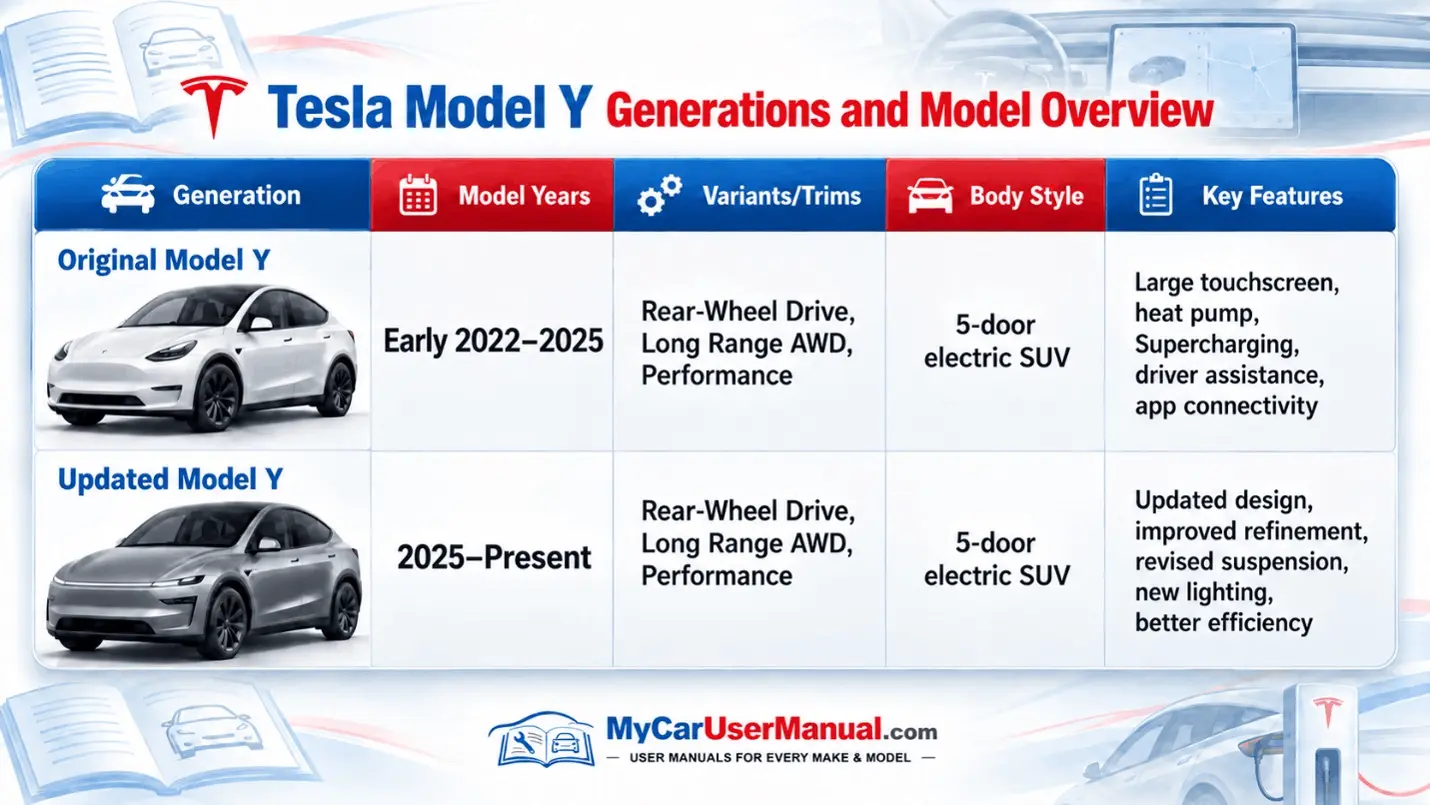
Original Model Y covers early 2022–2025, with Rear-Wheel Drive, Long Range AWD, and Performance versions.
Updated Model Y runs from 2025–Present with a revised design, lighting, and suspension.
Both generations use a 5-door electric SUV body style.
Key features include a large touchscreen, heat pump, Supercharging, driver assistance, and improved efficiency.
What does the Tesla Model Y Owner's Manual Cover?
The Tesla Model Y user manual explains how to use the vehicle the right way. It covers everyday functions. It provides important information about safety systems, tyres, maintenance, emergency procedures, and troubleshooting. Some features vary according to model year, trim, region, hardware, and software version.
Main Information Covered in the Manual
Touchscreen controls and vehicle settings
Keys, phone key, doors and windows
Front and rear storage areas
Seats, seat belts and child safety
Airbags and occupant protection
Climate controls and cabin heating
Charging and battery information
Driving modes and regenerative braking
Autopilot and driver assistance features
Cameras and parking assistance
Lights, wipers and mirrors
Wheels, tyres and tyre pressures
Software updates
Vehicle maintenance
Emergency procedures
Troubleshooting alerts and warning messages
Tesla Model Y Warning Lights: Find Meanings in the Manual
The Model Y shows vehicle status, warning symbols, and alerts mainly on the touchscreen. Some appear briefly, while others stay visible when attention is needed.
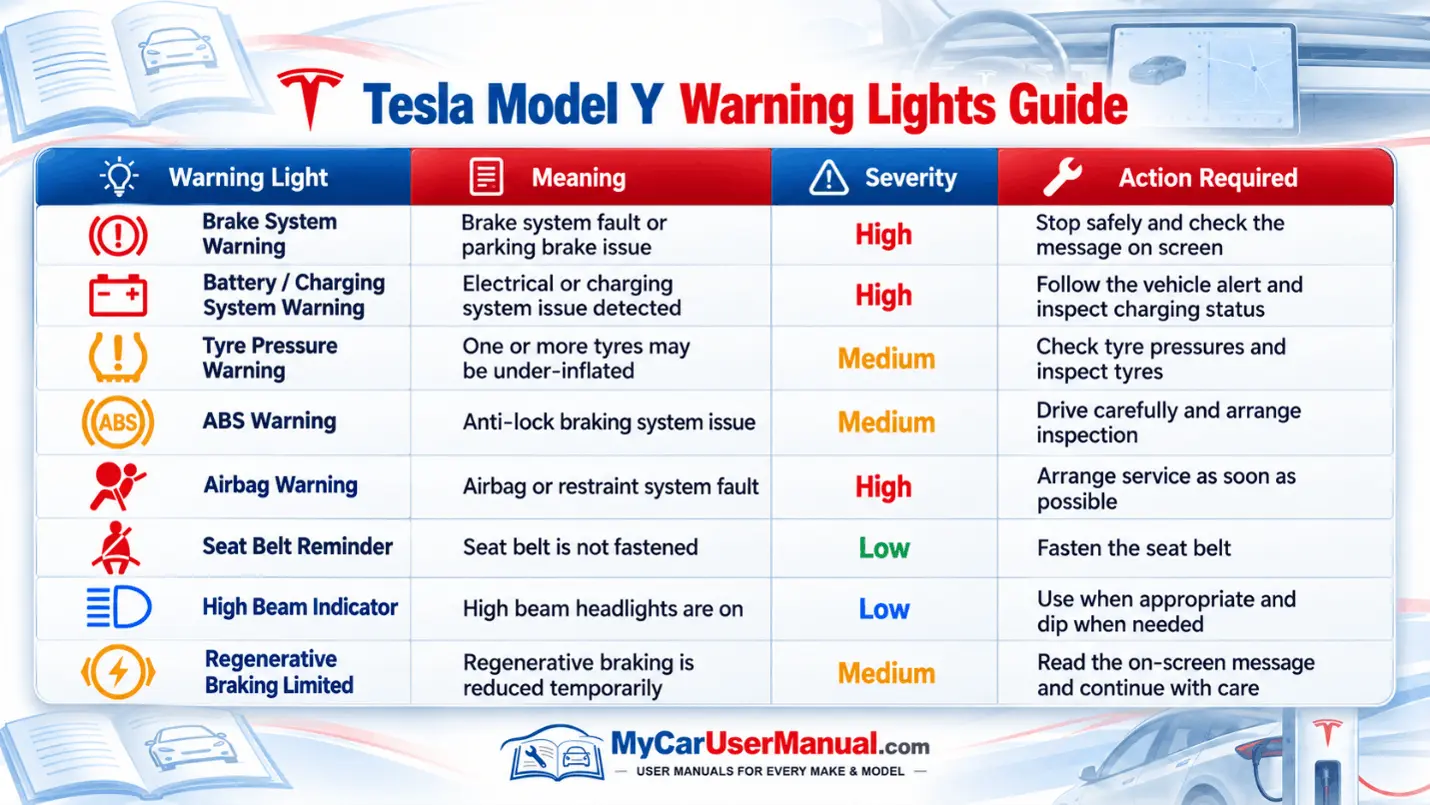
Check the Tesla Model Y manual PDF when a warning appears. The symbol and colour show the type of warning. The touchscreen message explains what it means. It also tells you what action to take.
Important Warning Light Checks
Red warnings normally require immediate attention.
Amber warnings usually indicate a fault or system requiring inspection.
Check the touchscreen for a detailed alert message.
Do not rely on the symbol alone.
Check tyre pressure when the tyre warning appears.
Persistent brake, airbag, or safety-system warnings should not be ignored.
Tesla Model Y Maintenance Schedule: Manual Checks
A Model Y does not use the same servicing schedule as a petrol or diesel vehicle. There are no engine-oil changes, spark plugs, or conventional fuel-system servicing. Regular checks are still important.
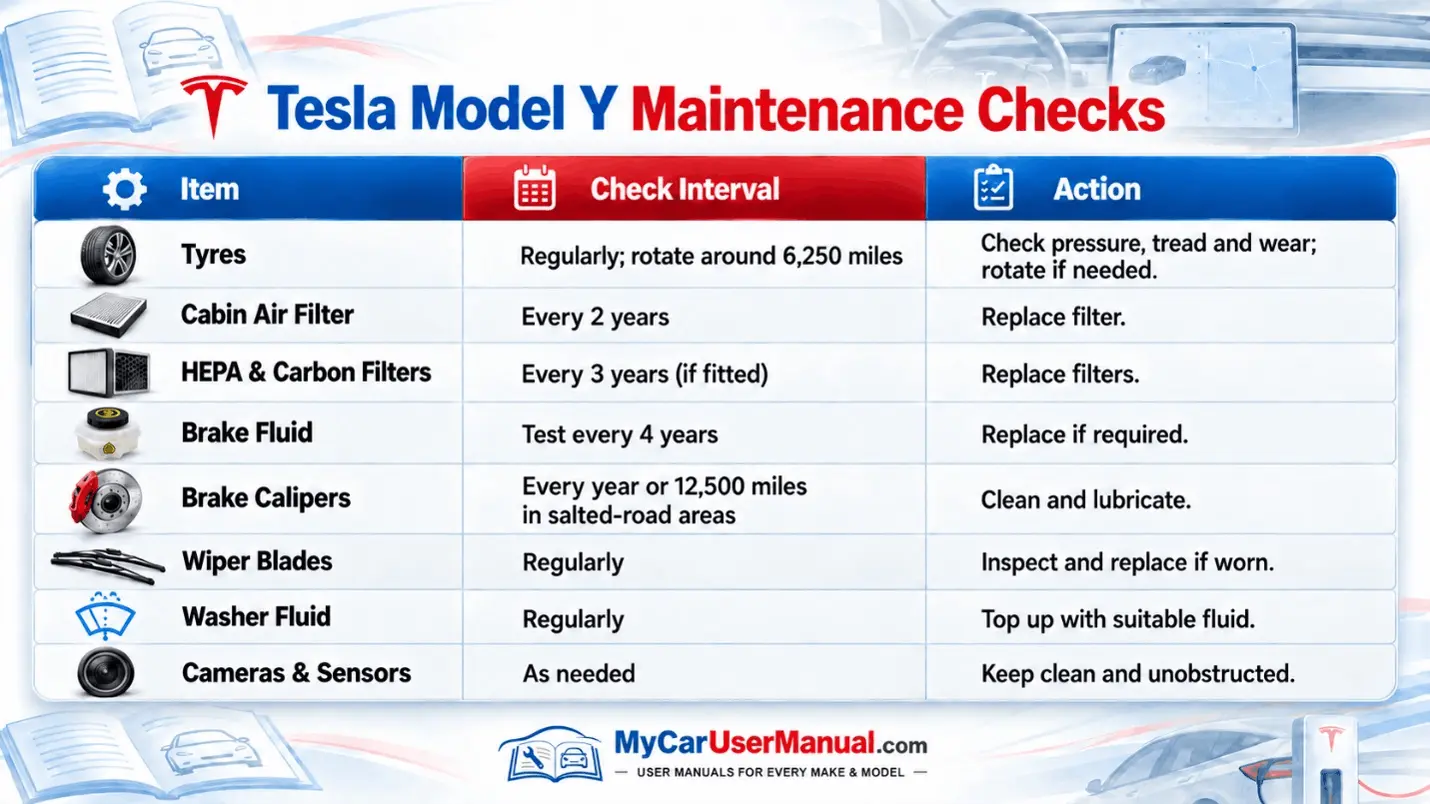
The Tesla Model Y manual PDF explains maintenance requirements for tyres, filters, brakes, wipers, and other components. Tesla also provides a Maintenance Summary through the touchscreen on compatible software versions.
Key Maintenance Points
Check tyre condition and pressure regularly.
Rotate tyres when the recommended mileage or tread difference is reached.
Replace the cabin air filter at the recommended interval.
Replace HEPA and carbon filters where fitted.
Have the brake fluid tested every four years.
Pay attention to Maintenance Summary reminders.
Follow the manual for your exact vehicle and software version.
How to Navigate the Tesla Model Y Owner’s Manual Effectively?
The Tesla Model Y user manual contains many sections. Use the built-in PDF search for fast navigation. Choose the correct model year. Then use the contents page or PDF search function.
Remember that Tesla vehicles receive software updates. Controls, menu names, and available features may therefore change after the vehicle was built. Use the most relevant and up-to-date manual PDF available for your model year.
Steps to Find Information Quickly
Select your Tesla Model Y model year.
Open the relevant owner's manual PDF.
Use the contents page to locate the main subject.
Use PDF search for terms such as “charging”, “tyres”, “brakes” or the wording of an alert.
Check warnings and notes within the relevant section.
Compare instructions with the menus shown on your car.
Download or print useful pages if you want an offline reference.
Troubleshooting Tesla Model Y Common Issues Using the Owner's Manual
Many Model Y concerns can be checked through the owner’s manual. The troubleshooting sections explain alerts, charging difficulties, tyre warnings, connectivity problems, and other common operating issues.
Read the complete touchscreen alert whenever one appears. It usually provides more useful information than the warning symbol alone. For high-voltage battery faults, serious brake warnings, or safety-system faults, follow Tesla's instructions rather than attempting repairs yourself.
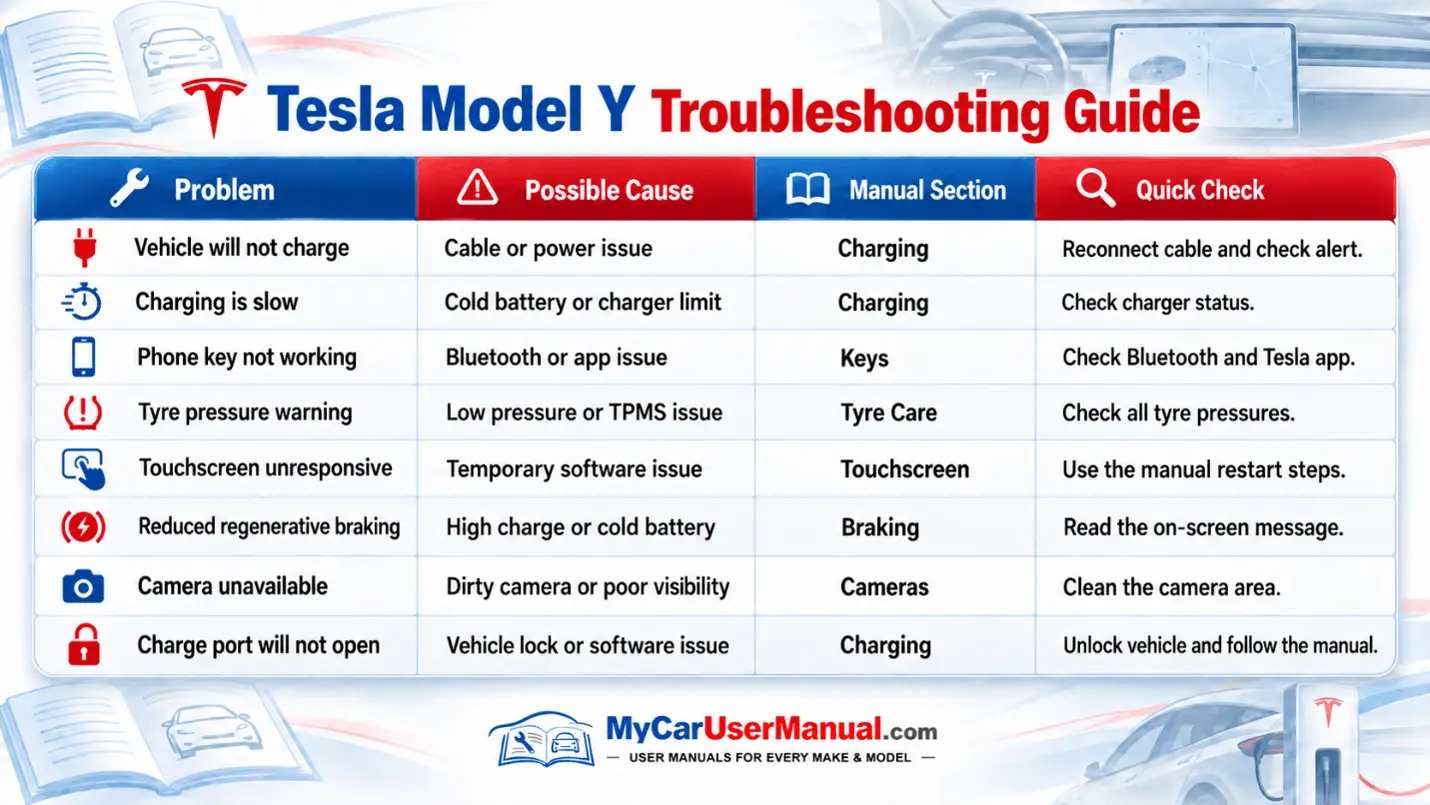
Common Tesla Model Y Problems to Check
Vehicle will not charge
Charging is slower than expected
Phone key does not connect
Tyre pressure warning remains on
Touchscreen becomes unresponsive
Reduced regenerative braking
Estimated range changes unexpectedly
Camera or driver assistance feature is unavailable
Door or charge port does not respond
Software update will not complete
Troubleshooting Steps
Read the full alert shown on the touchscreen.
Note when the problem started and whether it repeats.
Search the Tesla Model Y handbook using the alert wording.
Follow only the checks recommended in the manual.
Restart or reset a system only where the manual specifically provides that procedure.
Do not open or interfere with high-voltage battery components.
Arrange professional assistance when an alert says the vehicle requires service.