Vauxhall Insignia Owner Manuals: Free PDF Download

Looking for a Vauxhall Insignia owner’s manual? At My Car User Manual, you can find free Vauxhall Insignia owner manuals in PDF format. You can choose the manual by year, model, trim, engine, and generation. Use the right handbook to find the information you need. You can view, read, print, or download it. Check it before looking at any feature, warning light, service item, or dashboard setting.

These Vauxhall Insignia owner manuals are organised for quick access on mobile, tablet, and desktop. Manuals are regularly updated where available. You can look for the latest matching PDF for your vehicle year and model.

Vauxhall Insignia PDF Owner Manual: Free PDF Viewing for All Generations

The Vauxhall Insignia owner’s manual PDF is the official reference. It guides you in everyday use. You can get information about safety, controls, maintenance, and basic troubleshooting. It helps you understand the vehicle.

You can use the manual online or save a copy for later. The PDF handbooks can be:

  • Viewed free in your browser
  • Read on mobile, tablet, laptop, or desktop
  • Printed for garage, glovebox, or workshop use
  • Downloaded for offline access
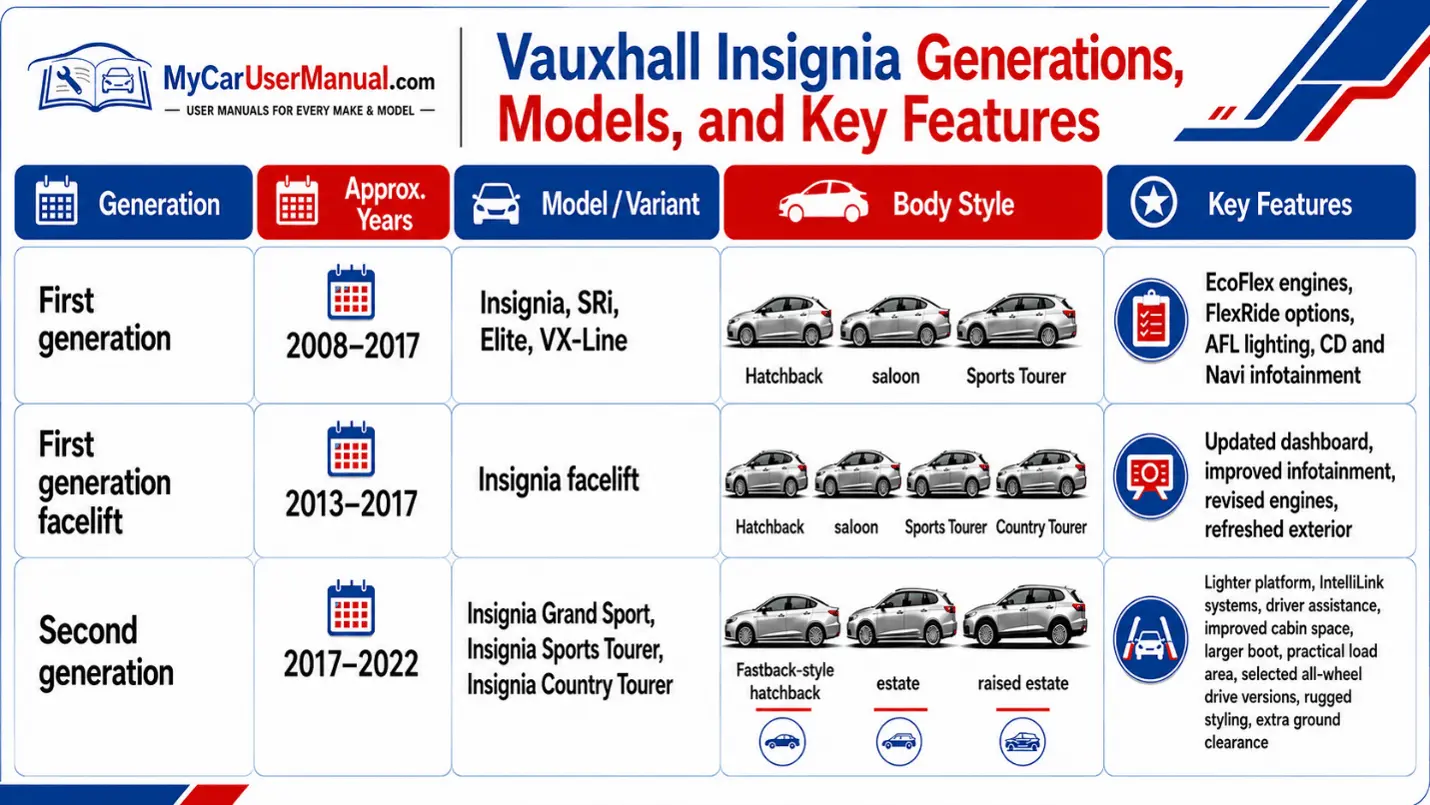
  • Checked by model year, body style, and generation

Always select the manual by year. Specifications, trims, engines, and features may vary by market and year. Use your vehicle registration year, VIN plate, engine type, trim level, and dashboard layout to help match the correct Vauxhall Insignia handbook.
Vauxhall Insignia Owner Manual PDF

What does the Vauxhall Insignia Owner's Manual Cover?

A Vauxhall Insignia user manual PDF explains the main systems. It is useful for owners who need clear instructions before operating or maintaining the car.

Typical manual coverage includes:

  • Dashboard controls and instrument display
  • Key, remote locking, and alarm system
  • Seats, mirrors, steering wheel, and driving position
  • Lights, wipers, demisting, and climate control
  • Infotainment, Bluetooth, navigation, and radio settings
  • Driver assistance and parking aids
  • Fuel, AdBlue, engine oil, coolant, and washer fluid
  • Tyre pressures, wheel changing, and tyre repair kit
  • Towing, loading, roof bars, and luggage area use
  • Warning lights and driver information messages
  • Fuse boxes, bulbs, and battery care
  • Maintenance schedule and service checks
  • Emergency procedures and roadside guidance

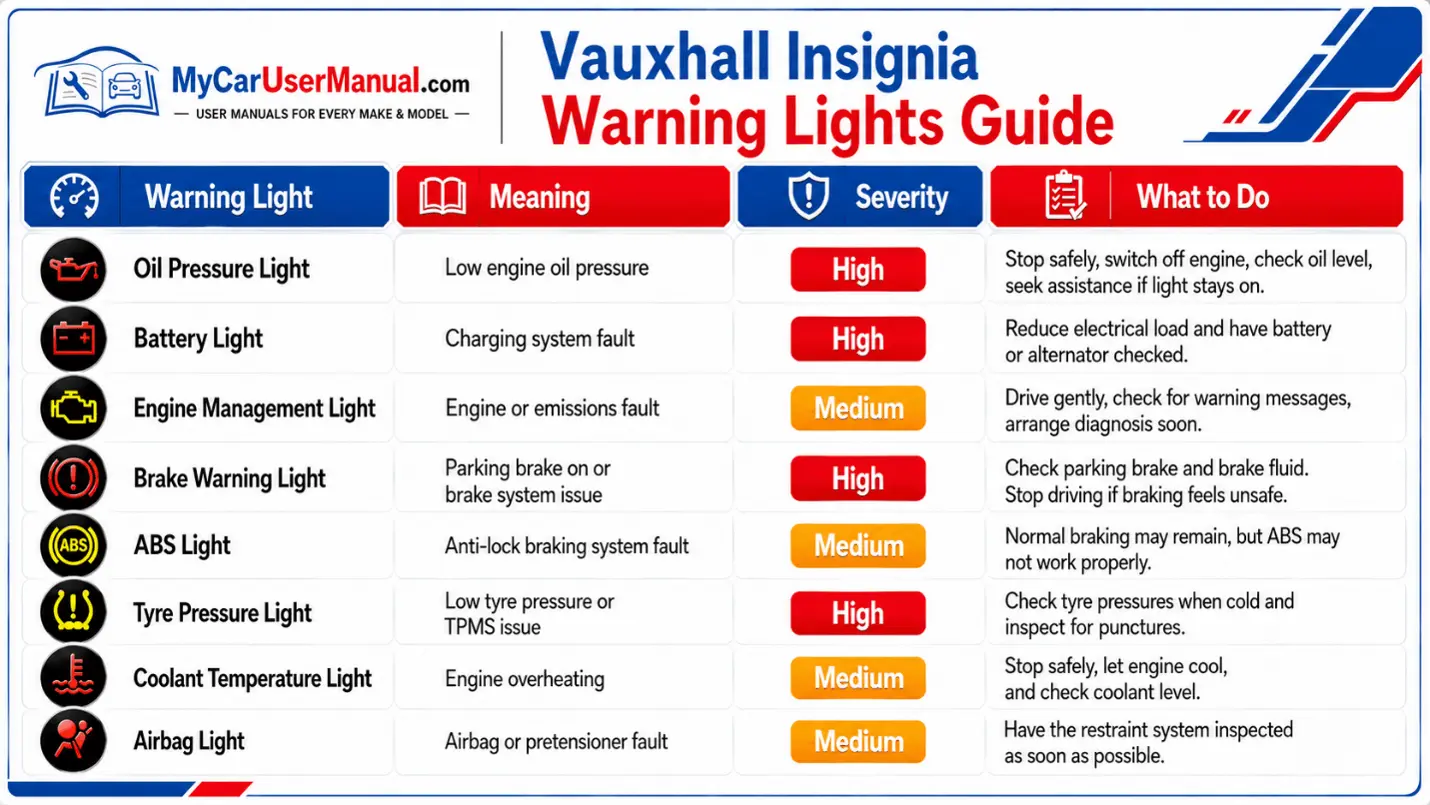
Vauxhall Insignia Warning Lights and Meanings

Use the Vauxhall Insignia warning lights section in the owner's manual before driving on. Red warnings usually need immediate action. Amber warnings usually mean the vehicle needs attention soon.

Warning lights can vary by model year and display type. Some symbols appear in the instrument cluster, while others appear with text messages on the driver information centre.
Vauxhall Insignia Manual PDF

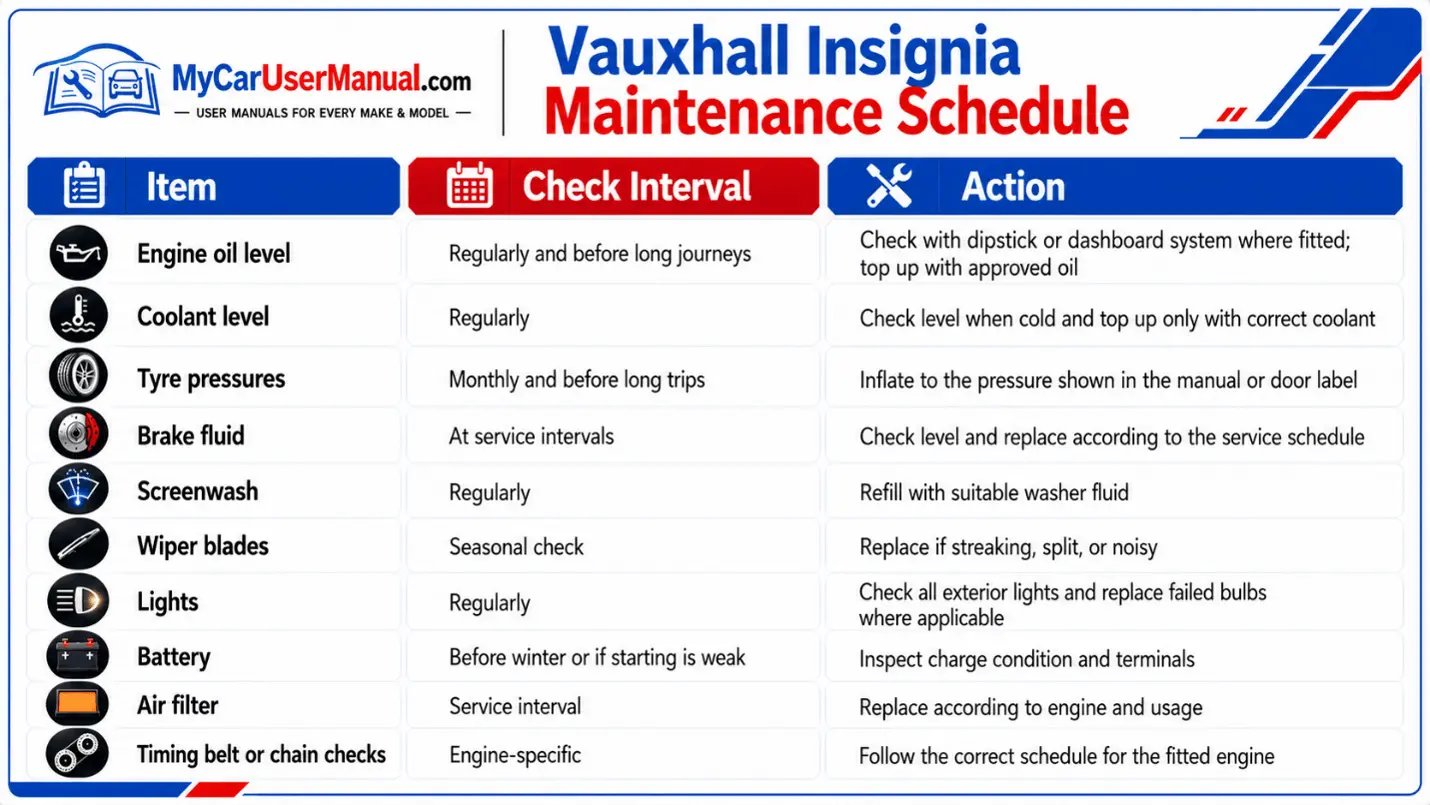
Vauxhall Insignia Maintenance Schedule

The Vauxhall Insignia maintenance schedule helps you keep routine checks organised between services. Always follow the schedule in your exact Vauxhall Insignia user manual, as intervals can differ by engine, mileage, age, driving conditions, and service plan.
Vauxhall Insignia User Manual PDF

How to Navigate the Vauxhall Insignia Owner’s Manual Effectively?

To navigate the Vauxhall Insignia handbook, quickly search by topic. PDF manuals are useful because you can search for exact terms.

  • Choose the correct Vauxhall Insignia manual by year and model.
  • Open the PDF in your browser or PDF reader.
  • Use the contents page for broad sections such as instruments, driving, care, and technical data.
  • Use the search function for specific terms or warning messages.
  • Check diagrams against your dashboard, buttons, and infotainment screen.
  • Read safety warnings before doing any maintenance or emergency procedure.
  • Print only the pages you need, such as fuse layouts, tyre pressures, or warning lights.
  • Save the PDF offline for use when you have no internet connection.

For best results, compare the manual with your vehicle’s trim level and equipment. Some features may be optional, unavailable, renamed, or shown differently depending on year and model.

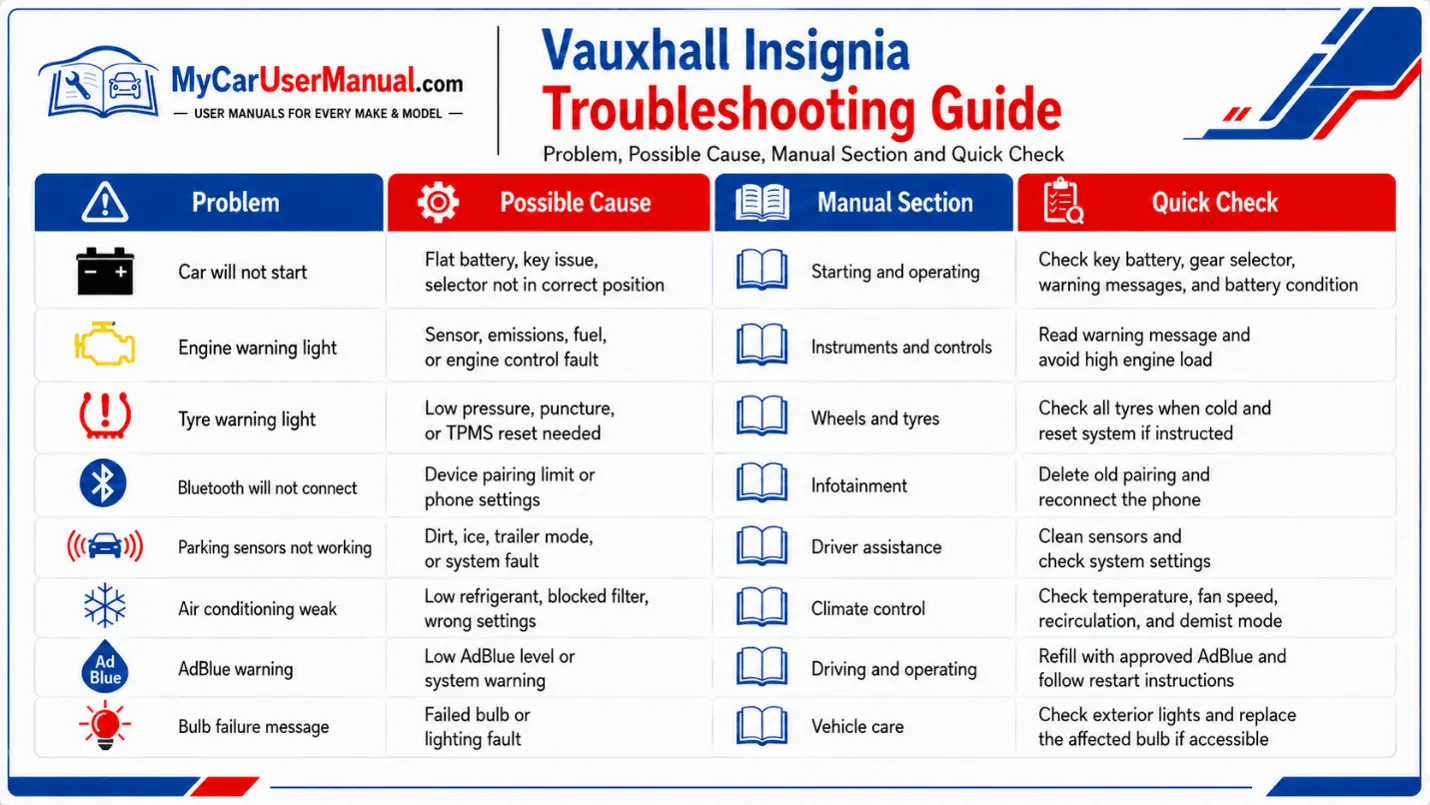
Troubleshooting Vauxhall Insignia Common Issues Using the Owner's Manual

The Vauxhall Insignia troubleshooting section is useful for basic checks before booking a repair. It can help identify simple causes, safe next steps, and when professional diagnosis is needed.

Common problems covered in owner manuals may include:
  • Engine warning light or reduced power message
  • Low tyre pressure warning
  • Key not detected or remote locking issue
  • Flat battery or slow starting
  • Infotainment pairing problems
  • Parking sensor warnings
  • AdBlue range messages on diesel models
  • Poor demisting or air conditioning performance
  • Bulb failure messages
  • Fuse-related electrical faults
Vauxhall Insignia Handbook & Service Guide

Use these steps for simple checks:

  • Park safely and read the dashboard message fully.
  • Match the symbol or message with the warning lights section.
  • Check whether the warning is red, amber, or informational.
  • Look up the related section in the Vauxhall Insignia owner’s manual PDF.
  • Carry out only the checks described as safe for the owner.
  • Do not continue driving if the manual says to stop immediately.
  • Record the warning message, mileage, and conditions when the issue appeared.
  • Arrange inspection if the warning returns or the manual advises service attention.